- Subscribe to RSS Feed
- Mark Topic as New
- Mark Topic as Read
- Float this Topic for Current User
- Bookmark
- Subscribe
- Mute
- Printer Friendly Page
Flashing Arduino file using labview
Solved!
 Prakashsp
05-22-2018 11:20 PM
- Mark as New
- Bookmark
- Subscribe
- Mute
- Subscribe to RSS Feed
- Permalink
- Report to a Moderator
Hi, I am using ATmega2560 Arduino board and I want to flash a arduino (.ino) file using VISA from labview. but the program returns VISA write timeout (1073807339) error. Is it possible to flash arduino file from labview?. If it is how to flash the arduino file?
Solved! Go to Solution.

 dkfire
05-23-2018 06:51 AM
- Mark as New
- Bookmark
- Subscribe
- Mute
- Subscribe to RSS Feed
- Permalink
- Report to a Moderator
What should the Arduino do with a .ino file ?
An Arduino is a embedded chip that need a compiled code to run. You need to compile your .ino file and then transfer the compiled code to the Arduino.
You might be able to do that with a external exe file, that comes with the Arduino compiler.

 ELNO
ELNO
05-23-2018
07:08 AM
- last edited on
04-08-2025
04:16 PM
by
 Content Cleaner
- Mark as New
- Bookmark
- Subscribe
- Mute
- Subscribe to RSS Feed
- Permalink
- Report to a Moderator
Hello,
Arduino compiler in lab view is available refer below link.
https://www.ni.com/en-us/shop/product/arduino--compatible-compiler-for-labview.html
better to use the arduino IDE available in arduino website.
05-23-2018 07:12 AM
- Mark as New
- Bookmark
- Subscribe
- Mute
- Subscribe to RSS Feed
- Permalink
- Report to a Moderator
Hi,
Actually I want to set some digital pins with different delays. For that I used Arduino interface for LabVIEW and it is working. But I need very small delay between two digital pins( in the order of ms). The minimum delay I am achieving is 20ms (Digital Write VI itself taking 20ms to set the pin as 1 or 0). So I tried with Arduino file(.ino file) which will run in the Arduino board continuously. I am able to flash the Arduino file with the Arduino compiler. But I want to do this from LabVIEW. I had flashed binary files (.bin files) using LabVIEW VISA succesfully and it is working well. Similarly I want to do the same thing for Arduino(.ino) files. Is it possible to flash .ino file using VISA or is there any other options to control and automate the Arduino compiler to flash the file into the board?
dkfire
05-23-2018 08:19 AM
- Mark as New
- Bookmark
- Subscribe
- Mute
- Subscribe to RSS Feed
- Permalink
- Report to a Moderator
You still need to compile your ino files, you can't do anything with a bare ino file on a Arduino.
Then, if you really want to use VISA for transfer, you need to learn the bootloader protocol of the Arduino to be able to get it into bootloader mode, and then you can transfer your compiled code.
I would try to Google how you compile an arduino file from an external program, and use the programs that comes with the Arduino IDE to compile and transfer the code to your Arduino board.
05-23-2018 08:29 AM
- Mark as New
- Bookmark
- Subscribe
- Mute
- Subscribe to RSS Feed
- Permalink
- Report to a Moderator
Thank you very much.. I will also search for that..
Arduiuno compatible compiler for labVIEW - how will this work? and do I need to install this?

 RTSLVU
05-23-2018 09:30 AM - edited 05-23-2018 09:30 AM
- Mark as New
- Bookmark
- Subscribe
- Mute
- Subscribe to RSS Feed
- Permalink
- Report to a Moderator
If you expand the lower window in the Arduino IDE while you are programming you will see that the Arduino IDE calls another program (AVRdude) and AVRdude actually programs the Arduino.
So why not just call AVRDude with the LabVIEW systemexec.vi?
=== Engineer Ambiguously ===
========================
dkfire
05-23-2018 09:34 AM
- Mark as New
- Bookmark
- Subscribe
- Mute
- Subscribe to RSS Feed
- Permalink
- Report to a Moderator
Or just use the Arduino Programmer IDE with commandline:
https://github.com/arduino/Arduino/blob/master/build/shared/manpage.adoc
05-23-2018 09:47 AM
- Mark as New
- Bookmark
- Subscribe
- Mute
- Subscribe to RSS Feed
- Permalink
- Report to a Moderator
Can you please explain some more detail regarding this? How could I call AVRdude?
RTSLVU
05-23-2018 10:03 AM
- Mark as New
- Bookmark
- Subscribe
- Mute
- Subscribe to RSS Feed
- Permalink
- Report to a Moderator
Well you would have to read the Avrdude documentation for all the command line parameters...
But dkfire has a better idea really as all you need to do is call the Arduino IDE with the Systemexec.vi using a command line
arduino [--verify|--upload] [--board package:arch:board[:parameters]] [--port portname] [--pref name=value] [-v|--verbose] [--preserve-temp-files] [FILE.ino]
BTW: This is the Systemexec vi
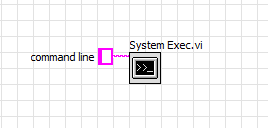
You will find it under Connectivity----->Libraries & Executables in the pallet.
=== Engineer Ambiguously ===
========================
