- Subscribe to RSS Feed
- Mark Topic as New
- Mark Topic as Read
- Float this Topic for Current User
- Bookmark
- Subscribe
- Mute
- Printer Friendly Page
File - Project sort by date on start screen

 Heyou
Heyou
10-10-2016 04:16 PM
- Mark as New
- Bookmark
- Subscribe
- Mute
- Subscribe to RSS Feed
- Permalink
- Report to a Moderator
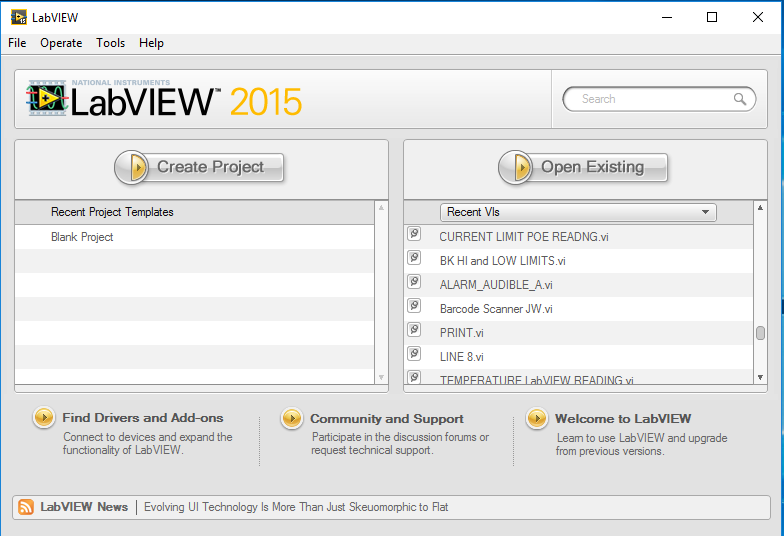
I am curious if a way exists to sort VI's / projects by date at the start screen. Not sure what e proper name is. See the attached screenshot.

 JÞB
JÞB
10-10-2016 04:45 PM
- Mark as New
- Bookmark
- Subscribe
- Mute
- Subscribe to RSS Feed
- Permalink
- Report to a Moderator
Yes. It requires a bit of easy work from you though to customize. Simply read the LabVIEW.ini key for the GSW project paths, use the file functions to get the creation date and order the list. Copy the information, close LabVIEW and replace the value of the project paths key in the ini.
"Should be" isn't "Is" -Jay

 Bob_Schor

10-10-2016 04:46 PM
- Mark as New
- Bookmark
- Subscribe
- Mute
- Subscribe to RSS Feed
- Permalink
- Report to a Moderator
I call this the "GSW" (for "Getting Started With") Screen. The entries on this screen are stored in an .ini file buried within your LabVIEW Program folder. You could, in principle, read this file, carefully parse out the line containing the files, do some work to look up the dates associated with the files, replace the current .ini line with one where the names are sorted by date, and save it back, but is it really worth all that work? Note that in order to see the new order, you'll probably have to exit and restart LabVIEW. And if you mess up the .ini file, you might mess up your LabVIEW installation ...
Bob Schor
P.S. -- I don't think the likely benefit is worth the trouble and risk. Now, I did write a utility that lets you clear out the GSW screen (that's much simpler ...).
JÞB
10-10-2016 06:53 PM
- Mark as New
- Bookmark
- Subscribe
- Mute
- Subscribe to RSS Feed
- Permalink
- Report to a Moderator
Nice idea Bob
"Should be" isn't "Is" -Jay

 crossrulz
10-11-2016 06:55 AM
- Mark as New
- Bookmark
- Subscribe
- Mute
- Subscribe to RSS Feed
- Permalink
- Report to a Moderator
@JÞB wrote:Simply read the LabVIEW.ini key for the GSW project paths...
To be a little more exact, the OP needs to update the Pinned Recently Used list.
Not sure why anybody would actually want that many VIs pinned. I tend to only have my projects pinned.
There are only two ways to tell somebody thanks: Kudos and Marked Solutions
Unofficial Forum Rules and Guidelines
"Not that we are sufficient in ourselves to claim anything as coming from us, but our sufficiency is from God" - 2 Corinthians 3:5
JÞB
10-11-2016 08:29 AM
- Mark as New
- Bookmark
- Subscribe
- Mute
- Subscribe to RSS Feed
- Permalink
- Report to a Moderator
@crossrulz wrote:
@JÞB wrote:Simply read the LabVIEW.ini key for the GSW project paths...
To be a little more exact, the OP needs to update the Pinned Recently Used list.
Not sure why anybody would actually want that many VIs pinned. I tend to only have my projects pinned.
Bob already pointed out that the GSW project list is probably not worth messing with frequently.
To be honest, while I like the GSW, it is modal even when called from the Menu View>>Getting Started Window (it should be floating when launched within a development session) so the GSW Pinned Projects list is good for one project opening only and then you need to re-launch it. Plus you can't do a darned thing in LabVIEW while that modal panel is up.
Tools>>Options
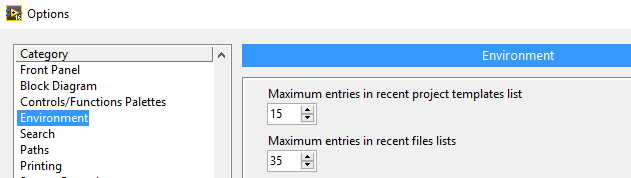
Is a nicer workaround.
Max Entries in recent files lists sets maximums for both the GSW recent files and the Menu File>>Recent Projects and Recent Files lists. I find it a bit easier just to boost the default 5 to something more effective.
Caveate: I open a lot of files from the forums, Opening recent projects from the file menu is usefull. Less useful for production work is opening recent files out of context (not in the library of project or target that you should be working in.)
"Should be" isn't "Is" -Jay
10-18-2016 09:06 AM
- Mark as New
- Bookmark
- Subscribe
- Mute
- Subscribe to RSS Feed
- Permalink
- Report to a Moderator
Thanks guys you have given me the direction I needed.

