- Subscribe to RSS Feed
- Mark Topic as New
- Mark Topic as Read
- Float this Topic for Current User
- Bookmark
- Subscribe
- Mute
- Printer Friendly Page
Excel and .NET Problems
Solved!
 mcduff
03-01-2018 10:45 AM
- Mark as New
- Bookmark
- Subscribe
- Mute
- Subscribe to RSS Feed
- Permalink
- Report to a Moderator
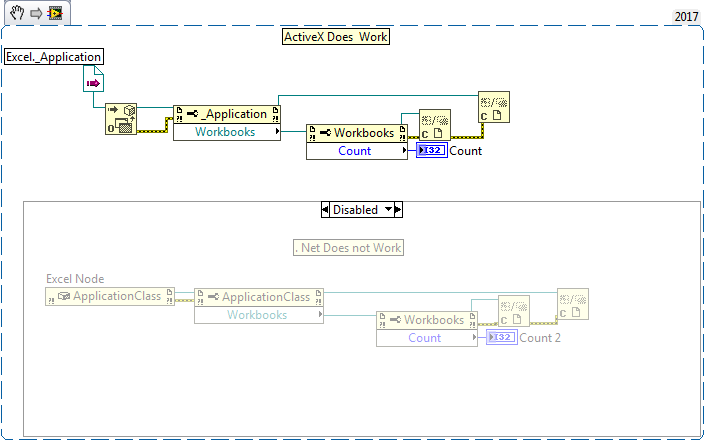
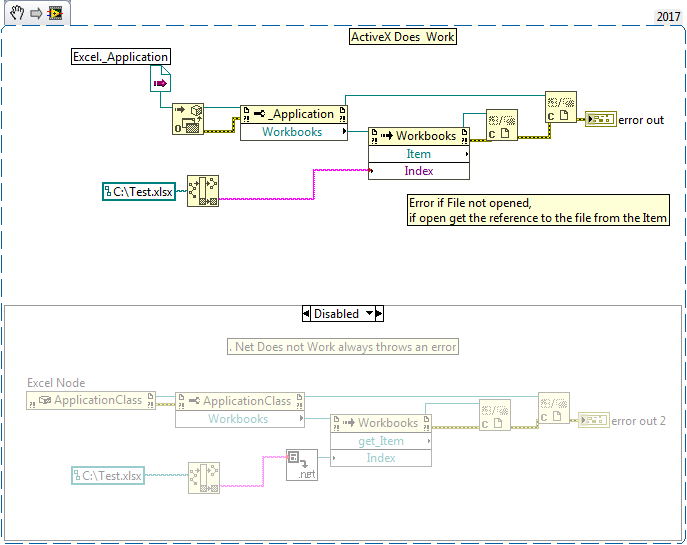
I know there is the RGT toolkit which I have and ActiveX which works, however, I would like to know if anyone has a solution to this problem using .NET. (@PhilipBrooks, .NET guru, if you are reading this.)
I am having problems determining the number of workbooks open with Excel and whether a particular file is open. Note the ActiveX versions posted here DO WORK, however I want to know why the .NET solutions do not work.
PNGs and VIs are attached.
Thanks for your help.
Regards,
mcduff
Solved! Go to Solution.
 Gregory
03-01-2018 11:52 AM
- Mark as New
- Bookmark
- Subscribe
- Mute
- Subscribe to RSS Feed
- Permalink
- Report to a Moderator
Can you post the VIs for 2016 or earlier?
03-01-2018 11:56 AM
- Mark as New
- Bookmark
- Subscribe
- Mute
- Subscribe to RSS Feed
- Permalink
- Report to a Moderator
Thanks for looking into this.
mcduff
Gregory
03-01-2018 12:51 PM
- Mark as New
- Bookmark
- Subscribe
- Mute
- Subscribe to RSS Feed
- Permalink
- Report to a Moderator
I've had no success yet, but based on this article I think you want the _Application property. The ApplicationClass is reserved for internal use. But when I select _Application it says no public constructors are available...

 aputman
03-01-2018 03:16 PM
- Mark as New
- Bookmark
- Subscribe
- Mute
- Subscribe to RSS Feed
- Permalink
- Report to a Moderator
@Gregory wrote:
I've had no success yet, but based on this article I think you want the _Application property. The ApplicationClass is reserved for internal use. But when I select _Application it says no public constructors are available...
No, I think the ApplicationClass is correct. However mcduff's code is creating a new instance of Excel, not grabbing the already opened instance. If you put an ApplicationClass.Visible = True, you can see it flash onto the screen and then close.
03-01-2018 05:33 PM
- Mark as New
- Bookmark
- Subscribe
- Mute
- Subscribe to RSS Feed
- Permalink
- Report to a Moderator
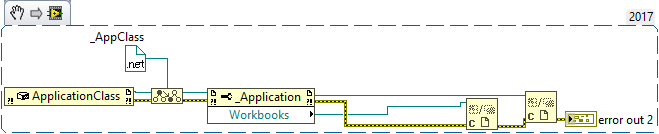
This still does not work, but you can convert to a more specific type to the _Application Class, even when I use this class I can not get the count or find item. I think aputman is on the right track, we need a reference to the excel application that is running.
mcduff
aputman
03-02-2018 09:39 AM
- Mark as New
- Bookmark
- Subscribe
- Mute
- Subscribe to RSS Feed
- Permalink
- Report to a Moderator
There is a way to do this in C# but I haven't figured out how to port this over to Labview .NET.
03-02-2018 09:47 AM
- Mark as New
- Bookmark
- Subscribe
- Mute
- Subscribe to RSS Feed
- Permalink
- Report to a Moderator
I think you are on the right track. Based on your previous comment, I too have been looking for the "GetObject" call in .net to try and get the current instance of excel. However, I cannot find it in any of the libraries that supposedly have it. I think if we can find that, then it may/should work.
Thanks again for looking.
Cheers,
mcduff
03-02-2018 05:01 PM
- Mark as New
- Bookmark
- Subscribe
- Mute
- Subscribe to RSS Feed
- Permalink
- Report to a Moderator
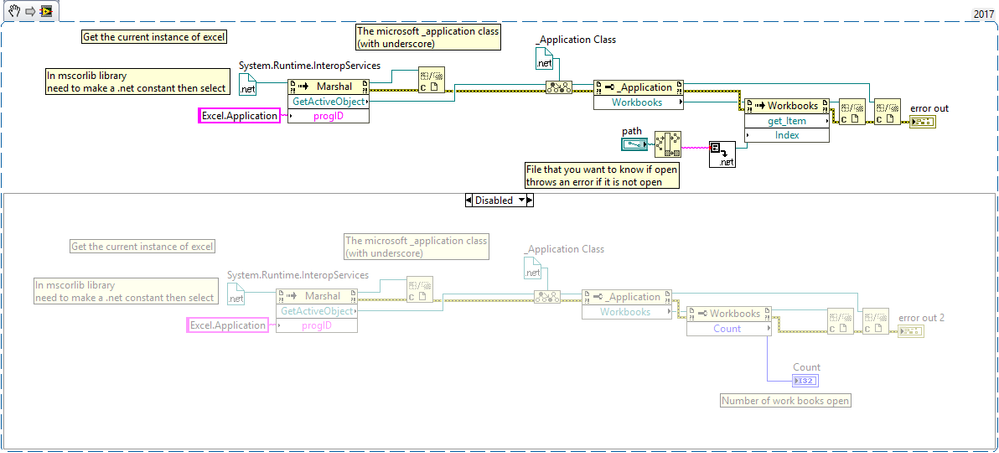
Thanks for your hints I think a found a solution to get the current instance of excel. Thanks for your help.
See snippet and VI.
mcduff
aputman
03-02-2018 05:10 PM
- Mark as New
- Bookmark
- Subscribe
- Mute
- Subscribe to RSS Feed
- Permalink
- Report to a Moderator
Awesome. I will have to take a look at this on Monday because I couldn't figure out how to get the Marshal object.
