Excel 2013 ActiveX object unavailable
已解決!

I'm trying to open an Excel ActiveX reference but can't. I'm using LabVIEW 2012 and Excel 2013.
I've placed an Automation Open VI on the block diagram and created a control at the refnum input. When I click Select ActiveX Class on the control (see below), the only Excel-related option available is the ExcelTDM plugin I use for viewing TDMS files in Excel. I'm relatively new to ActiveX so I'm not sure what's wrong here. Are there any know compatibility issues with Office 2013 and LabVIEW? Or is the approach flawed?

P.S.. I can use examples I download and can open Excel, but none of the invoke nodes property nodes can be modified:

已解決! 轉到解決方案。


Have you tried using LabVIEW 2013?
I would suspect that since LabVIEW 2012 came out BEFORE Excel 2013, that they aren't compatible.
"LabVIEW 2012 came out BEFORE Excel 2013"
Our default version in work is 2012 so I'm stuck with that. But I HAVE tried LabVIEW 2013 too, and the same issue exists.
 nyc_(is_out_of_
在 03-11-2014 09:44 AM
- 標籤為新
- 標示為書籤
- 訂閱
- 靜音
- 訂閱 RSS 提要
- 將本訊息視為重要文章
- 列印
- 將不當文章回報版主
@InTest wrote:
"LabVIEW 2012 came out BEFORE Excel 2013"
Our default version in work is 2012 so I'm stuck with that. But I HAVE tried LabVIEW 2013 too, and the same issue exists.
A VI would be helpful.
All I see is a front panel and a fuzzy JPG.
I didn't include a VI because I can't select the ActiveX class/Excel application, so any VI I include would just be an Automation Refnum control on the front panel - this is the crux of the issue. The second screenshot (apologies if it's fuzzy but it looks fine on my screen) is supposed to illustrate how I can open and run downloaded VI's (but can't select any other methods because the Excel ActiveX object is not available to me).
I've changed the ActiveX settings in the Trust Centre in Excel too but that has had no effect.
I've tried to zoom in closer to the action on the Set Cell Value with Range.vi (this is after I right-clicked on the _Worksheet invoke node). Should there be more methods available here?
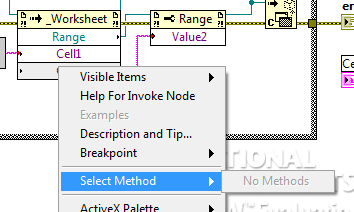
I've attached the Set Cell Value with Range.vi for completeness. This was saved with LabVIEW 2012.
nyc_(is_out_of_在 03-11-2014 10:09 AM
- 標籤為新
- 標示為書籤
- 訂閱
- 靜音
- 訂閱 RSS 提要
- 將本訊息視為重要文章
- 列印
- 將不當文章回報版主
I am using LabVIEW 2013 Student Edition and I have Microsoft Excel 2010.
I do see other methods for the Invoke Node for the Worksheet .
For me, the Type Library choice I made for Automation Refnum is Microsoft Excel 14.0 Object Library Version 1.7.
I suspect since you have Excel 2013, that it would be Microsoft Excel 15.0 Object Library.
Thanks.
I'm starting to think this is a general compatibility issue with Microsoft Office 2013. Excel is not available in any form for me.
I was able to check this on a lab machine and I have access to the Excel methods with Excel 2010 installed. This is a compatiblity issue between LabVIEW 2012/2013 and Excel 2013.
nyc_(is_out_of_在 03-11-2014 10:30 AM
- 標籤為新
- 標示為書籤
- 訂閱
- 靜音
- 訂閱 RSS 提要
- 將本訊息視為重要文章
- 列印
- 將不當文章回報版主
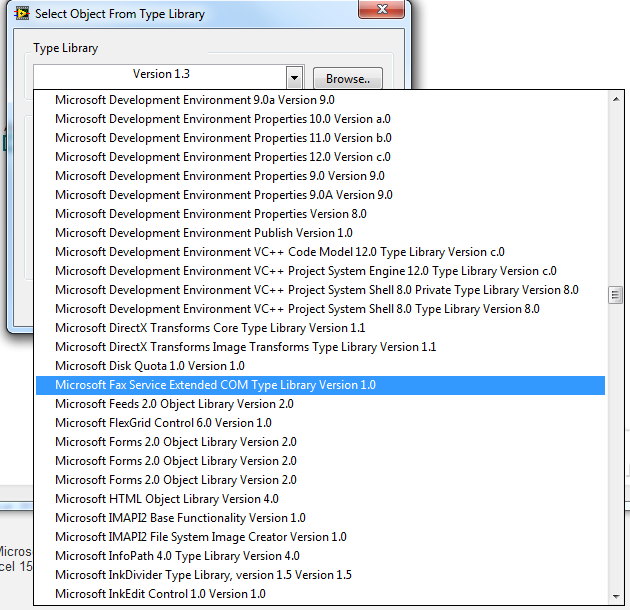
Do you see the Type Library for Word or any other Microsoft Office package?
No. See image below for the only Microsoft Office types available:

