- Subscribe to RSS Feed
- Mark Topic as New
- Mark Topic as Read
- Float this Topic for Current User
- Bookmark
- Subscribe
- Mute
- Printer Friendly Page
Example Shock Absorber Performance Report not working correctly
Solved!
 urssieg
03-04-2014 10:56 AM
- Mark as New
- Bookmark
- Subscribe
- Mute
- Subscribe to RSS Feed
- Permalink
- Report to a Moderator
Hi,
I have a problem in using the "word edit cell.vi" to manipulate multiple cells in a table of a word document. What this vi is doing on my system is to insert the values of the first column in all other columns. Check out the example Shock Absorber Performance Report. If i run this report, all values are identical to the first column which I think is not the supposed behaviour of this example.
Do you see the same behaviour or is just on my system?
I'm using LV 2013, Word 2010
best regrads
Urs
Solved! Go to Solution.

 Ray.R
Ray.R

03-04-2014 11:37 AM - edited 03-04-2014 11:38 AM
- Mark as New
- Bookmark
- Subscribe
- Mute
- Subscribe to RSS Feed
- Permalink
- Report to a Moderator
I did not get what you described. Below is what I get using LV2012 + Word 2007.

03-04-2014 11:49 AM
- Mark as New
- Bookmark
- Subscribe
- Mute
- Subscribe to RSS Feed
- Permalink
- Report to a Moderator
Thanks for the fast answer.
My result is:
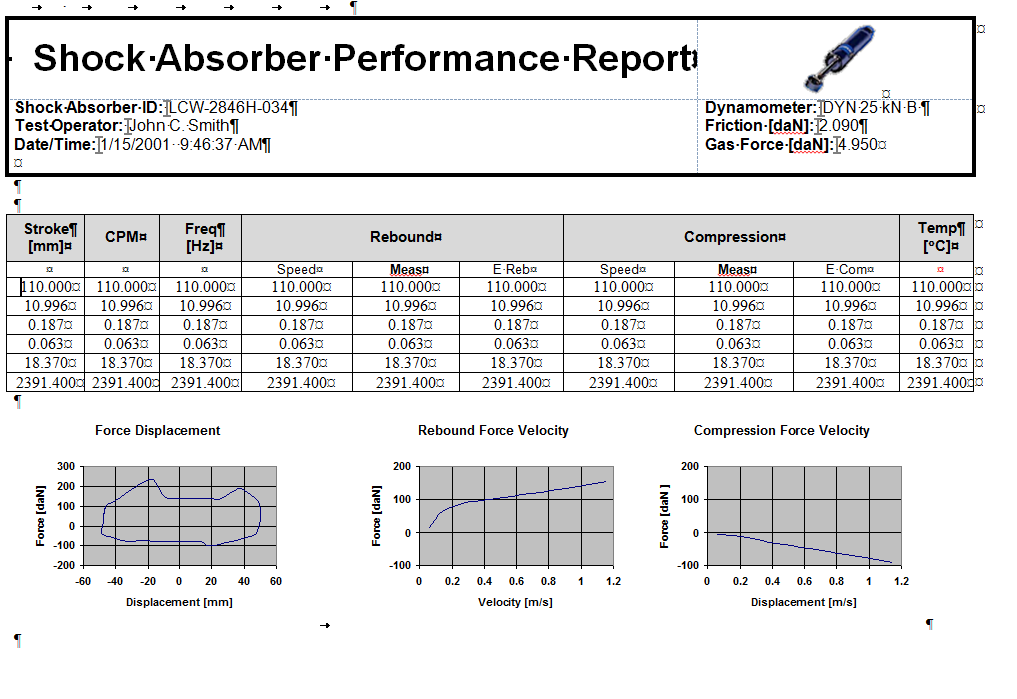
And I get the same Result with LV2011, LV2012 in combination with word 2010.
Does anyone have an idea what could cause such a behaviour and how to fix it?
Ray.R
03-04-2014 12:22 PM - edited 03-04-2014 12:23 PM
- Mark as New
- Bookmark
- Subscribe
- Mute
- Subscribe to RSS Feed
- Permalink
- Report to a Moderator
Did you probe the values from table going to the report? It could be something with the Simulate Data sub-vi.
In the image below, the values from the table are shown in the (large) 2D array inside the red circle. You should be getting something similar.

Ray.R
03-04-2014 12:26 PM
- Mark as New
- Bookmark
- Subscribe
- Mute
- Subscribe to RSS Feed
- Permalink
- Report to a Moderator
In case the VI was modified... You should be able to find it inside the attached library..
03-06-2014 02:14 AM
- Mark as New
- Bookmark
- Subscribe
- Mute
- Subscribe to RSS Feed
- Permalink
- Report to a Moderator
Nope, table seems to be fine!
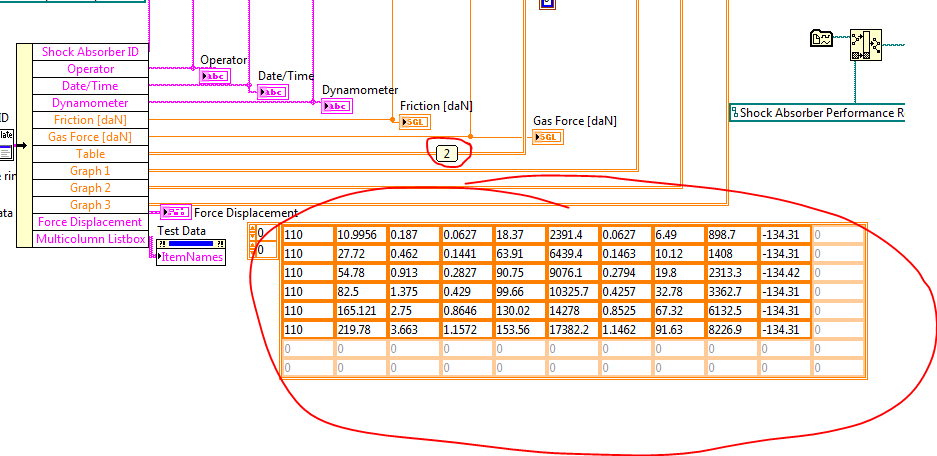
Are there any special settings in word which I have to adapt?
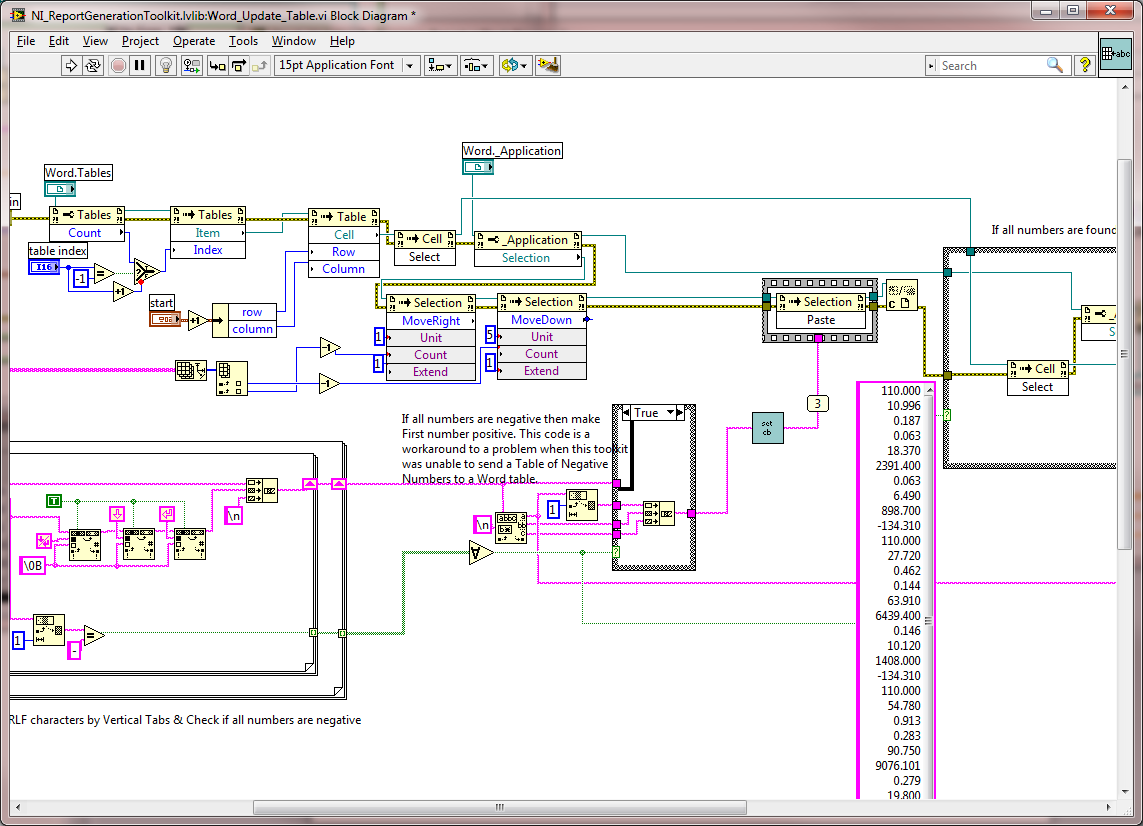
How is your VI "Word_Update_Table.vi" looking like? Is there a way to somehow force this vi to update two columns?
As far as I understand the word table is somehow updated with this paste invoke node. Do you have any idea of a setting to get more information about where the error is? For example a modified Input or a manual build update table vi?
03-06-2014 03:48 AM
- Mark as New
- Bookmark
- Subscribe
- Mute
- Subscribe to RSS Feed
- Permalink
- Report to a Moderator
I found the solution thanks to the thread Solution and Thoric's answer.
It seems to be a problem with word 2010.
You will find the same for loops in "Word_update_table.vi"
Attached you will find the modified vi.
Ray.R
03-06-2014 08:12 AM
- Mark as New
- Bookmark
- Subscribe
- Mute
- Subscribe to RSS Feed
- Permalink
- Report to a Moderator
Thanks for the link to the solution.
Don't you just love how MS is able to retain compatibility within its different version of software applications? 😛
