- Subscribe to RSS Feed
- Mark Topic as New
- Mark Topic as Read
- Float this Topic for Current User
- Bookmark
- Subscribe
- Mute
- Printer Friendly Page
Dual Processor Multi Core Parrell Processing Question
Solved!
 Tom Drew
11-26-2009 07:50 AM
- Mark as New
- Bookmark
- Subscribe
- Mute
- Subscribe to RSS Feed
- Permalink
- Report to a Moderator
Hey Guys
I'm looking for a little clarification on an issue with parrell processing in LabView. If I have a Dual Processor machine with two 4 core CPU's will be able to access all 8 cores in the LabView environment. I'm presuming it can use any cores the operating system can see?
Thanks for the help,
Tom
Solved! Go to Solution.

 Norbert_B
11-26-2009 08:28 AM
- Mark as New
- Bookmark
- Subscribe
- Mute
- Subscribe to RSS Feed
- Permalink
- Report to a Moderator
Tom,
this is essentially true. But this does not imply that LV runs faster or applications you create using LV are faster/more stable/whatsoever.
Why do you ask this? Do you have any issues?
Norbert
----------------------------------------------------------------------------------------------------
CEO: What exactly is stopping us from doing this?
Expert: Geometry
Marketing Manager: Just ignore it.
11-26-2009 08:38 AM
- Mark as New
- Bookmark
- Subscribe
- Mute
- Subscribe to RSS Feed
- Permalink
- Report to a Moderator
Hey thanks for the reply,
The reason I ask is because we are going to be building a LabView VI to control an OCT device and a high speed imaging system simultaneously. I want to farm off different Job's to different processors so they can run in parallel to improve efficiency and simplify timing issues.
The OCT system currently uses four cores on a quad core so I will need another chip on the motherboard if I require more cores. I have read a lot about utilising multicourse in LabView but nothing on multiprocessors on multicourses.
Thanks,
Tom
Norbert_B
11-26-2009 08:44 AM
- Mark as New
- Bookmark
- Subscribe
- Mute
- Subscribe to RSS Feed
- Permalink
- Report to a Moderator
Tom,
it is the job of the OS that applications can use all cores if necessarry. So for the application itself, it should make no difference if the system (in hardware) is MultiCPU, MultiCore or even simply HyperThread.....
Norbert
----------------------------------------------------------------------------------------------------
CEO: What exactly is stopping us from doing this?
Expert: Geometry
Marketing Manager: Just ignore it.

 pallen
11-26-2009 05:36 PM
- Mark as New
- Bookmark
- Subscribe
- Mute
- Subscribe to RSS Feed
- Permalink
- Report to a Moderator
 Andrey_Dmitriev
11-27-2009 07:48 AM - edited 11-27-2009 07:50 AM
- Mark as New
- Bookmark
- Subscribe
- Mute
- Subscribe to RSS Feed
- Permalink
- Report to a Moderator
Norbert B wrote:
it is the job of the OS that applications can use all cores if necessarry. So for the application itself, it should make no difference if the system (in hardware) is MultiCPU, MultiCore or even simply HyperThread.....
Norbert
Its true, but I would like to add my 5 cents here.
Lets say, if you have single loop like
while (true){
//do something
}
then OS will get no chance to run it in multiple threads. So, you will get max 12,5% CPU load at 8 cores PC or 50% max on dual core PC.
I have dual core PC right now, and lets check it:
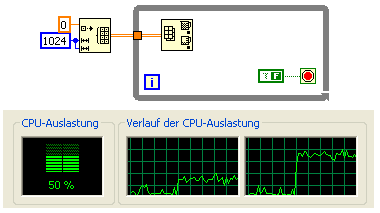
So, as we can see - 50% CPU load reached (one core loaded more, but its another story).
Well, if we will use two while loops, then we will get 100 % load:
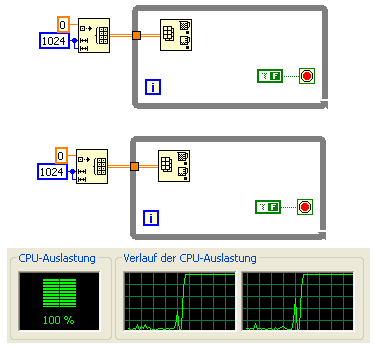
Of course, if you will need to load all 8 cores, then you should have 8 parallel loops.
Compare BD above with the following:
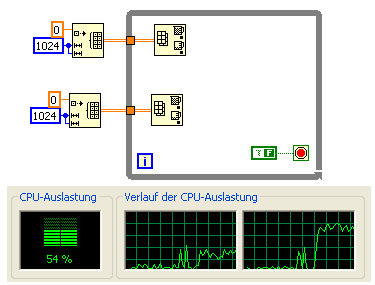
We have two Array minmax functions, and they independend, but we have 50% only.
Well, you can get also 100% CPU utulization withing single while loop. In th example below you have two SubVI, which called in the same loop:
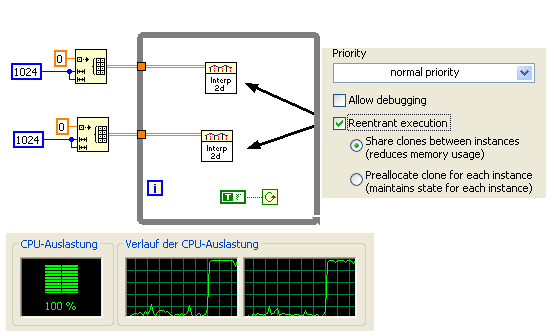
We have here 100 %. Important, that these VIs should be reenterant!
See what happened if they not reeenterant:
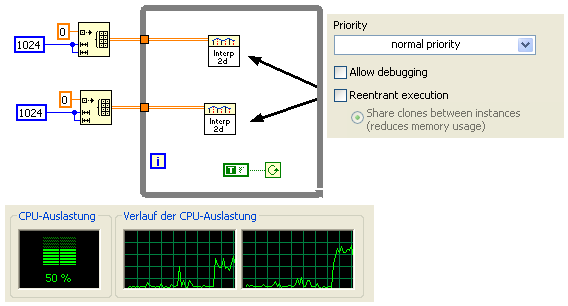
Now a little bit about Vision. Behing of most of the Vision SubVIs are DLL calls. Some Vision functions already optimized for multicore execution. For example, convolution:
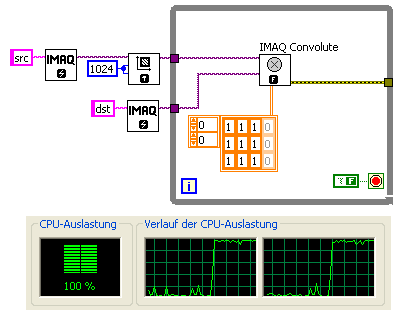
On the BD above we have single loop with one SubVI, but both cores are used (because convolute itself already optimized for multi core).
Remember, that not all Vision functions optimized yet. For, example, LowPass still single-threaded (compare this BD with BD above):
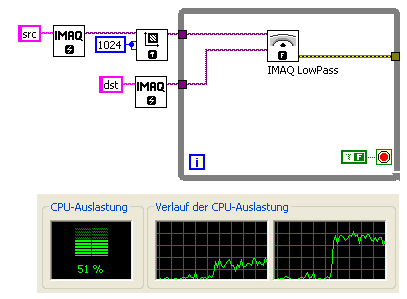
Sure, we can utilize multi cores - just perform parallel execution (you have to split image to two parts, then join together and so on):
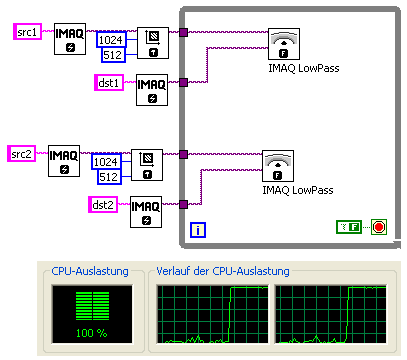
Remember, that SubVIs should be reeentrant, and all DLL calls should be thred safe (not in UI thread). Also good idea to turn off debugging in such experiments for eliminate additional CPU load.
Another point about 8 cores. As far as I know, LabVIEW (and LabVIEW-based application) will support only 4 cores within one execution system by default (at least prior to LabVIEW 2009). If you need to utulize all 8 cores, then you should add some lines into LabVIEW.ini. Refer to the following thread where you can found more details:
Interpolate 1d slow on 8 core machine
Hope all written above was correct.
Thank for reading and best regards,
Andrey.
- Tags:
- multicore
11-27-2009 08:39 AM
- Mark as New
- Bookmark
- Subscribe
- Mute
- Subscribe to RSS Feed
- Permalink
- Report to a Moderator
Hey Guys,
Thanks very much for your responces! i have a much better idea about what is going on now. Its really good to see that LabView has such a strong support from its users.
Thanks Again
Tom
 Mathan
11-27-2009 08:46 AM
- Mark as New
- Bookmark
- Subscribe
- Mute
- Subscribe to RSS Feed
- Permalink
- Report to a Moderator
Tom Drew wrote:
Its really good to see that LabView has such a strong support from its users.
That's indeed 100% true. You can learn a lot here.
Thanks for marking the solution and also kudos to the person who helped you.
Enjoy wiring.
