- Subscribe to RSS Feed
- Mark Topic as New
- Mark Topic as Read
- Float this Topic for Current User
- Bookmark
- Subscribe
- Mute
- Printer Friendly Page
Dropdown filter menu
Solved!
 milan87
07-04-2023 02:42 AM
- Mark as New
- Bookmark
- Subscribe
- Mute
- Subscribe to RSS Feed
- Permalink
- Report to a Moderator
Hello,
is it possible to create drop down filter menu, something similar like in excel?
So you are able to select wanted content.

Solved! Go to Solution.

 GerdW
GerdW

07-04-2023 02:54 AM
- Mark as New
- Bookmark
- Subscribe
- Mute
- Subscribe to RSS Feed
- Permalink
- Report to a Moderator
Hi milan,
@milan87 wrote:
is it possible to create drop down filter menu, something similar like in excel?
Yes.
You can create right-click menus at runtime.
Or you can use a listbox to show the list of options and use the item symbol to show the checkmark.
GerdW
using LV2016/2019/2021 on Win10/11+cRIO, TestStand2016/2019
07-04-2023 05:00 AM
- Mark as New
- Bookmark
- Subscribe
- Mute
- Subscribe to RSS Feed
- Permalink
- Report to a Moderator
can you please share some example, didn't manage to made this.
I also try with tree but without success.
GerdW
07-04-2023 05:42 AM
- Mark as New
- Bookmark
- Subscribe
- Mute
- Subscribe to RSS Feed
- Permalink
- Report to a Moderator
Hi milan,
@milan87 wrote:
didn't manage to made this.
I also try with tree but without success.
What have YOU tried and where are YOU stuck?
Please provide your example VIs! (Keep in mind many of us prefer LabVIEW 2021 or older. I prefer LabVIEW2019.)
GerdW
using LV2016/2019/2021 on Win10/11+cRIO, TestStand2016/2019
07-05-2023 12:57 AM
- Mark as New
- Bookmark
- Subscribe
- Mute
- Subscribe to RSS Feed
- Permalink
- Report to a Moderator
Hello,
there is no some example to share.
I followed your instruction:
''Or you can use a checkbox to show the list of options and use the item symbol to show the checkbox.''
So i added symbols, but as can see, this is just symbols.
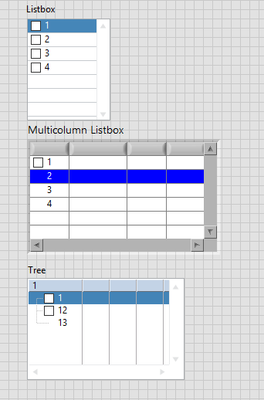
So, this could work, when take checkbox coordinate, check if it is mouse is on checkbox position, and then using property node, change symbol somehow.
Or i missed something.
GerdW
07-05-2023 01:18 AM - edited 07-05-2023 01:26 AM
- Mark as New
- Bookmark
- Subscribe
- Mute
- Subscribe to RSS Feed
- Permalink
- Report to a Moderator
Hi milan,
@milan87 wrote:
I followed your instruction:
''Or you can use a checkbox to show the list of options and use the item symbol to show the checkbox.''
So i added symbols, but as can see, this is just symbols.
On a listbox you can use events to determine the mouse position (or the item you are working with). Then you can add code to change the item symbol as needed from "empty box" to "checked box" and vice versa.
(The same applies to trees or runtime menus.)
I never wrote you get all that for free: you always need some code to handle user interactions!
Just an example:

GerdW
using LV2016/2019/2021 on Win10/11+cRIO, TestStand2016/2019

07-05-2023 04:18 AM
- Mark as New
- Bookmark
- Subscribe
- Mute
- Subscribe to RSS Feed
- Permalink
- Report to a Moderator
this helped me a lot.
Thanks you very much.
