- Subscribe to RSS Feed
- Mark Topic as New
- Mark Topic as Read
- Float this Topic for Current User
- Bookmark
- Subscribe
- Mute
- Printer Friendly Page
Data logging in LabVIEW

 ThePotatoMan
08-01-2011 08:58 PM
- Mark as New
- Bookmark
- Subscribe
- Mute
- Subscribe to RSS Feed
- Permalink
- Report to a Moderator
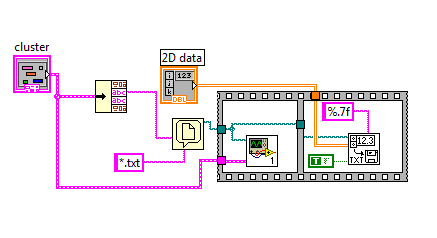

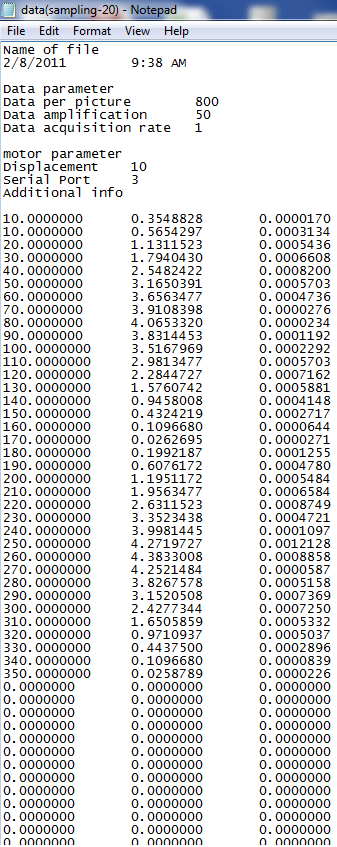
Salutations,
I'm experiencing an error in my data logging in my .txt file/notepad.
As you can see from the output, I have many unneccessary data entry, such as, the 0s after my actual entry.
I've pasted some screenshots to help aid in clearing my doubt.
I don't think I should upload my VI, as i'm doing a school project,
and I'll appreciate any help/tips/advice to aid me in completing my task.
So, basically, my question is, how do I clear the unneccessary 0s after I've recorded the actual data, which is after 360.
Thanks!

 RavensFan

08-01-2011 09:08 PM
- Mark as New
- Bookmark
- Subscribe
- Mute
- Subscribe to RSS Feed
- Permalink
- Report to a Moderator
The question should be where are those zeroes coming from?
Are they in the 2-D array of data that you are passing in? What is generating that data in the 2-D array?
Once you know where the extra zeroes are coming from, you can stop them from being created, or delete them from the data array then.
08-01-2011 09:11 PM
- Mark as New
- Bookmark
- Subscribe
- Mute
- Subscribe to RSS Feed
- Permalink
- Report to a Moderator
We don't know where it's coming from either.
Previously, when we run it, it was fine.
This only occurs from yesterday onwards.
08-02-2011 03:15 AM
- Mark as New
- Bookmark
- Subscribe
- Mute
- Subscribe to RSS Feed
- Permalink
- Report to a Moderator
Hello, the unneccessary 0s problem has been solved.
Now, we have another problem, which is the duplicate of the value 10.
Supposedly, the first value should be 0, and then, 10.
Is it still lies with the 2D array that's passing through ?
RavensFan
08-02-2011 08:24 AM
- Mark as New
- Bookmark
- Subscribe
- Mute
- Subscribe to RSS Feed
- Permalink
- Report to a Moderator
I'm sure it is. Since the part of the code that generates the 2-D array isn't shown, I could only speculate.
