ni.com is currently undergoing scheduled maintenance.
Some services may be unavailable at this time. Please contact us for help or try again later.
- Subscribe to RSS Feed
- Mark Topic as New
- Mark Topic as Read
- Float this Topic for Current User
- Bookmark
- Subscribe
- Mute
- Printer Friendly Page
DSC Tutorial Custom Periodic I/O Server Problem

 TheKernel
03-02-2023 04:46 PM
- Mark as New
- Bookmark
- Subscribe
- Mute
- Subscribe to RSS Feed
- Permalink
- Report to a Moderator
Hi all,
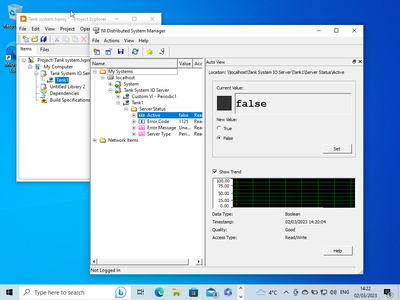
I'm having trouble seeing the Input Flowrate [GPM] I/O data item for my Tank1 I/O server in the NI Distributed System Manager. I have deployed the project library and followed all the steps in the 'Getting Started with the LabVIEW Datalogging and Supervisory Control Module' tutorial, but I only see the server statuses of Active, Error Code, Error Message, and server type under the Tank1 folder (image1).
Image 1
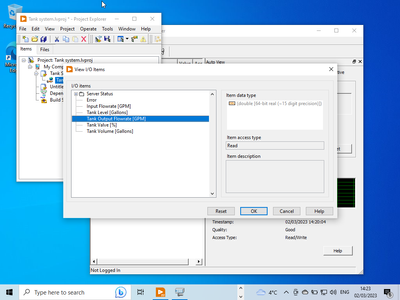
The Input Flowrate [GPM] is visible in the project library's View I/O window, but not in the Distributed System Manager (image2).
Image 2
Any suggestions on what might be causing this issue or how to resolve it?
Additional info:
LabView 2022 Q3 (32bit)
Thanks in advance,
The Kernel
 LightBuzzyear
03-12-2023 05:16 PM
- Mark as New
- Bookmark
- Subscribe
- Mute
- Subscribe to RSS Feed
- Permalink
- Report to a Moderator
Hello Kernel, I'm having the same issue with a project for college and 90%+ of classmates are encountering same issue. Does anyone have a fix before project deadline of next Friday?!!

 Asif138
06-15-2023 07:11 AM
- Mark as New
- Bookmark
- Subscribe
- Mute
- Subscribe to RSS Feed
- Permalink
- Report to a Moderator
May i see your I/O Server?
