- Subscribe to RSS Feed
- Mark Topic as New
- Mark Topic as Read
- Float this Topic for Current User
- Bookmark
- Subscribe
- Mute
- Printer Friendly Page
Custom Project Template Fails due to Compiled Code
Solved!
 Kenny_K
04-03-2022 01:07 PM - edited 04-03-2022 01:11 PM
- Mark as New
- Bookmark
- Subscribe
- Mute
- Subscribe to RSS Feed
- Permalink
- Report to a Moderator
I have created a project template to use within our company.
When I mass compile the source, I get no errors.
I verified that none of the VIs are broken, none are password locked, and I have no missing VIs, per the following knowledge base: https://knowledge.ni.com/KnowledgeArticleDetails?id=kA03q000000x1k8CAA&l=en-US
Part was through creating the project from the template, I get the following error:
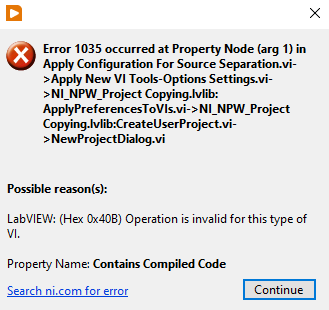
I tried creating this VI to look through my source directory for any VI that contains compiled code, but I did not get any results....
Is there a log to see what VI is causing the failure?
Solved! Go to Solution.

 JÞB
JÞB
04-03-2022 01:56 PM - edited 04-03-2022 01:59 PM
- Mark as New
- Bookmark
- Subscribe
- Mute
- Subscribe to RSS Feed
- Permalink
- Report to a Moderator
That error may mean you ran into something that has no code to separate from <ThisFile>.vi
Did you stick a global in the project template? Try changing the extension of any globals as a work around. If that resolves it you may have found a bug.
"Should be" isn't "Is" -Jay

 paul_cardinale
04-04-2022 07:07 AM
- Mark as New
- Bookmark
- Subscribe
- Mute
- Subscribe to RSS Feed
- Permalink
- Report to a Moderator
When I get that error, it's usually because my code is trying to do something on a block diagram of a file that doesn't have a block diagram; such as a global VI, or a .ctl.
JÞB
04-04-2022 07:19 AM
- Mark as New
- Bookmark
- Subscribe
- Mute
- Subscribe to RSS Feed
- Permalink
- Report to a Moderator
According to my fallible memory
Controls, typedefs, Globals and polys throw error 1035 if the method is not allowed.
I assume separate source parses the files by extension since I have used custom templates containing typedef.ctl and ctt files. Poly instances should allow separation from source ( at least I've never hit the error but feel free to check the method details) that leaves those evil Globals as the most likely culprit.
"Should be" isn't "Is" -Jay

 UliB
UliB
04-04-2022 07:24 AM - edited 04-04-2022 07:26 AM
- Mark as New
- Bookmark
- Subscribe
- Mute
- Subscribe to RSS Feed
- Permalink
- Report to a Moderator
The help for 'Contains Compiled Code Property' contains
Available with control VIs              Yes
Available with global VIs               Yes
Available with strict type definitions  No
Available with polymorphic VIs          Yes
JÞB
04-04-2022 09:53 AM
- Mark as New
- Bookmark
- Subscribe
- Mute
- Subscribe to RSS Feed
- Permalink
- Report to a Moderator
OK, you didn't mention the presence of Globals but, re reading and thinking about it some more.....
Are there any source only file types? If those are separated from source the source lives in cashe only your template source should not be separated BUT the project properties should set the new project's setting IF you want to override the environment options of the target development machine.
"Should be" isn't "Is" -Jay

 Darren
04-04-2022 11:17 AM
- Mark as New
- Bookmark
- Subscribe
- Mute
- Subscribe to RSS Feed
- Permalink
- Report to a Moderator
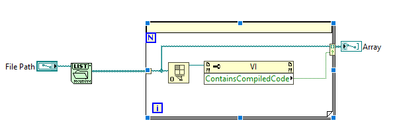
All VIs (Standard, Control, Poly, Global, etc.) should be able to have the Separate Compiled Code setting applied to them. My best guess is that there is a VI without a block diagram that is in the source of your project (does your project template include any PPLs?). I suggest writing some code that looks like this, which should identify which VI in the project is causing issues:

04-04-2022 01:07 PM
- Mark as New
- Bookmark
- Subscribe
- Mute
- Subscribe to RSS Feed
- Permalink
- Report to a Moderator
A handy VI to have.
Yes, I did have a PPL (residing in my user.lib, not under the source ProjectTemplate folder), and that was the issue. Once I removed the PPL from the project, it built correctly.
I will need to update the PostScripting to re-add the PPL to the project.
Thanks for all the responses.
