- Subscribe to RSS Feed
- Mark Topic as New
- Mark Topic as Read
- Float this Topic for Current User
- Bookmark
- Subscribe
- Mute
- Printer Friendly Page
Current Font in Labview
Solved!
 thutch79
04-17-2014 09:13 AM
- Mark as New
- Bookmark
- Subscribe
- Mute
- Subscribe to RSS Feed
- Permalink
- Report to a Moderator
I have a minor, but annoying problem. I've recently done some UI work and I used a font other than "application" font. Now, anything I do defaults back to that font. No matter how many times I change the font back to "application" font, it defaults back to the font I used that one time.
How do I get the font to default to "application" font? It seems like labview always reverts to "current" font which for some reason is stuck on that font I used.
Solved! Go to Solution.

 JÞB
JÞB
04-17-2014 09:36 AM - edited 04-17-2014 09:40 AM
- Mark as New
- Bookmark
- Subscribe
- Mute
- Subscribe to RSS Feed
- Permalink
- Report to a Moderator
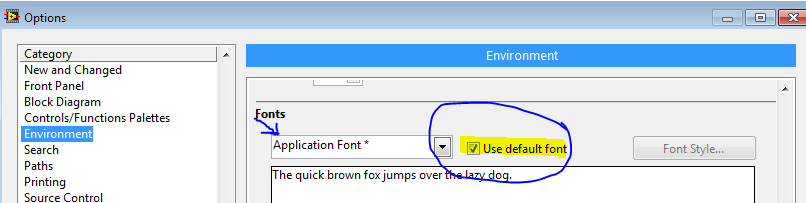
Toos>>Options
Then restart LabVIEW to get the ini file uncorrupted.
EDIT: And JB's advice too. I forgot about those!
"Should be" isn't "Is" -Jay

 JB
JB
04-17-2014 09:36 AM
- Mark as New
- Bookmark
- Subscribe
- Mute
- Subscribe to RSS Feed
- Permalink
- Report to a Moderator
- Ctrl+0 (zero) to open the Font Dialog box
- Select the desired font
- Check "Panel Default" and "Diagram default"
JB
04-17-2014 09:44 AM
- Mark as New
- Bookmark
- Subscribe
- Mute
- Subscribe to RSS Feed
- Permalink
- Report to a Moderator
You can also edit below keys of LabVIEW.ini :
appFont --> application
FPFont --> front panel
BDFont --> block diagram
The format is "Name" Size. For example :
FPFont="Tahoma" 13
04-17-2014 10:12 AM
- Mark as New
- Bookmark
- Subscribe
- Mute
- Subscribe to RSS Feed
- Permalink
- Report to a Moderator
Thanks guys. I tried Jeff's suggestion first and that seemed to do the trick.

 champ065
06-04-2018 03:58 PM
- Mark as New
- Bookmark
- Subscribe
- Mute
- Subscribe to RSS Feed
- Permalink
- Report to a Moderator
I have a question on this similar topic. I have a build that the font size get's large when I put it on the end system. Both OS are Win7, I have the default for the app, diag, and system fonts check. Also, I defined in the .ini file that font and size I wanted. Any ideas? I'm using 13pt MS Sans Serif font.
Thank you for any help you can provide.

 Yamaeda
06-04-2018 04:05 PM - edited 06-04-2018 04:06 PM
- Mark as New
- Bookmark
- Subscribe
- Mute
- Subscribe to RSS Feed
- Permalink
- Report to a Moderator
The Windows scaling affects the font. If you don't use AppFont, but set the text to Segoe UI 15 i think it's fixed.
/Y
 champ065
06-05-2018 02:50 AM
- Mark as New
- Bookmark
- Subscribe
- Mute
- Subscribe to RSS Feed
- Permalink
- Report to a Moderator
Also, I'm running LV 2012sp1.
So, when you use appfont and select "Use default" is it using the computers default or what's in the .ini file?
