- Subscribe to RSS Feed
- Mark Topic as New
- Mark Topic as Read
- Float this Topic for Current User
- Bookmark
- Subscribe
- Mute
- Printer Friendly Page
Creating Random Colors
Solved!
 LeroyBogz
04-30-2014 02:34 PM
- Mark as New
- Bookmark
- Subscribe
- Mute
- Subscribe to RSS Feed
- Permalink
- Report to a Moderator
Just out of curiosity - I'm trying to make a string display random colors. My understanding is text.textcolor accepts a hex number in the format "RRGGBB". I"m doing the following, but I'm not sure that this is right. Can someone check and let me know?
Much appreciated.
LB
Solved! Go to Solution.

04-30-2014 02:53 PM - edited 04-30-2014 02:55 PM
- Mark as New
- Bookmark
- Subscribe
- Mute
- Subscribe to RSS Feed
- Permalink
- Report to a Moderator
Hello LB,
If you're looking for a truly random color, there is no need to build the RGB components individually. You can just generate a random integer within the color range you want to use, valid numbers should be 0-16777215 (decimal), 16777216 is used for transparent objects but can't be used for text.
Regards,

 MarcDub
04-30-2014 02:56 PM
- Mark as New
- Bookmark
- Subscribe
- Mute
- Subscribe to RSS Feed
- Permalink
- Report to a Moderator
You need to create a binary 24-bit number to give the color. Labview provides a VI (RGB to Color.vi) to create a color based on 3 8-bit numbers in the sub-palette Graphics & Sounds / Picture functions. See below


 JÞB
JÞB
04-30-2014 03:17 PM
- Mark as New
- Bookmark
- Subscribe
- Mute
- Subscribe to RSS Feed
- Permalink
- Report to a Moderator
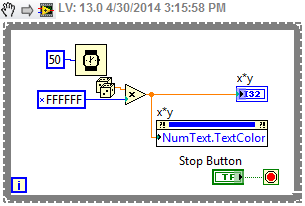

 bseguin
09-14-2018 12:28 AM
- Mark as New
- Bookmark
- Subscribe
- Mute
- Subscribe to RSS Feed
- Permalink
- Report to a Moderator
Old thread, but in some case you will face the problem where you cannot distinguish the background color and the text color.
Here is a VI that helps...
https://lavag.org/files/file/301-55-easily-distinguishable-colorvi/
Benoit
