- Subscribe to RSS Feed
- Mark Topic as New
- Mark Topic as Read
- Float this Topic for Current User
- Bookmark
- Subscribe
- Mute
- Printer Friendly Page
- « Previous
-
- 1
- 2
- Next »
Count multiple element in a 1D array
Solved!
 JÞB
JÞB
05-29-2015 09:32 PM - edited 05-29-2015 09:54 PM
- Mark as New
- Bookmark
- Subscribe
- Mute
- Subscribe to RSS Feed
- Permalink
- Report to a Moderator
Hi LV warrior.
I have a problem concerning manipulating data of an array.
I have an array of elements(numbers), and I want to count the different elements in an array.
Example : Array of (1,1,1,1,2,2,2,3,3,3,3,3,5,5,5)
I want to have at the end a listbox showing that we have :
4 Times 1
3 Times 2
5 Times 3
3 Times 5
I have no idea how. Any insight would be helpful..
Thanks
Uhmmmm.. Guys should we maybe move this to the rube goldberg thread?
You might think of that as a "Histogram"
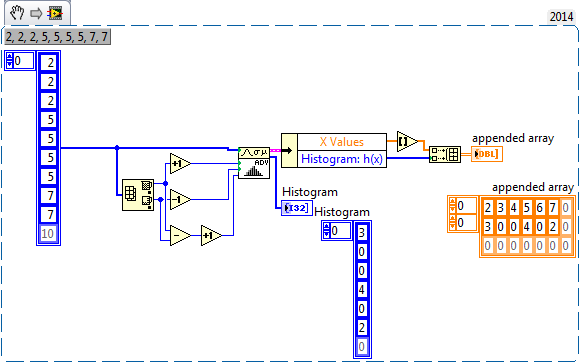
"Should be" isn't "Is" -Jay
JÞB
05-29-2015 10:12 PM
- Mark as New
- Bookmark
- Subscribe
- Mute
- Subscribe to RSS Feed
- Permalink
- Report to a Moderator
Slight rounding problem in the first attempt-fixed
(Dang Bankers)
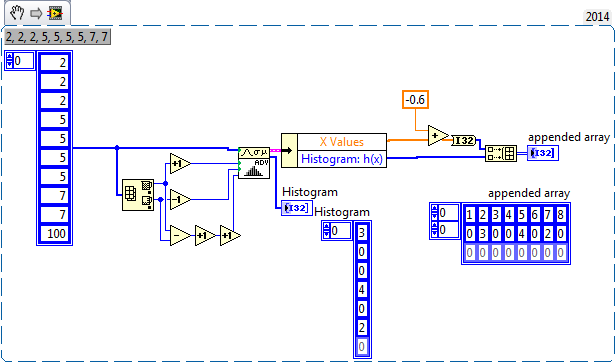
"Should be" isn't "Is" -Jay

 RavensFan

05-29-2015 11:05 PM
- Mark as New
- Bookmark
- Subscribe
- Mute
- Subscribe to RSS Feed
- Permalink
- Report to a Moderator
@syahid89 wrote:
Hei thanks for the response (I Guess)
My Idea is to split the array containing different element, then calculate size of every newly formed array.
But I do think this idea is not effective, and there must be easier way to do this.
As an NI employee, shouldn't you already be getting LabVIEW training as part of your on the job training?

 altenbach
05-30-2015 01:11 AM
- Mark as New
- Bookmark
- Subscribe
- Mute
- Subscribe to RSS Feed
- Permalink
- Report to a Moderator
syahid89 wrote:have an array of elements(numbers), and I want to count the different elements in an array.
Example : Array of (1,1,1,1,2,2,2,3,3,3,3,3,5,5,5)
I want to have at the end a listbox showing that we have :
4 Times 1
3 Times 2
5 Times 3
3 Times 5
Can we make assumptions about the datatype and range of possible numbers?
 altenbach
05-30-2015 02:16 AM - edited 05-30-2015 02:17 AM
- Mark as New
- Bookmark
- Subscribe
- Mute
- Subscribe to RSS Feed
- Permalink
- Report to a Moderator
If the numbers are relatively small positive integers, you can increment an array where the index represents the number and the value represents the count. (top of image). THis is a very fast solution that operates in-place.
In the more general case, I would recommend the variant solution, but in a slightly different way than mentioned earlier. Just use typecasting for the name (formatting numbers in decimal text seems like a complicated detour!). (bottom of image). It can easily be used for arrays with almost any datatype (of course the final formatting would require some adaptation).

altenbach
05-30-2015 02:34 AM - edited 05-30-2015 02:35 AM
- Mark as New
- Bookmark
- Subscribe
- Mute
- Subscribe to RSS Feed
- Permalink
- Report to a Moderator
@altenbach wrote:
... It can easily be used for arrays with almost any datatype (of course the final formatting would require some adaptation).
Here's a quick example where the array elements are clusters of a I16 and a DBL. Works equally well.

altenbach
05-30-2015 02:44 AM - edited 05-30-2015 02:44 AM
- Mark as New
- Bookmark
- Subscribe
- Mute
- Subscribe to RSS Feed
- Permalink
- Report to a Moderator
If the array elements contain variable-lenght fields, we need to replace the typecase with flatten/unflatten (else we get a broken wire, of course). The rest stays the same. 😄


05-31-2015 08:39 PM
- Mark as New
- Bookmark
- Subscribe
- Mute
- Subscribe to RSS Feed
- Permalink
- Report to a Moderator
Yes I have.
However as a manufacturing guy , I am more familiriased to read the code, not to build ithe algorithm.
I was hoping to learn more and by joining the forum, it may help me to see different ways of coding.
This is what I came up with the first time :

Then I realise there must be a better way than to use 2 "for loops".
So I come out here to ask if there's some other way and so far I have seen a few proposal albeits the "simpletone-ness of my question".
Quite fruitful 🙂
Thanks
altenbach
05-31-2015 09:16 PM - edited 06-01-2015 10:28 AM
- Mark as New
- Bookmark
- Subscribe
- Mute
- Subscribe to RSS Feed
- Permalink
- Report to a Moderator
These are great exercises to play with LabVIEW structures and think about a problem.
Just looking at your image, there are a few points you should learn. For example, "index array" is resizable and if you wire the first index terminal, the next index is assumed to be one higher. All you need in the first loop is a single index array and there is no need to calculate the +1.
There are a few logical flaws. What comes to mind immediately is that on the last iteration you run out of elements on the second index and thus get a zero returned. If the sorted array ends in a collection of zeroes, you might count one extra. No way to tell because we cannot see the other case, etc.
Why would you need to split the array at position X to measure the size of the resulting array? Shouldn't you be able to calculalte the lenght from the value of X directly? 😄
A good exercise would be to start with sorting the array, then measuring the lenght of each strech with identical elements. It can definitely be made much simpler and efficient than your code. Try it! 😄
- « Previous
-
- 1
- 2
- Next »
