- Subscribe to RSS Feed
- Mark Topic as New
- Mark Topic as Read
- Float this Topic for Current User
- Bookmark
- Subscribe
- Mute
- Printer Friendly Page
Convert byte array to float
Solved!
 aan928
09-19-2016 08:04 AM
- Mark as New
- Bookmark
- Subscribe
- Mute
- Subscribe to RSS Feed
- Permalink
- Report to a Moderator
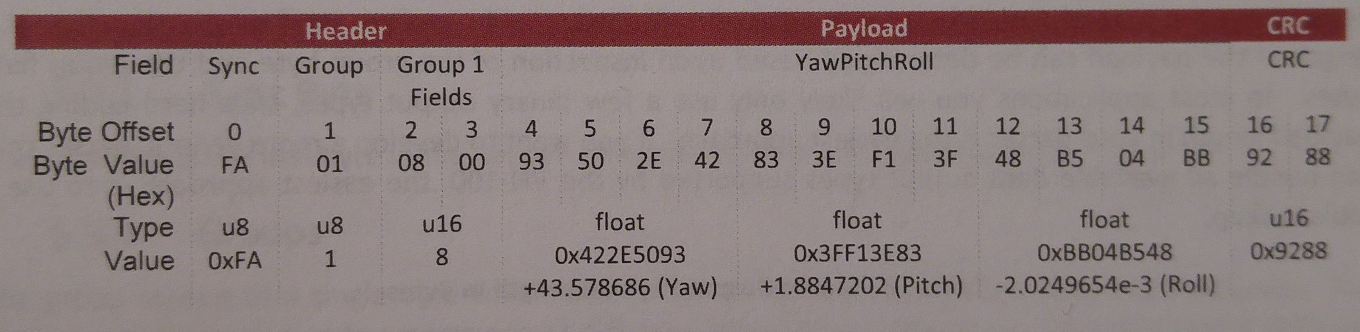
I have a byte array which I get from the sensor. I have manage to seperate the payload into three 4 sections. A and B and C are float values: A=+43.57, B=+1.88, C=-2.02. How may I proceed? I have tried type casting and converting to big endian. It doesnt work. Any ideas?

Solved! Go to Solution.

 PazhanivelVenka
09-19-2016 08:09 AM
- Mark as New
- Bookmark
- Subscribe
- Mute
- Subscribe to RSS Feed
- Permalink
- Report to a Moderator
You are searching for FA but the attached VI with default doesnt contain FA.
Share us the data payload which you got and the expected decimal Value. will help you in converting using LabVIEW.
Palanivel Thiruvenkadam | பழனிவேல் திருவெங்கடம்
LabVIEW™ Champion |Certified LabVIEW™ Architect |Certified TestStand Developer
Kidlin's Law -If you can write the problem down clearly then the matter is half solved.
-----------------------------------------------------------------------------------------------------------------
09-19-2016 08:12 AM - edited 09-19-2016 08:16 AM
- Mark as New
- Bookmark
- Subscribe
- Mute
- Subscribe to RSS Feed
- Permalink
- Report to a Moderator
In my project everything is correct. I duplicated the file and have mistakenly typed AA in the field. It should be FA.
PazhanivelVenka
09-19-2016 08:18 AM
- Mark as New
- Bookmark
- Subscribe
- Mute
- Subscribe to RSS Feed
- Permalink
- Report to a Moderator
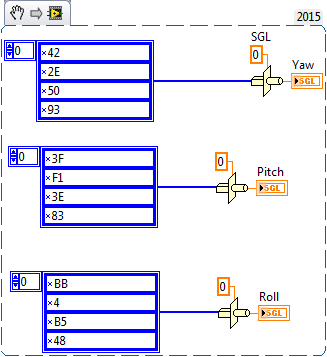
I hope i i did similiar conversion couple of years before, i rememeber i gave the reference for typecast is SGL instead of DBL.
Just have a try.
Palanivel Thiruvenkadam | பழனிவேல் திருவெங்கடம்
LabVIEW™ Champion |Certified LabVIEW™ Architect |Certified TestStand Developer
Kidlin's Law -If you can write the problem down clearly then the matter is half solved.
-----------------------------------------------------------------------------------------------------------------
PazhanivelVenka
09-19-2016 08:23 AM
- Mark as New
- Bookmark
- Subscribe
- Mute
- Subscribe to RSS Feed
- Permalink
- Report to a Moderator
@aan928 wrote:In my project everything is correct. I duplicated the file and have mistakenly typed AA in the field. It should be FA.
Its Working Just try this

Palanivel Thiruvenkadam | பழனிவேல் திருவெங்கடம்
LabVIEW™ Champion |Certified LabVIEW™ Architect |Certified TestStand Developer
Kidlin's Law -If you can write the problem down clearly then the matter is half solved.
-----------------------------------------------------------------------------------------------------------------

 GerdW
GerdW
09-19-2016 08:24 AM
- Mark as New
- Bookmark
- Subscribe
- Mute
- Subscribe to RSS Feed
- Permalink
- Report to a Moderator
Hi aan,
each part, consisting of 4 bytes, should be typecasted to a SGL value.
- Right now you typecast to DBL - FAIL 😄
- When the byte order is wrong you should use Reverse1DArray on those 4 byte-parts. Using SwapBytes/Words is wrong too…
- You can also use UnflattenFromString, which gives you the option to change the byte order for free…
GerdW
using LV2016/2019/2021 on Win10/11+cRIO, TestStand2016/2019
