- Subscribe to RSS Feed
- Mark Topic as New
- Mark Topic as Read
- Float this Topic for Current User
- Bookmark
- Subscribe
- Mute
- Printer Friendly Page
Controlling a while loop
Solved!
 Clement1
11-18-2016 06:56 AM - edited 11-18-2016 06:58 AM
- Mark as New
- Bookmark
- Subscribe
- Mute
- Subscribe to RSS Feed
- Permalink
- Report to a Moderator
Hello,
I have a text file called "displacement.txt" which contains X and Y coordinates. For the moment, I just use X.
I use X coordinates to light on a LED. When X - (X-1) > -100, the led lights on otherwise it's off. I make a boolean button called "Start", when It's true, the equation (X - (X-1) > -100) can process.
I want when the case structure is false ( Start = false), the while loop wait until Start is true to continue because in this case, the program continue to calculate X coordinates.
For example :
When the current value of X is 50 and X-1 is 100 and Start is false, I would like the program to wait with X = 50 and X-1 = 100 until Start is true.
I don't know if it's clear ...
Thank you, best regards.
Solved! Go to Solution.

 Bob_Schor

11-18-2016 08:10 AM
- Mark as New
- Bookmark
- Subscribe
- Mute
- Subscribe to RSS Feed
- Permalink
- Report to a Moderator
If all you want to do is to Wait (and do nothing) until Start is True, you could use a While Loop that encloses, say, a "Wait 100 msec" function and has Start wired (paradoxically) to the Stop terminal. When this loop runs, it will wait, checking the Start button 10 times a second (you can check more often by reducing the Wait time -- you could even eliminate the Wait time, but then your poor Computer would be bogged down doing nothing). You can pass the value of Start out of the loop (it will, of course, be True when the loop exits) and use this to start your "Process X" loop.
A more elegant way to handle Front Panel Controls is with an Event Structure in a While Loop, but that's for the next lesson ...
Bob Schor
11-18-2016 08:45 AM
- Mark as New
- Bookmark
- Subscribe
- Mute
- Subscribe to RSS Feed
- Permalink
- Report to a Moderator
I did it with your method but the X coordinate always change.
Bob_Schor
11-18-2016 08:57 AM
- Mark as New
- Bookmark
- Subscribe
- Mute
- Subscribe to RSS Feed
- Permalink
- Report to a Moderator
No, you didn't. You need to learn the Fundamental Principle of LabVIEW, the Principle of Data Flow. Spend some time with the Introduction to LabVIEW Tutorials.

Note that this is definitely not the way I would use a Start button, but (as I said) that's for the Next Lesson ...
Bob Schor
11-18-2016 11:24 AM
- Mark as New
- Bookmark
- Subscribe
- Mute
- Subscribe to RSS Feed
- Permalink
- Report to a Moderator
No changes ... X coordinates always change even the while loop is in false mode.
Bob_Schor
11-18-2016 12:23 PM
- Mark as New
- Bookmark
- Subscribe
- Mute
- Subscribe to RSS Feed
- Permalink
- Report to a Moderator
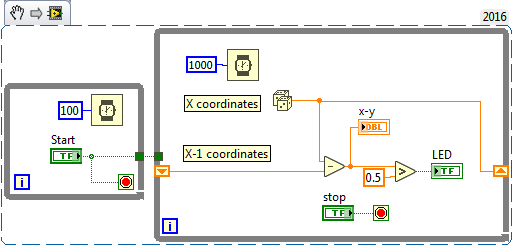
I don't know how you are testing this (and I don't have your data file), so I made a simulation, using a random number generator and turning on the LED when successive differences were > 0.5.
As you described it, you want to "do nothing" until the Start button is pushed, and then continue until the Stop button is pushed. This code does exactly that, and is (essentially) the code that you posted above and says doesn't work (a puzzlement).
Bob Schor
11-18-2016 01:02 PM
- Mark as New
- Bookmark
- Subscribe
- Mute
- Subscribe to RSS Feed
- Permalink
- Report to a Moderator
It works perfectly with your case and mine too thank you.
