- Subscribe to RSS Feed
- Mark Topic as New
- Mark Topic as Read
- Float this Topic for Current User
- Bookmark
- Subscribe
- Mute
- Printer Friendly Page
Control buttons in sequence

 Nathanzzs
02-04-2020 04:48 PM
- Mark as New
- Bookmark
- Subscribe
- Mute
- Subscribe to RSS Feed
- Permalink
- Report to a Moderator
Howdy everyone,
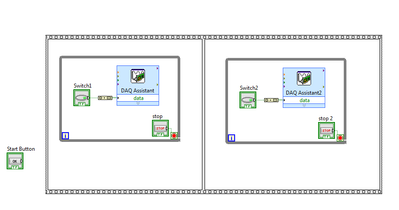
I'm new to LabVIEW and I just started to use LabVIEW to control a DAQmx to generate digital signals. I simply use buttons to control one digital terminal correspondingly,however, I want to realize the following sequence. First, once I hit the start button, switch 1 will be turned on and generate digital signals on corresponding terminal. After I turn off switch 1, switch 2 will be turned on to generate signals on another terminal. After switch 2 is turned off, the whole process will end. I have no clue to how realize the sequence so I definitely need some help from you. Is there any suggestion of where should I start? Or is there any VI example that I can learn to realize the button sequence from? Thanks!

 Gregory
02-04-2020 06:53 PM
- Mark as New
- Bookmark
- Subscribe
- Mute
- Subscribe to RSS Feed
- Permalink
- Report to a Moderator
Hi Nathanzzs,
I am not sure I understand your requirement. Are going to make Switch1 go F->T->F and then Switch2 go F->T->F?
If you put them both in the same loop then you can just press whichever one you need to.
Also, when using a while loop you should not let it hog the processor too much. I usually add a "Wait(ms)" function with an input of 50 or 100 inside the loop.
 cbutcher

02-04-2020
08:21 PM
- last edited on
01-07-2025
10:09 AM
by
 Content Cleaner
- Mark as New
- Bookmark
- Subscribe
- Mute
- Subscribe to RSS Feed
- Permalink
- Report to a Moderator
Hi Nathanzzs,
I'd take a look over a State Machine tutorial.
Since you don't know the duration of the two switches in advance, but you do know the order and set of operations, I think it will be a good fit.
Your states could be something like:
- Init (open DAQmx tasks, any other setup steps)
- Wait for Switch 1 (or Start button). Make sure to use a wait to avoid 100% CPU usage for nothing (10-50ms is probably good)
- Turn on Switch 1 (put a DAQmx Write here, probably)
- Wait for Change in Switch (wait for Sw2 true, or Sw1 false, whichever you want to use to move on)
- Turn on Switch 2 (and make sure to turn off switch 1. You might make these different states and have one go straight into the other)
- Wait for End (until you turn off switch 2, or whatever)
- Turn off Sw2 (DAQmx Write again)
- Stop/Exit/Cleanup (your preferred term etc) - stop the DAQmx tasks and close the program.
Note this guide for DAQmx vs the DAQ Express nodes (you should learn DAQmx if you can): Learn 10 Functions in NI-DAQmx and Handle 80 Percent of Your Data Acquisition Applications
