- Subscribe to RSS Feed
- Mark Topic as New
- Mark Topic as Read
- Float this Topic for Current User
- Bookmark
- Subscribe
- Mute
- Printer Friendly Page
Compare set values 1D-Array
Solved!
 frank22
07-26-2019 05:34 AM
- Mark as New
- Bookmark
- Subscribe
- Mute
- Subscribe to RSS Feed
- Permalink
- Report to a Moderator
Sorry I have two array 1D with a column of unique numbers respectively. The column in first array does not change, the column in second array contains part of the data of the first array or a lower number of elements. I should look for the missing elements in the first column in a new array (result).
example:
1^ array 2^array result array
3,4,1,2,5 4,2 1,3,5
Could you please help me?
Thanks
Solved! Go to Solution.

 GerdW
GerdW

07-26-2019 05:45 AM
- Mark as New
- Bookmark
- Subscribe
- Mute
- Subscribe to RSS Feed
- Permalink
- Report to a Moderator
Hi Frank,
I should look for the missing elements in the first column in a new array (result).
Look for the existing elements!
Pick first element from array2, search for it in array1. If found, then delete it from array1.
Do the same for the 2nd element of array2.
After checking all elements from array2 only the "missing elements" will remain in array1!
All you need is a FOR loop, a shift register and the Search1DArray/DeleteFromArray functions…
GerdW
using LV2016/2019/2021 on Win10/11+cRIO, TestStand2016/2019
07-26-2019 05:57 AM
- Mark as New
- Bookmark
- Subscribe
- Mute
- Subscribe to RSS Feed
- Permalink
- Report to a Moderator
I thank you for the valuable information, I wouldn't know how to delete the element from the first array but now I'll try. Could you send me an outline of how you thought about doing? I would be grateful
GerdW
07-26-2019 06:05 AM - edited 07-26-2019 06:06 AM
- Mark as New
- Bookmark
- Subscribe
- Mute
- Subscribe to RSS Feed
- Permalink
- Report to a Moderator
Hi Frank,
Could you send me an outline of how you thought about doing?
Like this (pseudocode):
FOR each element in array2
  index := Search1DArray(array1, element)
  IF found THEN
     DeleteFromArray(array1, index)
  ENDIF
NEXT
MissingElements := array1
Your requirement is a nice way to actually learn LabVIEW and some of its features.
Show what you have tried so far and we will give suggestions on how to improve it!
GerdW
using LV2016/2019/2021 on Win10/11+cRIO, TestStand2016/2019
07-26-2019 06:24 AM
- Mark as New
- Bookmark
- Subscribe
- Mute
- Subscribe to RSS Feed
- Permalink
- Report to a Moderator
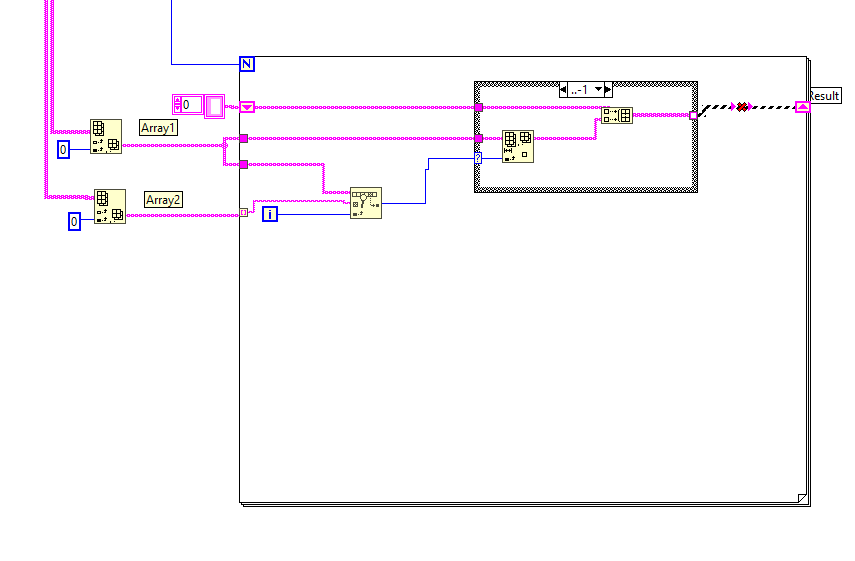
other the error on the right related to the size of the array I think there is more to do.
 GerdW
GerdW
07-26-2019 07:06 AM
- Mark as New
- Bookmark
- Subscribe
- Mute
- Subscribe to RSS Feed
- Permalink
- Report to a Moderator
Hi Frank,
did I mention any BuildArray function before?
Just a shift register, Search1DArray and DeleteFromArray:
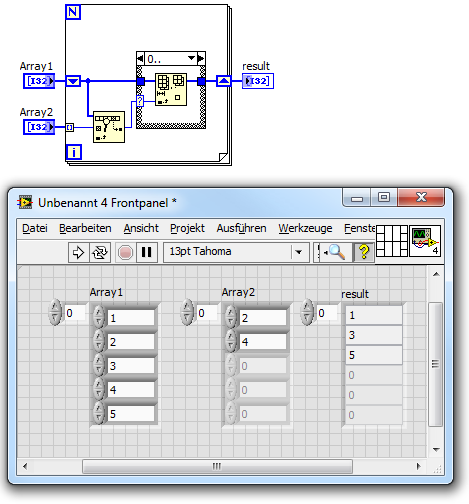
GerdW
using LV2016/2019/2021 on Win10/11+cRIO, TestStand2016/2019

 daveTW
07-26-2019 07:08 AM
- Mark as New
- Bookmark
- Subscribe
- Mute
- Subscribe to RSS Feed
- Permalink
- Report to a Moderator
Lucky Frank, now you did his homework...
07-26-2019 07:39 AM
- Mark as New
- Bookmark
- Subscribe
- Mute
- Subscribe to RSS Feed
- Permalink
- Report to a Moderator
Thanks you very much.
07-27-2019 04:37 AM
- Mark as New
- Bookmark
- Subscribe
- Mute
- Subscribe to RSS Feed
- Permalink
- Report to a Moderator
Because it does not work?


 RavensFan
07-27-2019 07:19 AM
- Mark as New
- Bookmark
- Subscribe
- Mute
- Subscribe to RSS Feed
- Permalink
- Report to a Moderator
Attach your VI and not a picture. We can't debug pictures.
I'm suspicious of 2 things:
1. You are working with strings and not numbers.
2. Both of your input arrays have what appear to be empty strings as the last element. While I'm not sure how that would cause element "2" to appear, dealing with strings and empty strings certainly wasn't part of your original problem description. Perhaps one of those "2" 's is not just a "2" but has a space or some other hidden character in it. For example, if you are searching the array for "2{space}", it certainly will not find a match with "2".
