ni.com is currently undergoing scheduled maintenance.
Some services may be unavailable at this time. Please contact us for help or try again later.
- Subscribe to RSS Feed
- Mark Topic as New
- Mark Topic as Read
- Float this Topic for Current User
- Bookmark
- Subscribe
- Mute
- Printer Friendly Page
Communicate with OCM632

 RamizHasan
11-20-2020 05:19 AM
- Mark as New
- Bookmark
- Subscribe
- Mute
- Subscribe to RSS Feed
- Permalink
- Report to a Moderator
Hi Guys,
I have a query, is it possible in Labview to communicate with OCM632 device by Orbit Controls AG ocm632
After searching on NI instrument drivers and on internet, i was unable to find any information which could help me about this device.

 GerdW
GerdW

11-22-2020 11:17 AM
- Mark as New
- Bookmark
- Subscribe
- Mute
- Subscribe to RSS Feed
- Permalink
- Report to a Moderator
Hi Ramiz,
@RamizHasan wrote:
is it possible in Labview to communicate with OCM632 device by Orbit Controls AG ocm632
Yes, it's possible.
The device offers RS232 and optionally other communication busses.
(Read the manual to learn about the commands/message formats for remote control! (I would expect SCPI compatibility.)
GerdW
using LV2016/2019/2021 on Win10/11+cRIO, TestStand2016/2019
11-25-2020 04:31 AM
- Mark as New
- Bookmark
- Subscribe
- Mute
- Subscribe to RSS Feed
- Permalink
- Report to a Moderator
Hi @GerdW,
Thank you so much for responding, i'll try to read the manual and see what will be the possibility it has to communicate.
Kind Regards,
Ramiz
11-25-2020 05:08 AM
- Mark as New
- Bookmark
- Subscribe
- Mute
- Subscribe to RSS Feed
- Permalink
- Report to a Moderator
I've followed this manual and tried to connect with LAN, but it's not working for and it's not appearing in VISA resources also. When i follow the steps it gives me an error of connection failed.
https://www.orbitcontrols.ch/images/pdf_img/manual_germany_pdf/2018032736OCM642_DEM%20201803.pdf
Could it be a protocol issue as it's mentioned in manual specifically that it needs Telnet protocol?
GerdW
11-25-2020 05:31 AM - edited 11-25-2020 05:32 AM
- Mark as New
- Bookmark
- Subscribe
- Mute
- Subscribe to RSS Feed
- Permalink
- Report to a Moderator
Hi Ramiz,
@RamizHasan wrote:
Could it be a protocol issue as it's mentioned in manual specifically that it needs Telnet protocol?
Depending on what you tried so far: yes.
Did you use/implement the Telnet protocol?
When you want to use VISA functions you should connect to the device using any of the other options (RS232, USB (?) or GPIB)…
GerdW
using LV2016/2019/2021 on Win10/11+cRIO, TestStand2016/2019
11-25-2020 09:20 AM
- Mark as New
- Bookmark
- Subscribe
- Mute
- Subscribe to RSS Feed
- Permalink
- Report to a Moderator
Hi GerdW,
Thanks again for responding.
I have no idea about the implementation of telnet or how can i access the device using telnet, that's why i've tried your given options but seems like connecting the device with USB also didn't work as i am unable to find the visa resource.
For SCPI commands i have to use VISA resource at least so that i can start sending the commands.
I think i have to look into the implementation of Telnet, how does this work.
GerdW
11-25-2020 09:51 AM
- Mark as New
- Bookmark
- Subscribe
- Mute
- Subscribe to RSS Feed
- Permalink
- Report to a Moderator
Hi Ramiz,
@RamizHasan wrote:
seems like connecting the device with USB also didn't work as i am unable to find the visa resource.
What kind of USB resource is added upon connection? What device/port pops up in (Windows) DeviceManager? Do you need to install any special drivers for that device?
GerdW
using LV2016/2019/2021 on Win10/11+cRIO, TestStand2016/2019
11-26-2020 07:55 AM
- Mark as New
- Bookmark
- Subscribe
- Mute
- Subscribe to RSS Feed
- Permalink
- Report to a Moderator
Hi GerdW,
There was a problem with USB connection also, when i connect the USB it shows that driver isn't installed and it wasn't displaying in device manager correctly rather displaying as a some printer device.
So i've installed the FTDI device drivers to make the USB as serial port and after installing the driver the USB starts showing as mentioned in OCM documentation ( USB Serial Port (COMXX) ).
Now, i am able to communicate with the device but it's flaky. Sometimes read operation gives time out and without doing any change it works also.
Regards,
Ramiz
11-27-2020 06:53 AM
- Mark as New
- Bookmark
- Subscribe
- Mute
- Subscribe to RSS Feed
- Permalink
- Report to a Moderator
Hi,
I am unable to use any other command for write or query the data from the device except *IDN , i have tried in VISA test panel and also on Labview only IDN command works perfectly fine.
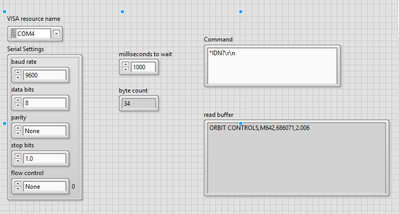
This is the command manual:OCM Command Manual
Any help would be appreciated!
Regards,
Ramiz
GerdW
11-27-2020 07:02 AM
- Mark as New
- Bookmark
- Subscribe
- Mute
- Subscribe to RSS Feed
- Permalink
- Report to a Moderator
Hi Ramiz.
@RamizHasan wrote:I am unable to use any other command for write or query the data from the device except *IDN , i have tried in VISA test panel and also on Labview only IDN command works perfectly fine.
No other command? Not even *RST?
How do you send the commands?
Do you always attach CR+LF at the end of the command string?
GerdW
using LV2016/2019/2021 on Win10/11+cRIO, TestStand2016/2019
