LabVIEW
- Suscribirse a un feed RSS
- Marcar tema como nuevo
- Marcar tema como leído
- Colocar este tema arriba del foro
- Favorito
- Suscribir
- Silenciar
- Página de impresión sencilla
- « Anterior
-
- 1
- 2
- Siguiente »
Color XY gra[h using a gradient?
¡Resuelto!
 NickG88
el 06-11-2010 04:31 PM
- Marcar como nuevo
- Favorito
- Suscribir
- Silenciar
- Suscribirse a un feed RSS
- Resaltar
- Imprimir
- Informe de contenido inapropiado
Hi,
I searched around on the forums and website a lot, but I couldn't find what I was looking for.
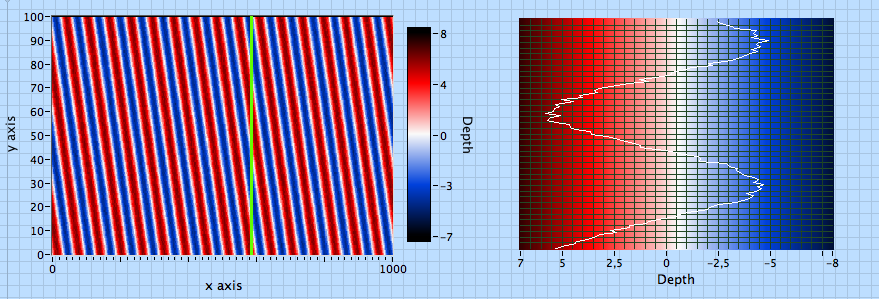
I have a set of data representing the thickness of a piece of metal, it's been measured at many points to make a grid of data and I plotted it using an Intensity Graph to show the topographical information. I then added a XY Graph beside it, and added a cursor to the intensity graph. As you move the cursor, it displays the profile at that slice.
I'm just wondering if it's possible to color my XY graph the same way the intensity graph is colored? Would I need to have a plot for each region or is there a way to interpolate colors on an xy graph?
Attached is a VI I made showing what I'm trying to do.
Thanks!
-Nick
¡Resuelto! Ir a solución.

 chilly_charly
el 06-12-2010 07:43 AM
- Marcar como nuevo
- Favorito
- Suscribir
- Silenciar
- Suscribirse a un feed RSS
- Resaltar
- Imprimir
- Informe de contenido inapropiado
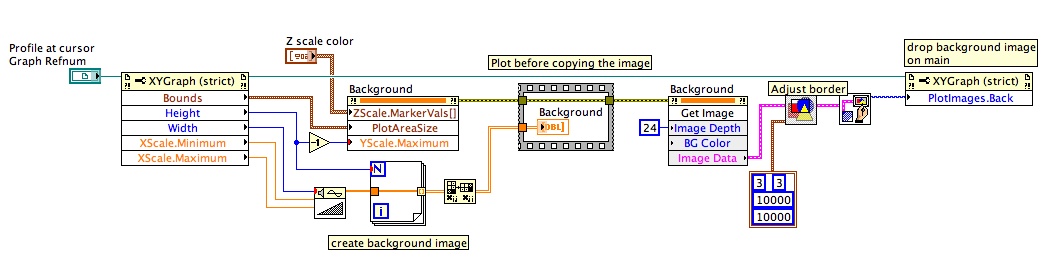
You can build a separate intensity graph with the appropriate colors, and drop the plot area image on the graph background, as shown on the attached vis
- Etiquetas:
- LabView_IntensityGraph
chilly_charly
el 06-13-2010 11:14 AM
- Marcar como nuevo
- Favorito
- Suscribir
- Silenciar
- Suscribirse a un feed RSS
- Resaltar
- Imprimir
- Informe de contenido inapropiado
Improved version of the subvi below. Now the background colors matches exactly the Zscale.
Although the white color is not centered on zero, this is the correct result, corresponding to the imposed scale : white = 0.5.
I wonder why the Zscale on the intensity graph is shifted...

 altenbach

el 06-13-2010 01:28 PM
- Marcar como nuevo
- Favorito
- Suscribir
- Silenciar
- Suscribirse a un feed RSS
- Resaltar
- Imprimir
- Informe de contenido inapropiado


- Etiquetas:
- LabView_IntensityGraph
el 06-14-2010 02:36 PM
- Marcar como nuevo
- Favorito
- Suscribir
- Silenciar
- Suscribirse a un feed RSS
- Resaltar
- Imprimir
- Informe de contenido inapropiado
Thanks for the feedback chilly charly and altenbach!
That's exactly what I was looking for altenbach, but both solutions look quite nice.
el 06-14-2010 03:07 PM
- Marcar como nuevo
- Favorito
- Suscribir
- Silenciar
- Suscribirse a un feed RSS
- Resaltar
- Imprimir
- Informe de contenido inapropiado
I think the Z scale on the intensity graph is shifted because I added random values to the sine wave to make it look a little noisy. I have it setting the mean value equal to white, so with the added random values it would probably be shifted up a bit.
altenbach
el 06-14-2010 03:43 PM
- Marcar como nuevo
- Favorito
- Suscribir
- Silenciar
- Suscribirse a un feed RSS
- Resaltar
- Imprimir
- Informe de contenido inapropiado
 sasko
sasko
el 11-20-2010 06:11 AM
- Marcar como nuevo
- Favorito
- Suscribir
- Silenciar
- Suscribirse a un feed RSS
- Resaltar
- Imprimir
- Informe de contenido inapropiado
Hello
It seems that my question belongs here.
I'v done some measurement in XY plane and generate color graph with 3D graph.
I'm trying to do the same with intensity graph and I need more interpolation between color?
One solution would be interpolating data but I more interesting in some Intensity graph feature.
Does someone knows what kind of interolation is used with 3D graph ?
Any idea ?
Regards
altenbach
11-20-2010 10:45 AM - editado 11-20-2010 10:46 AM
- Marcar como nuevo
- Favorito
- Suscribir
- Silenciar
- Suscribirse a un feed RSS
- Resaltar
- Imprimir
- Informe de contenido inapropiado
sasko wrote:It seems that my question belongs here.
No, it doesn't! This is a thread with a marked solution. Even though the topics are related, you now cannot mark a reply to your question as solution, because it is not your thread. Also, this thread is half a year old. So, next time start a new thread. Insert a link to this thread if you think it provides additional information. 😉
I don't know what kind of interpolation the 3D graph uses, but here's a quick draft (LV 8.0) using my old bilinear interpolation routines posted here many years ago. (see also this example).
It probably needs a few tweaks but should get you started.

 sasko
sasko
el 11-22-2010 04:24 AM
- Marcar como nuevo
- Favorito
- Suscribir
- Silenciar
- Suscribirse a un feed RSS
- Resaltar
- Imprimir
- Informe de contenido inapropiado
Sorry for disregarding the rules, I did not know for it.
Thank you for intensity graph example. It is great !
Sasa
- « Anterior
-
- 1
- 2
- Siguiente »
