- Subscribe to RSS Feed
- Mark Topic as New
- Mark Topic as Read
- Float this Topic for Current User
- Bookmark
- Subscribe
- Mute
- Printer Friendly Page
Color-RGB To 100%?

 Majd
Majd
11-24-2007 08:22 AM
- Mark as New
- Bookmark
- Subscribe
- Mute
- Subscribe to RSS Feed
- Permalink
- Report to a Moderator
The color-RGB functions Resolves the color to "Red Green and Blue"in 255 each, but im working on pait production line so i need to convert these values into 100% (for example 30% Red 60%Blue 10% Green) how to do that?
i know it may seem selly to you, but i have a lack of information in this part of the project?

 Ben
Ben

11-24-2007 08:34 AM - edited 11-24-2007 08:34 AM
- Mark as New
- Bookmark
- Subscribe
- Mute
- Subscribe to RSS Feed
- Permalink
- Report to a Moderator
It just sounds like you have to multiply "255" by your precentage (expressed as a fraction) and then combine the components.
This image show how to apply the same percentage to all three components of a "starting color" to produce a color ramp.
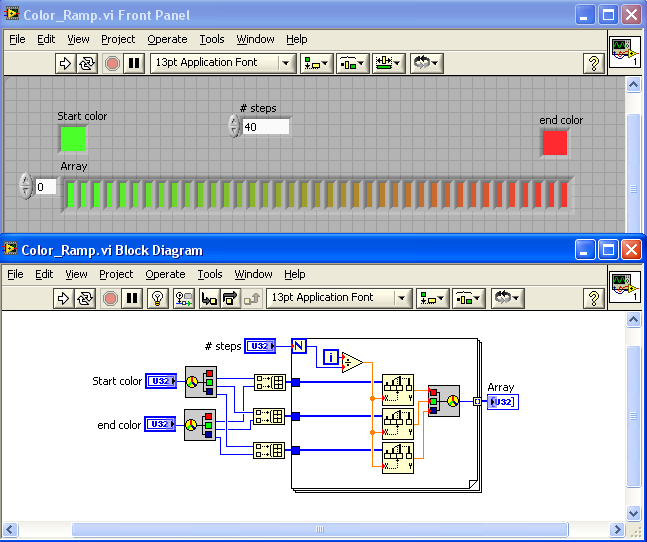
If that does not solve your challenge, post some code and we'll take a closer look.
Ben
Message Edited by Ben on 11-24-2007 08:34 AM

11-24-2007 01:44 PM
- Mark as New
- Bookmark
- Subscribe
- Mute
- Subscribe to RSS Feed
- Permalink
- Report to a Moderator
well lets say that the problem is like this:
i need to fill 1 litre of the orange color by mixing the three liquid colors Red,Green, and Blue
what is the percentage of each color in this litre? so i could tell the valves to be opened for specified time.

 Gabi1
Gabi1
11-24-2007 03:42 PM
- Mark as New
- Bookmark
- Subscribe
- Mute
- Subscribe to RSS Feed
- Permalink
- Report to a Moderator
Madj, that is exactly what the function vi to RGB is doing: take any color as an input, and decompose it into its RGB conponents. these are U8, therefore to convert to % divide by 255 *100, for each component.
... And here's where I keep assorted lengths of wires...

 RavensFan
11-24-2007 08:37 PM
- Mark as New
- Bookmark
- Subscribe
- Mute
- Subscribe to RSS Feed
- Permalink
- Report to a Moderator
Gabi1
11-25-2007 01:01 PM
- Mark as New
- Bookmark
- Subscribe
- Mute
- Subscribe to RSS Feed
- Permalink
- Report to a Moderator

... And here's where I keep assorted lengths of wires...

11-26-2007 08:32 AM
- Mark as New
- Bookmark
- Subscribe
- Mute
- Subscribe to RSS Feed
- Permalink
- Report to a Moderator
Be very careful. The RGB color model works well with light sources, but not with paint (which is a light sink/reflector). This is why printers don't use red, green, and blue inks, but yellow, cyan, and magenta (or some variant thereof). Check out this wikipedia article for a decent overview of the CMYK color model.
 griffindore
11-26-2007 10:44 AM
- Mark as New
- Bookmark
- Subscribe
- Mute
- Subscribe to RSS Feed
- Permalink
- Report to a Moderator
