- Subscribe to RSS Feed
- Mark Topic as New
- Mark Topic as Read
- Float this Topic for Current User
- Bookmark
- Subscribe
- Mute
- Printer Friendly Page
Coding Multiple TDMS Set Properties Efficiently
Solved!
 Steve Koza
03-23-2010 01:22 PM
- Mark as New
- Bookmark
- Subscribe
- Mute
- Subscribe to RSS Feed
- Permalink
- Report to a Moderator
I am trying to save some test settings as TDMS properties. I have figured out the mechanics of saving individual properties to the file, but I have 25 or so properties to write to the file. What is the most efficient way to code this in LV, so that I don't have to use the "TDMS Set Properties" block 25 different times? I have tried sending the block arrays, but it doesn't like that. Is there some kind of loop I can use?
Steve
Solved! Go to Solution.
- Tags:
- properties
- Set
- TDMS
03-23-2010 03:59 PM
- Mark as New
- Bookmark
- Subscribe
- Mute
- Subscribe to RSS Feed
- Permalink
- Report to a Moderator
For properties of the same or different data types, respectively:

For more advanced use cases (clusters, arrays of clusters), there's a library on LAVA that'll split this stuff up into properties and put it back together on read. Unfortunately, the link I had to the LAVA discussion thread seems to not work any more.
Herbert
03-23-2010 04:19 PM
- Mark as New
- Bookmark
- Subscribe
- Mute
- Subscribe to RSS Feed
- Permalink
- Report to a Moderator
I recovered the link to the discussion thread, but the links to the code appear to be broken. I don't have a copy of the library available, so you might need to log into LAVA and send a message to PJM_LabVIEW.
Hope that helps,
Herbert
03-24-2010 07:47 AM
- Mark as New
- Bookmark
- Subscribe
- Mute
- Subscribe to RSS Feed
- Permalink
- Report to a Moderator

 TCPlomp
03-24-2010 10:41 AM
- Mark as New
- Bookmark
- Subscribe
- Mute
- Subscribe to RSS Feed
- Permalink
- Report to a Moderator
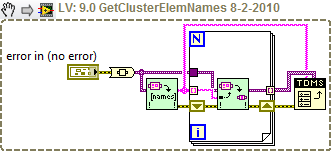
Another idea is this:
Ton
Nederlandse
 LabVIEW user groep www.lvug.nl
My LabVIEW Ideas
LabVIEW, programming like it should be!
