- Subscribe to RSS Feed
- Mark Topic as New
- Mark Topic as Read
- Float this Topic for Current User
- Bookmark
- Subscribe
- Mute
- Printer Friendly Page
Clear keyboard buffer

 JumpingKangaroo
05-11-2021 03:47 PM
- Mark as New
- Bookmark
- Subscribe
- Mute
- Subscribe to RSS Feed
- Permalink
- Report to a Moderator
Hi,
I have a very simple vi which i`m trying to detect when the left control button on the keyboard has been pressed. What i find is when the laptop is locked using the windows button + L the L and WIN remain in the buffer until they have been pressed in turn.
Is there anyway to clear this buffer after a key has been read?
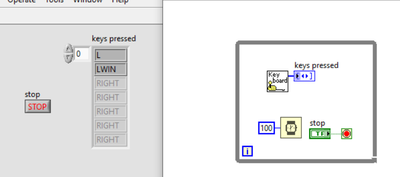
Thanks
James

 GerdW
GerdW

05-12-2021 02:00 AM - edited 05-12-2021 02:02 AM
- Mark as New
- Bookmark
- Subscribe
- Mute
- Subscribe to RSS Feed
- Permalink
- Report to a Moderator
Hi James,
which subVI are you using in that image? I don't recognize that icon…
Mind to attach your VI(s)?
Have you tried to use an event structure to detect keypress events?
Example:

GerdW
using LV2016/2019/2021 on Win10/11+cRIO, TestStand2016/2019

 altenbach
05-12-2021
11:25 AM
- last edited on
03-26-2026
08:45 AM
by
 Content Cleaner
- Mark as New
- Bookmark
- Subscribe
- Mute
- Subscribe to RSS Feed
- Permalink
- Report to a Moderator
@GerdW wrote:
which subVI are you using in that image? I don't recognize that icon…
Mind to attach your VI(s)?
My guess the subVI is this instance of the polymorphic "acquire input data".


05-13-2021 01:56 AM
- Mark as New
- Bookmark
- Subscribe
- Mute
- Subscribe to RSS Feed
- Permalink
- Report to a Moderator
Hi,
I`m using the acquire input device.vi. This is used in a larger vi to copy text from a front panel but it is an old program which was wrote using loops and is too much trouble to update.
Thanks
GerdW
05-13-2021
08:10 AM
- last edited on
03-26-2026
08:47 AM
by
Content Cleaner
- Mark as New
- Bookmark
- Subscribe
- Mute
- Subscribe to RSS Feed
- Permalink
- Report to a Moderator
Hi Kangaroo,
@JumpingKangaroo wrote:
This is used in a larger vi to copy text from a front panel but it is an old program which was wrote using loops and is too much trouble to update.
You need to acquire keyboard data to "copy text from a front panel"? I guess there are better ways to do that…
@JumpingKangaroo wrote:
What i find is when the laptop is locked using the windows button + L the L and WIN remain in the buffer until they have been pressed in turn.
I see that too.
I'm guessing this is because your task just sees, when the keys are pressed, but doesn't recognize the release of those keys when Windows intercepts for locking the screen…
You might filter the returned array for "LWIN" and "L" items. Or you improve the way how you "copy text from a frontpanel"…
@Christian wrote:
My guess the subVI is this instance of the polymorphic "acquire input data".
You're right (as usual)! 😄
I just looked into the Connectivity/InputDevices palette, but there only the polymorphic container icon is shown…
GerdW
using LV2016/2019/2021 on Win10/11+cRIO, TestStand2016/2019
