- Subscribe to RSS Feed
- Mark Topic as New
- Mark Topic as Read
- Float this Topic for Current User
- Bookmark
- Subscribe
- Mute
- Printer Friendly Page
Chart/Graph from 2D Array
Solved!
 edcs
edcs
03-04-2010 11:05 AM
- Mark as New
- Bookmark
- Subscribe
- Mute
- Subscribe to RSS Feed
- Permalink
- Report to a Moderator
I have a VI which creates .CSV files when taking measurements so that I can analyse the data in other software. I have recently added a camera to my system which also creates an .AVI file which I would like to analyse in conjunction with the .CSV file data.
I would like to write a VI which opens the .CSV file and then displays this data as a chart, so that eventually I can use a slider to display the correct frame of the .AVI file. However, I cannot figure out how to do this. When the .CSV file is opened it creates a 2D array, the first column is time in seconds; I would like this to form the X axis. The other 4 columns of the array are voltage readings from various transducers which range from -5v to 5v, these values would be indicated as amplitude on the Y axis.
As I understand, I can use an XY Chart to do this; however I haven't had much luck figuring out how to do this and the included examples aren't exactly great at explaining how to do this sort of thing.
Solved! Go to Solution.

 CtheR
CtheR
03-04-2010 11:37 AM - edited 03-04-2010 11:47 AM
- Mark as New
- Bookmark
- Subscribe
- Mute
- Subscribe to RSS Feed
- Permalink
- Report to a Moderator
CtheR
03-04-2010 11:46 AM - edited 03-04-2010 11:49 AM
- Mark as New
- Bookmark
- Subscribe
- Mute
- Subscribe to RSS Feed
- Permalink
- Report to a Moderator
Hi.
FORGET THE VI I POSTED ABOVE THIS! IGNORE IT!
This is the solution:
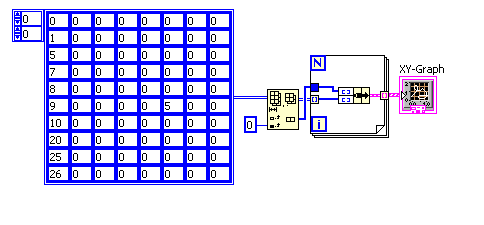
If you have questions feel free to ask.
Greets
CR
03-05-2010 04:11 AM
- Mark as New
- Bookmark
- Subscribe
- Mute
- Subscribe to RSS Feed
- Permalink
- Report to a Moderator
Thanks for the help, I was wondering if I needed to use a For loop.
What low level VI is that you are using before you insert the array into the For loop? It looks like Array Subset to me, but when I use it on my VI it doesn't work.
I'm on Labview 8.5.1 if that makes any difference.
CtheR
03-05-2010 06:01 AM
- Mark as New
- Bookmark
- Subscribe
- Mute
- Subscribe to RSS Feed
- Permalink
- Report to a Moderator
Hi!
I used the "delete from array" node.
I delete the first column (with the time) and send the deleted time column into the loop (not indexed).
It contains the x-values of our data set.
The rest of the array gets transposed (I forgot about it before, I was too hasty).
Every column is now a line, gets indexed by the loop and is clustered with the time values to a pair of x-values and y-values.
And done.
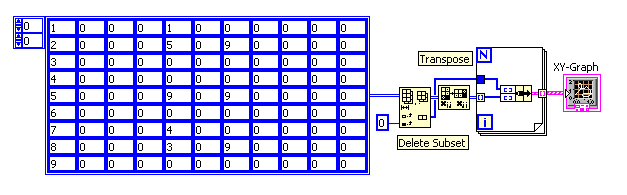
I've saved it as 8.5 VI.
Greets CR
03-05-2010 07:22 AM
- Mark as New
- Bookmark
- Subscribe
- Mute
- Subscribe to RSS Feed
- Permalink
- Report to a Moderator
 K.B
K.B
03-02-2011 08:55 PM
- Mark as New
- Bookmark
- Subscribe
- Mute
- Subscribe to RSS Feed
- Permalink
- Report to a Moderator
I have a similar problem.. I have a 1000x2 data from a CSV Excel file for which the graph is to be plot.. I converted the string into number format.. I am currently checking for 2x2 so that if it works I can run in a FOR loop and finish it. I need to plot the graph for the 2D array.
Thanks
KB
 PROing
01-22-2013 07:48 AM
- Mark as New
- Bookmark
- Subscribe
- Mute
- Subscribe to RSS Feed
- Permalink
- Report to a Moderator
HI!! i am new to labview.. and i saw this interesting and i start working as it on the screen.. but how to connect XY graph?
"clustered with the time values to a pair of x-values and y-values." what does tat mean
pls help me out..
thanq

01-23-2013 03:59 AM
- Mark as New
- Bookmark
- Subscribe
- Mute
- Subscribe to RSS Feed
- Permalink
- Report to a Moderator
Hello PROing,
This is quite an old post so I would recommend that you start a new thread and fully describe your problem so that the community can help out.
Thanks,
Applications Engineer
National Instruments UK&Ireland

 varsha88
03-14-2014 04:16 AM
- Mark as New
- Bookmark
- Subscribe
- Mute
- Subscribe to RSS Feed
- Permalink
- Report to a Moderator
hi,
u manage to get the solution for your question. i have the similar problem as yours.
