- Subscribe to RSS Feed
- Mark Topic as New
- Mark Topic as Read
- Float this Topic for Current User
- Bookmark
- Subscribe
- Mute
- Printer Friendly Page
Call Library Function Node 'Wrapper.Create': Library not found or failed to load. using windows 7 64 bits

 flanguy
01-20-2012 03:05 AM
- Mark as New
- Bookmark
- Subscribe
- Mute
- Subscribe to RSS Feed
- Permalink
- Report to a Moderator
Dear all
I try to interface my spectrometer (NIRquest from ocean optics) using labview on my 64 bits cumputer using windows 7.
I have absolutely no problem to run the spectrometer with the program dedicated to the spectrometer (called Spetrasuite).
I've installed "OmniDriverSPAM-1.66-win64-development-installer.exe" and everything went right.
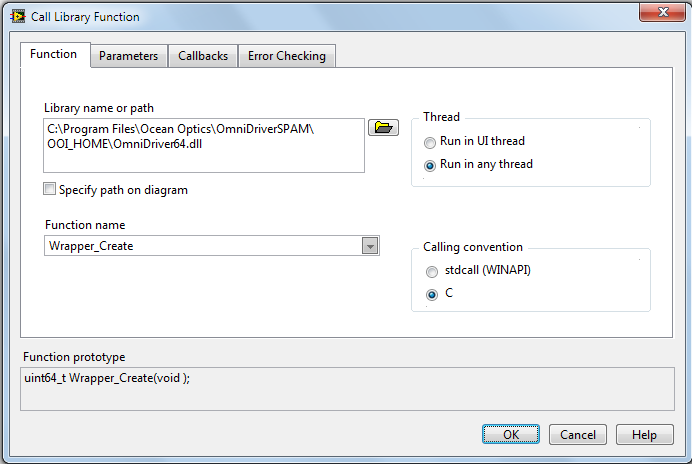
When I select a VI in LabView (e.g."wrapper_create.vi") from the wrapper.llb, LabView returns an error :
"Call Library Function Node 'Wrapper.Create': Library not found or failed to load."
I chek the call library function, but everyting seems to be right :
I use LabView 8.6.1 and my others *.vi are running perfectly...
Do you have any idea from where does the problem comes ?
Thank you very much
 smercurio_fc
01-20-2012 08:03 AM
- Mark as New
- Bookmark
- Subscribe
- Mute
- Subscribe to RSS Feed
- Permalink
- Report to a Moderator
Are you actually using LabVIEW 64-bit? You OS may be 64-bit, but the application has to be 64-bit in order to call a 64-bit DLL. A 32-bit process cannot call a 64-bit DLL.
I do not remember if LabVIEW 8.6.1 came in a 64-bit flavor. Check your DVD.

 demux
demux
01-26-2012
04:33 AM
- last edited on
11-04-2025
08:22 PM
by
 Content Cleaner
- Mark as New
- Bookmark
- Subscribe
- Mute
- Subscribe to RSS Feed
- Permalink
- Report to a Moderator
Hello Flanguy,
In addition to smercurio_fc's feedback I can confirm that LabVIEW 8.6.1 doesn't exist in 64-bit version.
Officially, LabVIEW 8.6.1 doesn't support Windows 7 either.
The minimal version of LabVIEW you would need to both support Windows 7 and exist in 64-bit version is LabVIEW 2009 64-bit or any 64-bit versions which are more recent.
In the two links (1 & 2) you can find more background information.
Kind Regards,
Wouter
National Instruments Belgium
