ni.com is currently undergoing scheduled maintenance.
Some services may be unavailable at this time. Please contact us for help or try again later.
- Subscribe to RSS Feed
- Mark Topic as New
- Mark Topic as Read
- Float this Topic for Current User
- Bookmark
- Subscribe
- Mute
- Printer Friendly Page
Calculate the number of the last X minute peaks

 sagi4422
06-02-2013 03:17 PM
- Mark as New
- Bookmark
- Subscribe
- Mute
- Subscribe to RSS Feed
- Permalink
- Report to a Moderator
Hi.
I am working on a SW which counts the peaks comes from a sensor.
Using Producer/Consumer method , one in aquiring the data and the second is finding the peaks using peak detector VI.
I was wondering if there is a simple way to calculate and show the number of peaks in the last X minutes . For example, in heartbeat there is average heart bear and the most updated last minute count of beats.
Thanks.
 johnsold
06-02-2013 03:42 PM
- Mark as New
- Bookmark
- Subscribe
- Mute
- Subscribe to RSS Feed
- Permalink
- Report to a Moderator
Are you keeping all the raw data from the sensor over the X minute period? If so, simply feed the subset of the array of data representing X minutes to the Peak Detector.vi from the Signal Processing palette. It has an output for number of peaks.
Another approach is to keep a running count in a shift register. Every time you find a new peak, add one to the count. Reset after X minutes.
Lynn
06-03-2013 02:13 AM
- Mark as New
- Bookmark
- Subscribe
- Mute
- Subscribe to RSS Feed
- Permalink
- Report to a Moderator
Dear Lynn.
Thanks for your quick answer.
The number of peaks should include only the last 1minute interval counts. like a dynamic 1 minute that always moves according to the time which includes only the counts in the last 1 minute interval. For example,
Absolute running Time =60 sec.
time range to search for peaks - 0-60seconds.
Absolute running Time =150 sec.
time range to search for peaks - 90-150seconds.
and so on....
Thanks.

 Henrik_Volkers
06-03-2013 04:31 AM
- Mark as New
- Bookmark
- Subscribe
- Mute
- Subscribe to RSS Feed
- Permalink
- Report to a Moderator
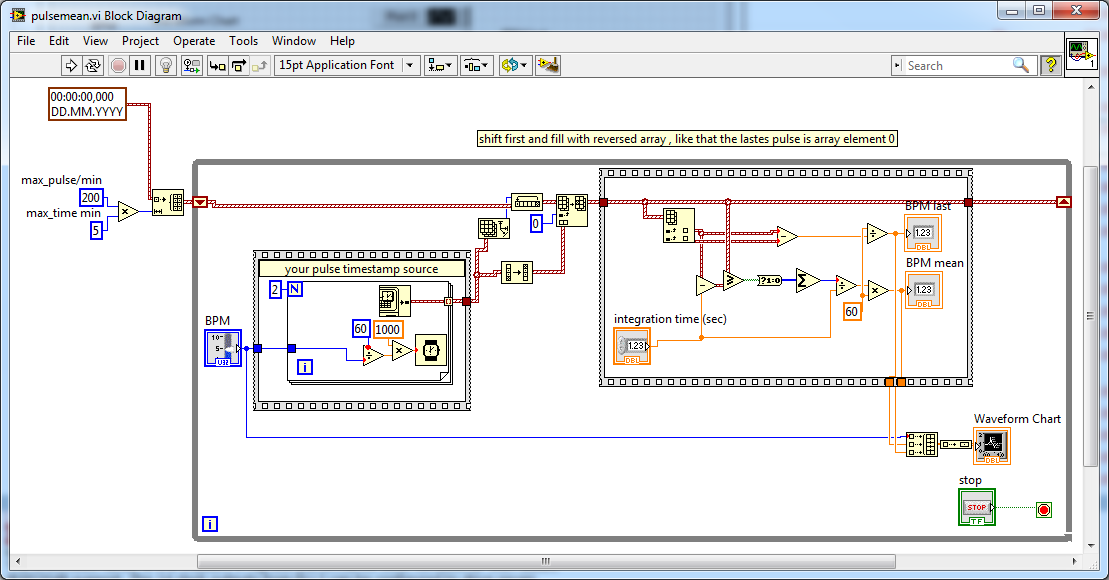
I would try it with a ring buffer only holding the time of a peak/pulse.
Buffer size would be max_pulserate (200 🙂 ) times max_time.
Calculating pulses per time frame would be a compare and add array 🙂
A picture tells more :
Henrik
LV since v3.1
“ground” is a convenient fantasy
'˙˙˙˙uıɐƃɐ lɐıp puɐ °06 ǝuoɥd ɹnoʎ uɹnʇ ǝsɐǝld 'ʎɹɐuıƃɐɯı sı pǝlɐıp ǝʌɐɥ noʎ ɹǝqɯnu ǝɥʇ'
Henrik_Volkers
06-03-2013 04:39 AM - edited 06-03-2013 04:40 AM
- Mark as New
- Bookmark
- Subscribe
- Mute
- Subscribe to RSS Feed
- Permalink
- Report to a Moderator
Point to add: Maybe it's wise to use the actual time for the time comparison 😛
In case of no pulse the display would stay at the last value 😄
Beep .. beep ..... beeeeeeeeeeeeeeeeeee(...)
Henrik
LV since v3.1
“ground” is a convenient fantasy
'˙˙˙˙uıɐƃɐ lɐıp puɐ °06 ǝuoɥd ɹnoʎ uɹnʇ ǝsɐǝld 'ʎɹɐuıƃɐɯı sı pǝlɐıp ǝʌɐɥ noʎ ɹǝqɯnu ǝɥʇ'
06-03-2013 04:47 AM
- Mark as New
- Bookmark
- Subscribe
- Mute
- Subscribe to RSS Feed
- Permalink
- Report to a Moderator
Thanks.
I didnt finish to go over it deeply.
In the meanwhile, can you save the VI in LV 2011?
Thanks
Henrik_Volkers
06-03-2013 05:35 AM - edited 06-03-2013 05:41 AM
- Mark as New
- Bookmark
- Subscribe
- Mute
- Subscribe to RSS Feed
- Permalink
- Report to a Moderator
here we go...
another possible improvement: Since the array of timestamps is sorted you could get a more precise value if you use the time between first and last pulse of a integration time ....
Henrik
LV since v3.1
“ground” is a convenient fantasy
'˙˙˙˙uıɐƃɐ lɐıp puɐ °06 ǝuoɥd ɹnoʎ uɹnʇ ǝsɐǝld 'ʎɹɐuıƃɐɯı sı pǝlɐıp ǝʌɐɥ noʎ ɹǝqɯnu ǝɥʇ'
06-03-2013 06:54 AM
- Mark as New
- Bookmark
- Subscribe
- Mute
- Subscribe to RSS Feed
- Permalink
- Report to a Moderator
Dear Henrik
I put your code into my VI but with no sucess to retrieve the time for the pulse.
Attached, the VI . What am I missing?
Thanks.
