- Subscribe to RSS Feed
- Mark Topic as New
- Mark Topic as Read
- Float this Topic for Current User
- Bookmark
- Subscribe
- Mute
- Printer Friendly Page
Button released programatically only in highlight mode
Solved!
 Vojtěch
09-17-2020 02:22 AM
- Mark as New
- Bookmark
- Subscribe
- Mute
- Subscribe to RSS Feed
- Permalink
- Report to a Moderator
Hello, I am trying to control two loops with one button. Given that you cannot use latching action with variable, I used switch with setting value back to false after loop ends. Everything works fine in highligh mode, but not when I try ti use it. I figured to it'll be faster to post it while I try to find the solution. Attaching testing VI.
(the indended fuction of program is to continuously read values from USB module and save them when button pressed, if you have suggestion to improve to code somehow I am open to it)
Solved! Go to Solution.

 pincpanter
09-17-2020 03:08 AM
- Mark as New
- Bookmark
- Subscribe
- Mute
- Subscribe to RSS Feed
- Permalink
- Report to a Moderator
This is a typical race condition: the local is reset to false before the lower loop reads it.
You should reset the local only after both loops are terminated.
A better choice is to use a latching button and manage the Value Change event also in the lower loop.
-------------------
LV 7.1, 2011, 2017, 2019, 2021
09-17-2020 03:27 AM
- Mark as New
- Bookmark
- Subscribe
- Mute
- Subscribe to RSS Feed
- Permalink
- Report to a Moderator
Well I need to run the other loop continuously, with event structrure it stucks and waits for event. Is there other way?
pincpanter
09-17-2020 03:38 AM
- Mark as New
- Bookmark
- Subscribe
- Mute
- Subscribe to RSS Feed
- Permalink
- Report to a Moderator
Wire a constant >= 0 to the Timeout input of the event structure.
-------------------
LV 7.1, 2011, 2017, 2019, 2021
09-17-2020 04:06 AM
- Mark as New
- Bookmark
- Subscribe
- Mute
- Subscribe to RSS Feed
- Permalink
- Report to a Moderator
Ok, but how then I get the value from stop button? Property node - value provides variant, not boolean, data type. Variable doesn't work with latching action. And this would this trigger event with every iteration wouldn't it?
pincpanter
09-17-2020 04:15 AM
- Mark as New
- Bookmark
- Subscribe
- Mute
- Subscribe to RSS Feed
- Permalink
- Report to a Moderator
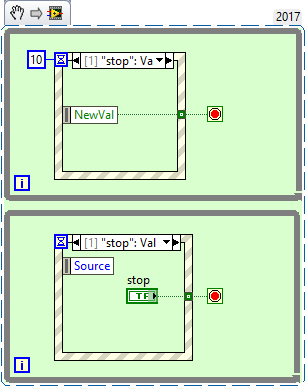
-------------------
LV 7.1, 2011, 2017, 2019, 2021
09-17-2020 04:22 AM
- Mark as New
- Bookmark
- Subscribe
- Mute
- Subscribe to RSS Feed
- Permalink
- Report to a Moderator
Ahh, ok I haven't realized I can fulfill any conditon from event structure to allow for next iteration. This works, thanks.
pincpanter
09-17-2020 04:34 AM
- Mark as New
- Bookmark
- Subscribe
- Mute
- Subscribe to RSS Feed
- Permalink
- Report to a Moderator
Let's add a caution remark. You can manage the very same event in multiple event structures, but be careful: all structures must be "ready to react" when the event occurs. A typical mistake is to put one of them into a case (of a case structure) that will not be executed because the external condition does not match. This would hang the program (user interface would become unresponsive).
Another remark is the following: now that you learned how to use the Timeout case in an event structure, you may combine both loops into one, provided that your timing requirements are not too tight and the save operation is not too time consuming.
-------------------
LV 7.1, 2011, 2017, 2019, 2021

 johntrich1971
09-17-2020 06:59 AM - edited 09-17-2020 07:01 AM
- Mark as New
- Bookmark
- Subscribe
- Mute
- Subscribe to RSS Feed
- Permalink
- Report to a Moderator
Another option is to move the Stop button to the bottom loop as shown here. No need for a second event structure. Also, there's no need for that local variable in the bottom loop. Just wire directly to the terminal. I would probably also consider a different approach to saving the data point. You currently have a race condition and may not always be saving the point that you want to save. By the way is there a reason that you're making a waveform and then coercing it to a DBL? You have a lot of Rube-Goldberg in there. I understand that some of that may be the result of making an example that is not your real program, but wasn't sure what may be in your real program.

Edited to Add: Once the stop button is made latching you can get rid of the write to local variable.
09-17-2020 07:30 AM
- Mark as New
- Bookmark
- Subscribe
- Mute
- Subscribe to RSS Feed
- Permalink
- Report to a Moderator
Connecting the loops via terminals resulted in unwanted dependency, so I solved it by using variables. The value doesn't change much in time (it is resistance dependent on temperature, you would set the temperature and wait for the resistance to become +/- stable). So you would just change temperature and hit save from time to time. That is why i want 1 quite current value to save with current temperature. If there is better way to convert waveform to single value I would like to hear it. I can attach "final" program now for you to explore.
