- Subscribe to RSS Feed
- Mark Topic as New
- Mark Topic as Read
- Float this Topic for Current User
- Bookmark
- Subscribe
- Mute
- Printer Friendly Page
Array threshold scan
Solved!
 hiNI
hiNI
11-07-2012 04:08 PM
- Mark as New
- Bookmark
- Subscribe
- Mute
- Subscribe to RSS Feed
- Permalink
- Report to a Moderator
Hello,
In the attached VI in Labiew 8.5, I wanted to return the x and y-axis value the last time the temp value is above 100 (on the positive side) and the last time that the temp is below -100 (on the negative side). I am not sure if it will be easier to scan the values from the right side of the graph to the left to return the correct values. I wanted to return the following points:
positive side: 100.58, 68.077
negative side:-101.05, 43.93
Thanks,
hiNi.
Solved! Go to Solution.

 JÞB
JÞB
11-07-2012 04:29 PM
- Mark as New
- Bookmark
- Subscribe
- Mute
- Subscribe to RSS Feed
- Permalink
- Report to a Moderator
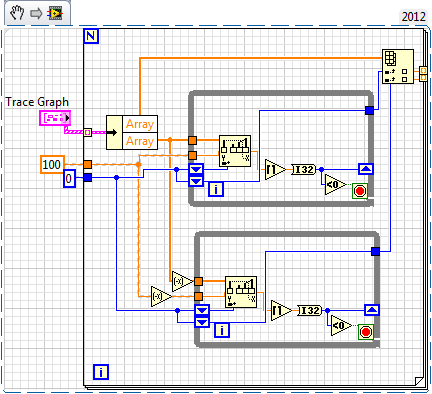
"Should be" isn't "Is" -Jay

 altenbach

11-07-2012 04:42 PM - edited 11-07-2012 04:46 PM
- Mark as New
- Bookmark
- Subscribe
- Mute
- Subscribe to RSS Feed
- Permalink
- Report to a Moderator
Here's a quick attempt:

Be aware that property nodes execute to top bottom, so you should set the active cursor before setting the position. You also only need two points for the reference lines. I currently show the positions as complex numbers for simplicity. Modify as desired.


 P@Anand
11-07-2012 10:00 PM
- Mark as New
- Bookmark
- Subscribe
- Mute
- Subscribe to RSS Feed
- Permalink
- Report to a Moderator
Christian, Am just curious to know the reason why you are dividing the array value by 1? Is there any functional difference when we do that?
The best solution is the one you find it by yourself
altenbach
11-07-2012 10:24 PM - edited 11-07-2012 10:25 PM
- Mark as New
- Bookmark
- Subscribe
- Mute
- Subscribe to RSS Feed
- Permalink
- Report to a Moderator
P@Anand wrote:
Christian, Am just curious to know the reason why you are dividing the array value by 1? Is there any functional difference when we do that?
I am not doing that, it was already in the original code. I left it there because I thought the original programmer might need to tune that factor later. 😉
P@Anand
11-07-2012 10:30 PM
- Mark as New
- Bookmark
- Subscribe
- Mute
- Subscribe to RSS Feed
- Permalink
- Report to a Moderator
My bad I didn't see the original code 🙂 (I thought its Christian trick  )
)
The best solution is the one you find it by yourself
11-08-2012 09:50 AM
- Mark as New
- Bookmark
- Subscribe
- Mute
- Subscribe to RSS Feed
- Permalink
- Report to a Moderator
Hello Jeff,
Can you include your code in LV 8. For some reason, I am not getting the correct "unbundle" data to go to the threshold block.
Thanks,
hiNi

 crossrulz
11-08-2012 09:59 AM
- Mark as New
- Bookmark
- Subscribe
- Mute
- Subscribe to RSS Feed
- Permalink
- Report to a Moderator
Jeff,
Did you mean to have the unbundle give different sets of arrays? Because you aren't. Another danger of using the same name for controls/indicators.
There are only two ways to tell somebody thanks: Kudos and Marked Solutions
Unofficial Forum Rules and Guidelines
"Not that we are sufficient in ourselves to claim anything as coming from us, but our sufficiency is from God" - 2 Corinthians 3:5
altenbach
11-08-2012 10:07 AM
- Mark as New
- Bookmark
- Subscribe
- Mute
- Subscribe to RSS Feed
- Permalink
- Report to a Moderator
Change the label of the two arrays in the cluster to something unique, e.g. "X" and "Y" to keep things sane. Otherwise, use a plain (not "by name") unbundle.
JÞB
11-08-2012 10:11 AM - edited 11-08-2012 10:13 AM
- Mark as New
- Bookmark
- Subscribe
- Mute
- Subscribe to RSS Feed
- Permalink
- Report to a Moderator
@crossrulz wrote:
Jeff,
Did you mean to have the unbundle give different sets of arrays? Because you aren't. Another danger of using the same name for controls/indicators.
It was a quick-n-dirty created constant from the original graph. Not the way I normally program. just to show an alternate approach for a find last crossing index
"Should be" isn't "Is" -Jay
