- Subscribe to RSS Feed
- Mark Topic as New
- Mark Topic as Read
- Float this Topic for Current User
- Bookmark
- Subscribe
- Mute
- Printer Friendly Page
Arduino LabView interface

 EngFarouk89
09-01-2014 12:17 AM
- Mark as New
- Bookmark
- Subscribe
- Mute
- Subscribe to RSS Feed
- Permalink
- Report to a Moderator
Hi All , I recently worked on a project called two axis solar tracking system that tracks the motion of the sun via mathematical formulas. I used Arduino platform as a controller. Now the communication between Arduino and computer is needed through Serial port. I want to create LabView program to read and write values to and from Arduino via VISA. the VI sends the Longitude and Latitude as user input to the controller and receives the values of Azimuth and Elevation angles and save these values into txt file, also I need that txt file contains the date and time of the readings. thanks to any one who try to help .

 Neos
Neos
09-01-2014 01:54 AM
- Mark as New
- Bookmark
- Subscribe
- Mute
- Subscribe to RSS Feed
- Permalink
- Report to a Moderator
So, What have you done so far.
Is your Arduino sketch ready and now you just want to communicate with LabVIEW.
If you are succesfully reciving the values from Ardunio then communicating with LabVIEW will be easy.
09-01-2014 05:53 AM
- Mark as New
- Bookmark
- Subscribe
- Mute
- Subscribe to RSS Feed
- Permalink
- Report to a Moderator
I have no problem with Arduino, my issue with labview because I am new with it , thanks
Neos
09-01-2014 05:58 AM
- Mark as New
- Bookmark
- Subscribe
- Mute
- Subscribe to RSS Feed
- Permalink
- Report to a Moderator
Ok, then look at the VISA palatte , you will find a lot of examples that ships with LabVIEW.
Start with simple VISA read write and post your vi here if you are having any problems.
09-01-2014 07:20 AM - edited 09-01-2014 07:33 AM
- Mark as New
- Bookmark
- Subscribe
- Mute
- Subscribe to RSS Feed
- Permalink
- Report to a Moderator
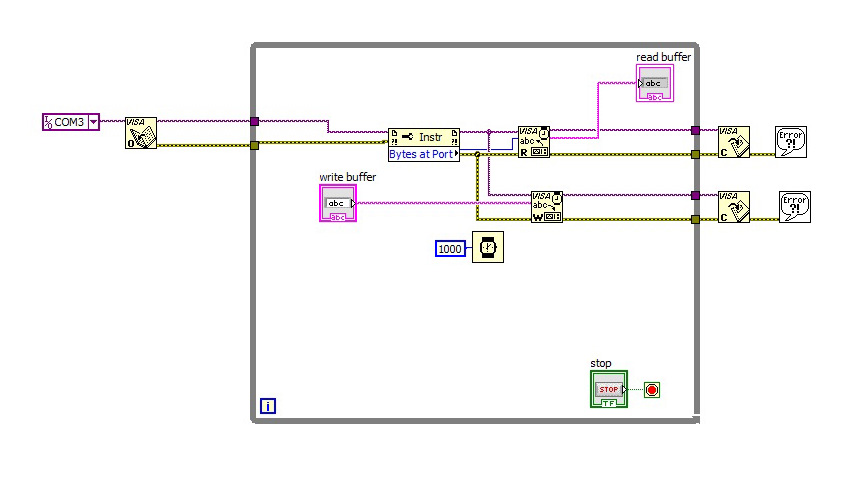
I tried with this vi but the readings apear for a while and disapear unlike arduino serial monitor stay and scrolling, I need the data stay on the indicator and scrolling , finally I want these data saved in txt file or any common format for documentation.

 crossrulz

09-01-2014 07:49 AM
- Mark as New
- Bookmark
- Subscribe
- Mute
- Subscribe to RSS Feed
- Permalink
- Report to a Moderator
Sice you wrote the Arduino code, you have control over the serial protocol. So let's talk about that before we start getting into the LabVIEW part of it.
How is the data formatted? ASCII? Raw binary?
When is the data send from the Arduino? Only as a response? Every X ms?
There are only two ways to tell somebody thanks: Kudos and Marked Solutions
Unofficial Forum Rules and Guidelines
"Not that we are sufficient in ourselves to claim anything as coming from us, but our sufficiency is from God" - 2 Corinthians 3:5
09-01-2014 07:59 AM - edited 09-01-2014 07:59 AM
- Mark as New
- Bookmark
- Subscribe
- Mute
- Subscribe to RSS Feed
- Permalink
- Report to a Moderator
Data transmitted from arduino to the Computer in ASCII format. thanks
crossrulz
09-01-2014 08:11 AM
- Mark as New
- Bookmark
- Subscribe
- Mute
- Subscribe to RSS Feed
- Permalink
- Report to a Moderator
Ok, since we are dealing with ASCII data, make sure you are appending an End Of Line to your data inside of the Arduino. This will make life a lot easier.
With the termination character enabled, the VISA Read will stop reading when 1) the desired number of characters are read, 2) the termination character is read, or 3) a timeout happens. So get rid of that Bytes At Port node. Instead, wire in a large number of characters to read (something like 50). The VISA Read will stop when that termination character is found and just return your single message.
Now, when does the Arduino send that data to your host computer?
There are only two ways to tell somebody thanks: Kudos and Marked Solutions
Unofficial Forum Rules and Guidelines
"Not that we are sufficient in ourselves to claim anything as coming from us, but our sufficiency is from God" - 2 Corinthians 3:5
Neos
09-01-2014 08:38 AM
- Mark as New
- Bookmark
- Subscribe
- Mute
- Subscribe to RSS Feed
- Permalink
- Report to a Moderator
09-01-2014 12:20 PM - edited 09-01-2014 12:39 PM
- Mark as New
- Bookmark
- Subscribe
- Mute
- Subscribe to RSS Feed
- Permalink
- Report to a Moderator
the values of Azimuth and elevation angle sent to labview program every single minute.
