- Subscribe to RSS Feed
- Mark Topic as New
- Mark Topic as Read
- Float this Topic for Current User
- Bookmark
- Subscribe
- Mute
- Printer Friendly Page
Append Waveform, keep time stamp
Solved!
 COIEngineer
09-25-2014 06:27 PM
- Mark as New
- Bookmark
- Subscribe
- Mute
- Subscribe to RSS Feed
- Permalink
- Report to a Moderator
I am reading from a USB module with data acquisition at 500 Hz. In order to achieve this within the loop time, I need to acquire multiple samples per loop. Once I have those samples (output in waveform), is there a way to append the waveform that maintains the time stamps?
I am currently using the "get time array", then inserting that data into a shift register of the same. I'd like to re-insert that data into the rest of the appended waveform to make writing the information that much easier. If that doesn't work, I'll probably just stick to making a 2D string array to write the data.
Thank you!
Solved! Go to Solution.

 crossrulz

09-25-2014 06:43 PM
- Mark as New
- Bookmark
- Subscribe
- Mute
- Subscribe to RSS Feed
- Permalink
- Report to a Moderator
Look for the Append Waveforms VI. It is in the Waveform->Analog Waveform palette. I think that does what you are looking for.
There are only two ways to tell somebody thanks: Kudos and Marked Solutions
Unofficial Forum Rules and Guidelines
"Not that we are sufficient in ourselves to claim anything as coming from us, but our sufficiency is from God" - 2 Corinthians 3:5
09-25-2014 07:07 PM
- Mark as New
- Bookmark
- Subscribe
- Mute
- Subscribe to RSS Feed
- Permalink
- Report to a Moderator
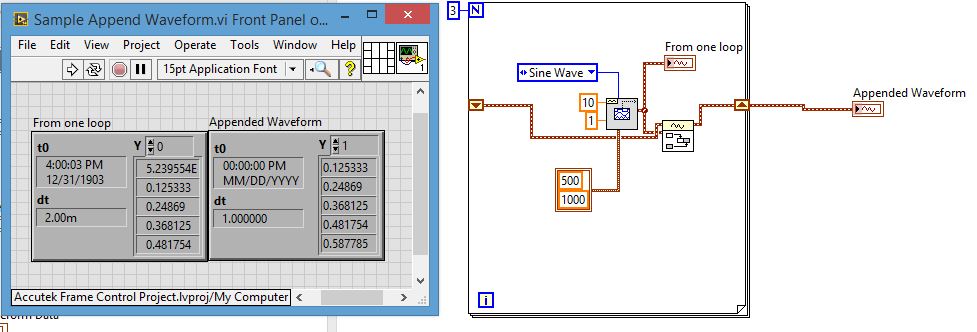
I tried the append waveform, but when I do that all dt and timestamp data appears to be removed (dt goes from .002 to 1)

 Dennis_Knutson
09-25-2014 07:40 PM
- Mark as New
- Bookmark
- Subscribe
- Mute
- Subscribe to RSS Feed
- Permalink
- Report to a Moderator
09-26-2014 10:25 AM
- Mark as New
- Bookmark
- Subscribe
- Mute
- Subscribe to RSS Feed
- Permalink
- Report to a Moderator
I am using Labview 2014, and have included the .vi and picture.
09-26-2014 10:32 AM
- Mark as New
- Bookmark
- Subscribe
- Mute
- Subscribe to RSS Feed
- Permalink
- Report to a Moderator
Here is the picture with timing visible.
 Dennis_Knutson
09-26-2014 10:43 AM
- Mark as New
- Bookmark
- Subscribe
- Mute
- Subscribe to RSS Feed
- Permalink
- Report to a Moderator
09-26-2014 10:59 AM
- Mark as New
- Bookmark
- Subscribe
- Mute
- Subscribe to RSS Feed
- Permalink
- Report to a Moderator
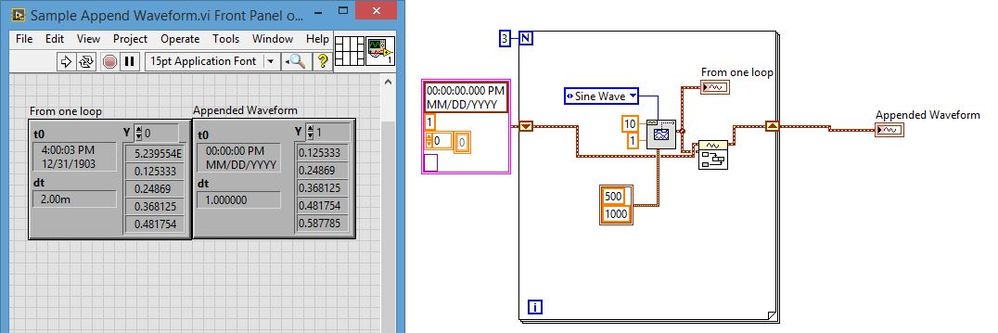
Do I need a seed value for the initialization? A constant doesn't appear to solve the problem. Thank you for your help on this.
09-26-2014 11:03 AM
- Mark as New
- Bookmark
- Subscribe
- Mute
- Subscribe to RSS Feed
- Permalink
- Report to a Moderator
I'm hoping to be able to be able to keep the t0 data from the first measurement.

 JÞB
JÞB
09-26-2014 11:15 AM - edited 09-26-2014 11:19 AM
- Mark as New
- Bookmark
- Subscribe
- Mute
- Subscribe to RSS Feed
- Permalink
- Report to a Moderator
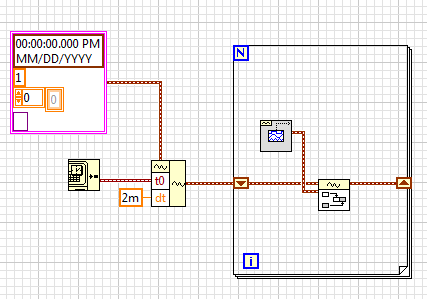
You need the correct dt and t0 in the initalizing constant Leave Y and Attributes empty. dt and t0 of waveform B are ignored by append waveform and the dt and t0 on the SR will be preserved and propigated through the loop.

"Should be" isn't "Is" -Jay
