3d Graph Custom Colorbar
已解决!
 Unknown_Mist
Please refer to the attached VI. Here is the block diagram. I would mention that I converted the outputs
x and y as, right click them -> Choose data type -> 1D Array of Real
Same for z except that 2D Array of Real was chosen.
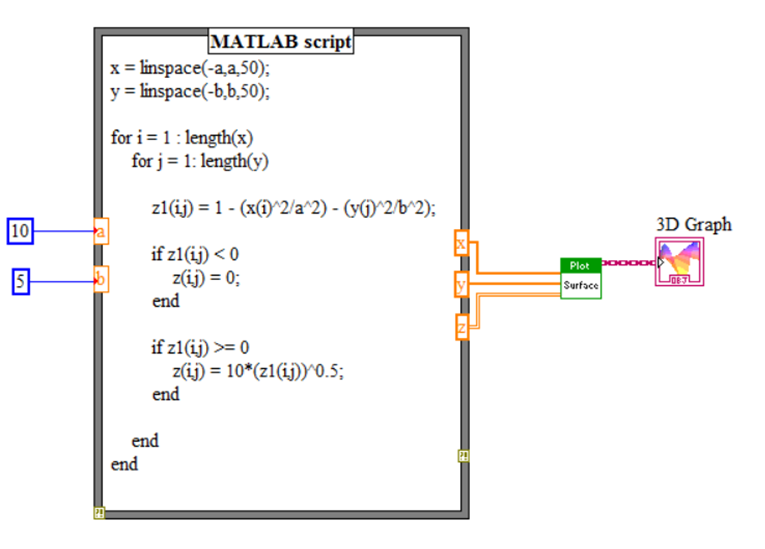
Here is the code used in MATLAB script, in case someone is unable to open the attached VI owing to version issues:
x = linspace(-a,a,50);
y = linspace(-b,b,50);

for i = 1 : length(x)
    for j = 1: length(y)

        z1(i,j) = 1 - (x(i)^2/a^2) - (y(j)^2/b^2);

        if z1(i,j) < 0
            z(i,j) = 0;
        end

        if z1(i,j) >= 0
            z(i,j) = 10*(z1(i,j))^0.5;
        end

    end
end
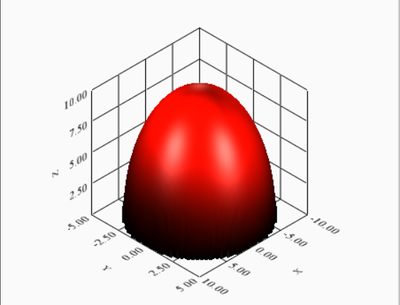
Here is the output of this vi:
What I want is something like this:
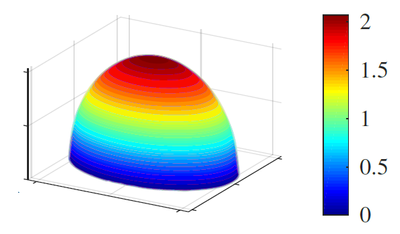
Any ideas? What am I doing wrong? Or what can be done to achieve the desired result using the given conditions? I am also attaching an MWE (Minimum working example) using mathscript to facilitate the direct and to the point answers as much as possible. I would highly appreciate if someone could not only edit the attached VI for desired results but also explain the concept behind a little.
已解决! 转到解答。

 Alexander_Sobol
Right click, select "3D Plot properties" (not simply properties), then Surface tab, there is Color map style selection.
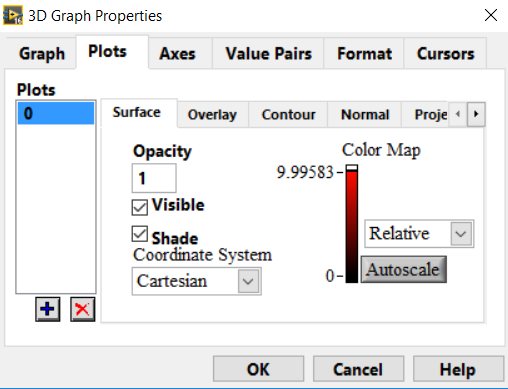
Hello, I did as told by you. But I can't change any colors here. How to do so?
Hello, It worked perfecgtly now. Thanks I got it. I had to right click the numeric markers to change the colors.
 shukla2208
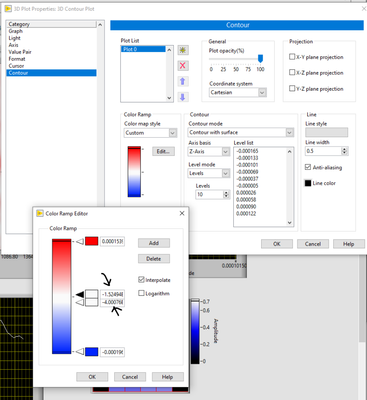
Hello, I have a little bit different question on the same topic.
Is it possible to programmatically control the color bar marker values.
For eg, in this plot, can I control the values of these (black arrow) markers?