How can I access an image from index.html is created by NXG?
已解决!
 Tepig
Tepig
I'm developing LabVIEW NXG Web Module application.
On index.html, I want to display "DF.png" located in local PC so, I wrote following code.
HTML Source
<div class="DF-bg">
    <div class="box">
    /*Do something */
    </div>
</div>
CSS Source
.DF-bg {
  background-image: url(../images/DF.png);
}
Folder Structure
Main.gcomp
+--index.gviweb
+--images
+-- DF.png
Of course, I have already selected "Always Include" configuration on gcomp settings.
When I executed the application on local PC, the image was shown as I expected. But once I uploaded and executed the .nipkg on SystemLink Cloud, no image was shown.
I guessed my path settings was wrong so, I modified as below but any change was occurred.
.DF-bg {
  background-image: url(/images/DF.png);
}
.DF-bg {
  background-image: url(index.html/images/DF.png);
}
I have no idea to achieve my request. Does anyone have a suggestion?
Thanks a lot, Emboar
There are only two ways to tell somebody thanks: Kudos and Marked Solutions
已解决! 转到解答。

 MilanR
Hi Emboar,
The path should be relative to the html file location, so for the following example:
Main.gcomp
+--index.gviweb
+--images
+--+--DF.png
The relative url from index to DF.png is:
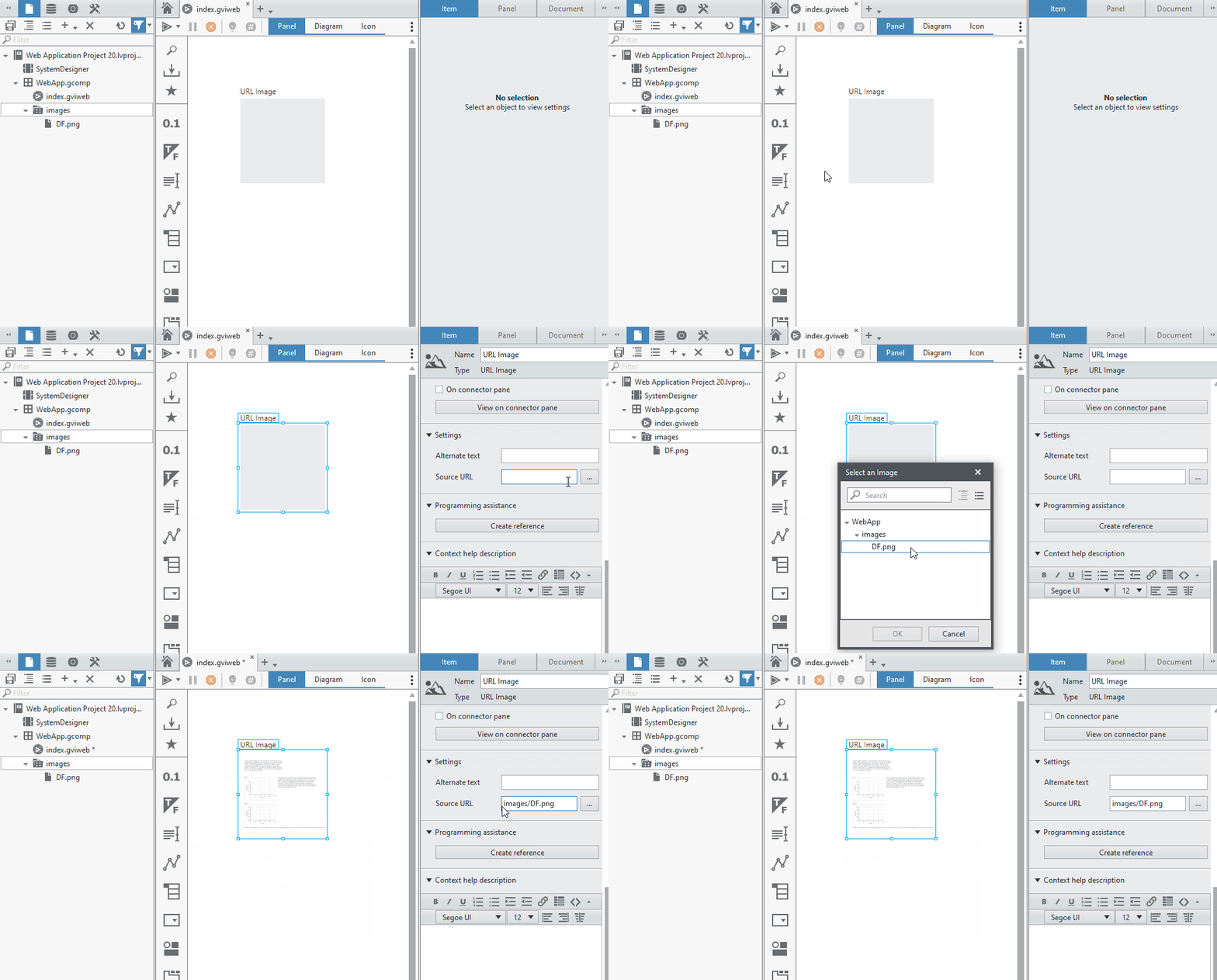
images/DF.pngNote that there is no preceding ../ or a preceding / in the url. Another valid representation would be ./images/DF.png (note the single period instead of a double period).
You can confirm relative path by using the URL Image control to select an image contained in your component and seeing the resulting Source URL in the configuration pane:
Milan
Hi MilanR, thanks for your comment. I tried both "images/DF.png" and "./images/DF.png" but the image didn't show up.
In this case, I'm not calling <img> tag in html. HTML code is below.
<div class="DF-bg">
            <div class="box">
                <h1 class="c-title white">
                    Discussion Forum
                </h1>
                <p class="des white">
                    Use Discussion Forum!
                </p>

            </div>
            <a class="button" href="https://forums.ni.com/">Discussion Forum</a>
        </div>
CSS code is below.
.DF-bg {
  background-image: url(./images/DF.png);
  background-size: cover;
  position: relative;
  height:500px;

}

.DF-bg::before{
 content: ' ';
 background-color: #333333;
 position: absolute;
 filter: blur(20px);
 opacity: 0.8;
 top: 0;
 right: 0;
 bottom: 0;
 left: 0;
}

.DF-bg a {
  position: absolute;
  top: 0;
  left: 0;
  top: 80%;
  left: 50%;
  -ms-transform: translate(-50%,-50%);
  -webkit-transform: translate(-50%,-50%);
  transform: translate(-50%,-50%);
}

.box{
 position: absolute;
 width: 100%;
 text-align: center;
 padding-top: 25px;
 height: 60%;
}
To access the image source from css, I guess following steps are required.
- move to upper folder (../)
- move to images folder (../images)
- specify the image (../images/DF.png)
Thanks to your explanation, I understood 1st "../" is not correct. But at local execution, the image was shown correctly by the way. If you have a chance to try to reproduce my problem, I'd like to know whether you can reproduce or not.
There are only two ways to tell somebody thanks: Kudos and Marked Solutions
I'm sorry for bothering you again...
I added new line into my html source as below.
I'm sorry, I had a small problem on my PC. Please ignore this post.
There are only two ways to tell somebody thanks: Kudos and Marked Solutions
Hi MilanR, I tried to reproduce the issue with blank project but couldn't no matter what I did.
I guessed my existing project had a wrong code so compared to the blank one but couldn't find root cause.
I decided to change my web style not to use background-image.
My web site has been go-live. If you are interested in, I'll share URL via private message.
I'm sorry for bothering you many times and really appreciate your kind support.
Best, Emboar
There are only two ways to tell somebody thanks: Kudos and Marked Solutions
