LabVIEW Cloud Toolkits
- Iscriversi a feed RSS
- Contrassegnare la discussione come nuova
- Contrassegnare la discussione come letta
- Sposta questo Discussione per l'utente corrente
- Preferito
- Iscriversi
- Disattiva notifiche
- Pagina in versione di stampa
Microsoft Azure VIs Run Error
Risolto!
 mcusir
in data 05-16-2018 06:53 AM
- Contrassegnare come Nuovo
- Preferito
- Iscriversi
- Disattiva notifiche
- Iscriversi a feed RSS
- Evidenziare
- Stampare
- Segnalare contenuto inappropriato
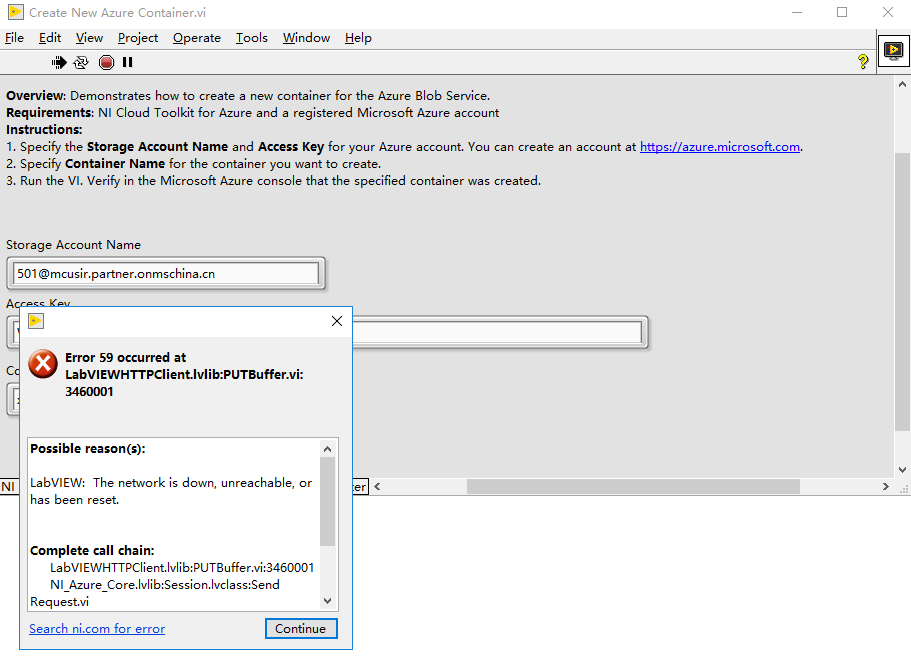
I successfully applied for the Azure cloud account today, but the example in the library ran error in compilation. I quit the firewall and antivirus software, and the fault is still. When debugging, it was found that it was wrong to run to PUTBuffer.vi. How do I solve it?
Risolto Andare alla soluzione.

 Darren
in data 05-16-2018 02:01 PM
- Contrassegnare come Nuovo
- Preferito
- Iscriversi
- Disattiva notifiche
- Iscriversi a feed RSS
- Evidenziare
- Stampare
- Segnalare contenuto inappropriato
For the Storage Account Name, make sure you're specifying the account name that you see in the Azure portal here:
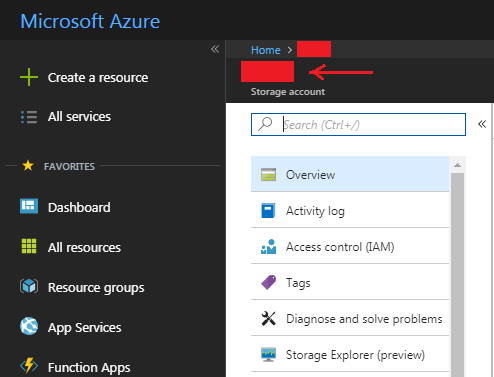
For the Access Key, you can go to Settings > Access keys and copy the 'Key' value from either the 'key1' or 'key2' field.
in data 05-16-2018 10:51 PM
- Contrassegnare come Nuovo
- Preferito
- Iscriversi
- Disattiva notifiche
- Iscriversi a feed RSS
- Evidenziare
- Stampare
- Segnalare contenuto inappropriato
Thank Darren's quick reply!
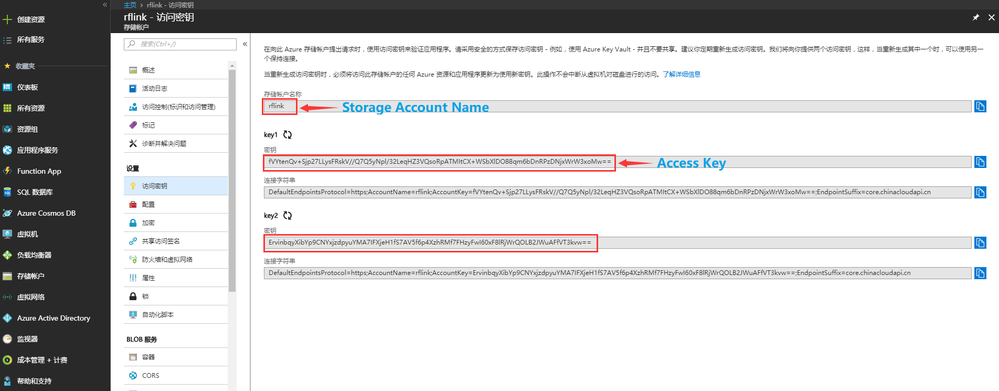
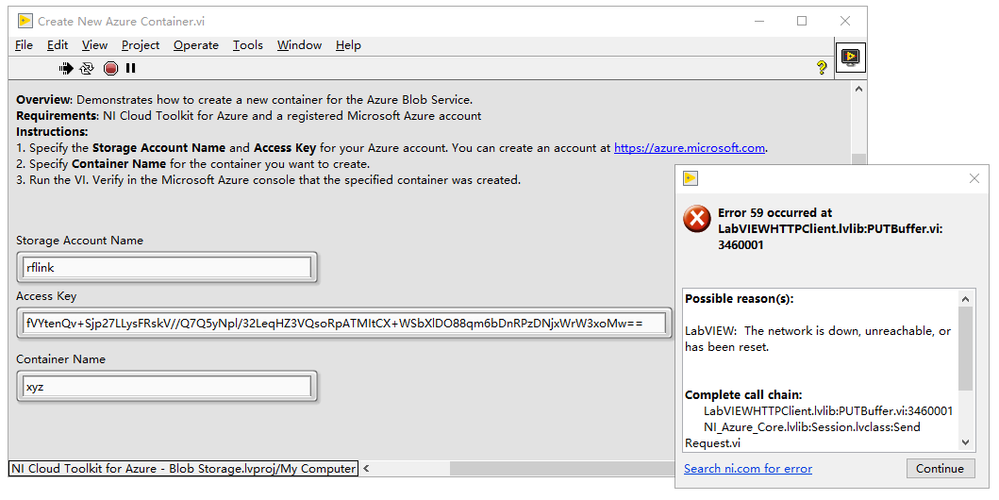
The program was run according to the following diagram, but it still did not solve the problem.I do not update the content of key1 and key2.
key1:
fVYtenQv+Sjp27LLysFRskV//Q7Q5yNpl/32LeqHZ3VQsoRpATMItCX+WSbXlDO88qm6bDnRPzDNjxWrW3xoMw==
key2:
ErvinbqyXibYp9CNYxjzdpyuYMA7IFXjeH1fS7AV5f6p4XzhRMf7FHzyFwI60xF8lRjWrQOLB2JWuAFfVT3kvw==
Storage Account Name:
rflink
Please run on your computer to see if it works OK.Thanks!

 Danny_Funk
in data 05-17-2018 10:17 AM
- Contrassegnare come Nuovo
- Preferito
- Iscriversi
- Disattiva notifiche
- Iscriversi a feed RSS
- Evidenziare
- Stampare
- Segnalare contenuto inappropriato
Hi there,
It's really not a good idea to post these keys on a public site, this gives anyone the potential to start manipulating your Azure account. I recommend regenerating key1 and key2 ASAP.
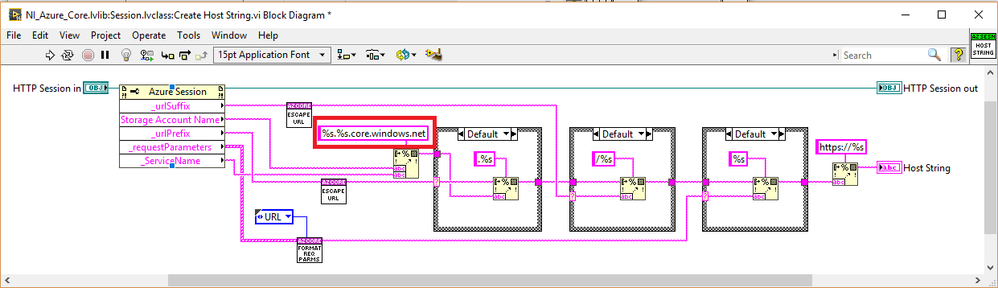
I see the source of the problem though. It looks like Azure toolkit's Create Host String.vi has hard coded to use the EndpointSuffix in the url to contain "core.windows.net". In your case, you've signed up for a Azure China account, and it has a different EndpointSuffix for the host URL. This will cause problems for other special Azure clouds (Germany, US government, China). You can fix it yourself by modifying the string constant to be core.chinacloudapi.cn instead of core.windows.net.
in data 05-18-2018 05:17 AM
- Contrassegnare come Nuovo
- Preferito
- Iscriversi
- Disattiva notifiche
- Iscriversi a feed RSS
- Evidenziare
- Stampare
- Segnalare contenuto inappropriato
Thank you for the quick and successful Reply of Danny Funk.
I have successfully created the container.I regenerated key1 and key2.
 sl_001
in data 03-21-2021 09:24 AM
- Contrassegnare come Nuovo
- Preferito
- Iscriversi
- Disattiva notifiche
- Iscriversi a feed RSS
- Evidenziare
- Stampare
- Segnalare contenuto inappropriato
The question is about the NI Cloud Toolkit for Azure.
To open an Azure session I use the VI Open Azure Session.vi
The opening parameters consist of a Storage Account Name and an Access Key.
For example :
Storage Account Name: storidddev2223
AccessKey: VjUz0XdYsr8e+B4Bxtabcdefghkly/123456778902345678923+NftIULBSk4skUA2U2i/Q==
This method works
We would like to change the identification method for a SAS Token.
Is it possible with this toolkit?
We tried the following new form of Key Access:
Storage Account Name: storidddev2223
AccessKey:
BlobEndpoint = https: //storidddev2223.blob.core.windows.net/; QueueEndpoint=https: //storidddev2223.queue.core.windows.net/; FileEndpoint=https://storidddev2223.file.core.windows.net/ ; TableEndpoint=https://storidddev2223.table.core.windows.net/; SharedAccessSignature=sv=2020-02-10&ss=bqt&srt=sco&sp=rwdlacupx&se=2022-03-31T17:31:16Z & st=2021-03-18T17:31:16Z&spr=https&sig=ABCDhijkRjYi7jCCoBBvYsSZ%2FlHAAAbEF9AXYZERbs%3D
Can you tell us if the error is in the format of the access key and if there is a solution to solve this problem?
What is the correct format?
Note: the storage account and access key names have been changed for confidentiality purposes.
*******************************
