- Subscribe to RSS Feed
- Mark Topic as New
- Mark Topic as Read
- Float this Topic for Current User
- Bookmark
- Subscribe
- Mute
- Printer Friendly Page
create a constant from a reference

 juergen
12-03-2010 09:27 AM
- Mark as New
- Bookmark
- Subscribe
- Mute
- Subscribe to RSS Feed
- Permalink
- Report to a Moderator
Hi
I create a reference with scripting from a control
Now I want to create a reference constant from the reference and I can not found this invoke node
Help
Jürgen

 francois-norman
12-03-2010 12:27 PM
- Mark as New
- Bookmark
- Subscribe
- Mute
- Subscribe to RSS Feed
- Permalink
- Report to a Moderator
Jürgen,
you can create a class specifier constant and then use the "Type" property to assign it to the right class. Use the "Class Name" property of the control to assign the type.
I woudn't use the control refnum to create the constant directly.
12-06-2010 04:24 AM
- Mark as New
- Bookmark
- Subscribe
- Mute
- Subscribe to RSS Feed
- Permalink
- Report to a Moderator
Hi
Thanks for your help
it help's me but it is not the final sulotion
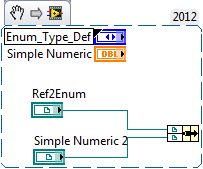
See the picture
I need my version because I put it in a cluster
I hope you can help me a secund time
Jürgen
 francois-norman
12-06-2010 08:28 AM
- Mark as New
- Bookmark
- Subscribe
- Mute
- Subscribe to RSS Feed
- Permalink
- Report to a Moderator
OK, you need a Strict Typed reference...
You need to create a control reference and from its terminal, change it to a constant... then delete the surplus control reference.
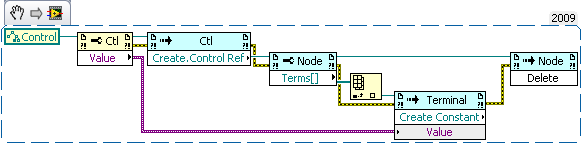
You'll have to add the created constant to your cluster... but that's not your question. 
12-06-2010 09:27 AM
- Mark as New
- Bookmark
- Subscribe
- Mute
- Subscribe to RSS Feed
- Permalink
- Report to a Moderator
Thanks for your help
it's done


 laurent74380
09-11-2012 06:22 AM
- Mark as New
- Bookmark
- Subscribe
- Mute
- Subscribe to RSS Feed
- Permalink
- Report to a Moderator
Hello,
I have a similar problem using VI Scripting. I use it to automatically generate templates containing subVIs and Type Def by copying them from a template source (Task(x).vi will be replaced with PXI6232.vi for instance).
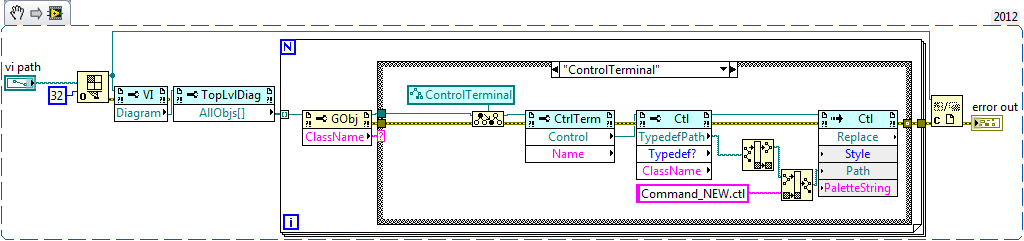
It works fine but I still have a problem with Reference Constant linked to Control, which is linked to a TypeDef. When I start my Scripting.vi, the control will be correctly relinked but the RefConstant will be deleted as shown in the Snippet.
How can I relink the RefConstant to its Control and avoiding its suppression?
Thanks,
Laurent