- Subscribe to RSS Feed
- Mark Topic as New
- Mark Topic as Read
- Float this Topic for Current User
- Bookmark
- Subscribe
- Mute
- Printer Friendly Page
LabVIEW Scripting Main Board

 tst
tst

12-06-2011 02:10 AM
- Mark as New
- Bookmark
- Subscribe
- Mute
- Subscribe to RSS Feed
- Permalink
- Report to a Moderator
This works fine here:
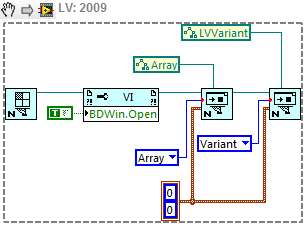
Without your actual code I don't know what the problem is with your example. The minimum would be seeing if you get an error and where it's coming from. If you're not getting an error then you need to clarify what you mean by "does not work". It would help if you upload the actual VI.
___________________
Try to take over the world!

 MengHuiHanTang
12-07-2011 01:46 PM
- Mark as New
- Bookmark
- Subscribe
- Mute
- Subscribe to RSS Feed
- Permalink
- Report to a Moderator
tst,
I found out why my code did not work. Notice the conversion red dot in your code; they are not in my code. The difference between your code and mine is that I created the default enum control from the VI. When I switched to the updated enum, my code works fine too. So the default enum must have been outdated. Thanks for the help.

 SeanDonner
02-23-2012 08:39 PM
- Mark as New
- Bookmark
- Subscribe
- Mute
- Subscribe to RSS Feed
- Permalink
- Report to a Moderator
Hi all.
I just started toying around with LabVIEW scripting. My ultimate goal is to use an 'Array of String' control and de-index it through a for-loop to create Indicators of type '1-D Array of Boolean' and label each one with the current element of the string array . The best I've been able to do is create *Controls* that are of type '1D Array of (void)' and I have no idea how to set their Lable name. I'm getting closer but I could sure use some direction.
Thanks!


02-24-2012 08:22 AM
- Mark as New
- Bookmark
- Subscribe
- Mute
- Subscribe to RSS Feed
- Permalink
- Report to a Moderator
You set the label of anything using the Label.Text property. Remember that array elements all have the same label (array elements all have the same properties, but can have different values). To create an array of any type, create the array, then create whatever you want to put into it with the array as the owner. Alternately, you can create the contents of the array, then use the Move method to move it into the array.

 jkirschner
07-28-2012 12:33 PM
- Mark as New
- Bookmark
- Subscribe
- Mute
- Subscribe to RSS Feed
- Permalink
- Report to a Moderator
Njg,
What is the "unofficial" method to expose those extra elements? I am trying to find a way to script the creation of FPGA code involving fixed-size arrays of fixed point numbers. Any idea if this is possible?
Trevor -- Have these methods since been officially exposed?
Thanks,
Jared

 lordexod
07-29-2012 11:27 AM
- Mark as New
- Bookmark
- Subscribe
- Mute
- Subscribe to RSS Feed
- Permalink
- Report to a Moderator
Maybe something like this:


 m3rl3n
08-03-2012 07:37 AM
- Mark as New
- Bookmark
- Subscribe
- Mute
- Subscribe to RSS Feed
- Permalink
- Report to a Moderator
In another thread I saw a reference to "plug-in released for the scripting by the R&D which you can install so that you can see all the property nodes ...." and it gives the link to this community. This is fine, but I don't have the time to search all of the posts on 8 pages to try to find the plug-in.
Does anyone know where it is? Is there a central repository for plugins / tools that have been created for sharing? (searchable?)
Thanks,
Dan
m3rl3n
08-03-2012 07:41 AM
- Mark as New
- Bookmark
- Subscribe
- Mute
- Subscribe to RSS Feed
- Permalink
- Report to a Moderator
Follow-up to the above message:
I have a case structure with many cases in my program (for various states) and as I've been programming, some of those cases have become obsolete. I was wondering if there is a way to pull out the names of cases that are active (ie have a case) and compare that to the ENUM control so that I can delete names of cases not being used?
Any thoughts, Ideas?
It's easy to get the names from the enum, but in my case that does not directly translate to the valid cases in the case structure itself.
Thanks for any input.
Dan
08-03-2012 08:08 AM
- Mark as New
- Bookmark
- Subscribe
- Mute
- Subscribe to RSS Feed
- Permalink
- Report to a Moderator
I am unsure what you are asking in your first question. If you want to know what property nodes are available for use, use the class browser. It is native to LabVIEW. Select View»Class Browser or hit Ctrl-Shift-B. If you want to find all the property nodes in a VI or set of VIs, use the Find & Replace function (Edit»Find and Replace...). Please elucidate if I have misunderstood.
You can get the current states from a case structure by using its Frame Names property (nearly at the end of the property list).

 rolfk
rolfk
08-03-2012 08:41 AM
- Mark as New
- Bookmark
- Subscribe
- Mute
- Subscribe to RSS Feed
- Permalink
- Report to a Moderator
If you have LabVIEW 2011 you don't need to download anything. Just go in your preferences and enable the checkbox to see scripting properties and methods.

