- Subscribe to RSS Feed
- Mark Topic as New
- Mark Topic as Read
- Float this Topic for Current User
- Bookmark
- Subscribe
- Mute
- Printer Friendly Page
JSON file I/O

 owls505
07-22-2014 01:31 PM
- Mark as New
- Bookmark
- Subscribe
- Mute
- Subscribe to RSS Feed
- Permalink
- Report to a Moderator
Hi,
This may sound like a stupid question, but I'll ask it nonetheless:
How do you actually open and read a .json file into Labview? I have the i3 JSON toolkit but all the examples I've seen that use this generate their own data in Labview, not read it in from an existing file. I need to read in the data from a already existing .json file and am getting weird behavior when I try to use the labview file i/o functions. Can you give an example of the sequence of steps to get data from the .json into labview?
Thanks so much,
Fred

 MilanR
07-22-2014
02:17 PM
- last edited on
05-02-2026
08:52 AM
by
 Content Cleaner
- Mark as New
- Bookmark
- Subscribe
- Mute
- Subscribe to RSS Feed
- Permalink
- Report to a Moderator
Hi Fred,
As you have seen the JSON VIs in the i3 JSON Toolkit are only able to parse strings. This means that loading a json string from a file will require two steps:
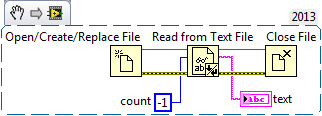
- The data in the file can be loaded into a string using the Read from Text File VI. From the documentation you can see that by passing a value less than zero to the count terminal you can load the entire file and it will be output to the text terminal.
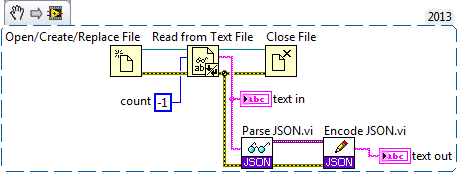
- The data from the text terminal can then be passed to the Parse JSON VI and be used with the rest of the JSON Toolkit.
One thing to keep in mind when parsing JSON text in LabVIEW 2013 is that now LabVIEW includes native JSON parsing functions which handle many cases. See the following post for some of the JSON parsing options available in LabVIEW: https://forums.ni.com/t5/JSON-Toolkit-for-LabVIEW/Is-this-the-same-toolkit-which-Aristos-Queue-creat...
Best,
Milan
Milan
