- Subscribe to RSS Feed
- Mark Topic as New
- Mark Topic as Read
- Float this Topic for Current User
- Bookmark
- Subscribe
- Mute
- Printer Friendly Page
VISA interface

 DennisMamachan
05-25-2020 06:55 AM
- Mark as New
- Bookmark
- Subscribe
- Mute
- Subscribe to RSS Feed
- Permalink
- Report to a Moderator
I have NI Vb 8012 for measurement. I wanted to know whether it is visa-compatible. if yes, Kindly do tell how to get visa ID string. Is it necessary to install any additional drivers for this device to be controlled by visa.

 Curt_C
05-27-2020 02:34 PM
- Mark as New
- Bookmark
- Subscribe
- Mute
- Subscribe to RSS Feed
- Permalink
- Report to a Moderator
Hi,
You should install the driver for the VB-8012 located here
https://www.ni.com/en-us/support/downloads/drivers/download.virtualbench-software.html#324215
Curt
05-28-2020 02:35 AM
- Mark as New
- Bookmark
- Subscribe
- Mute
- Subscribe to RSS Feed
- Permalink
- Report to a Moderator
Which visa software do I need to install for this process. I need this device to be controlled by another software and I need to write the visa ID string to the software. I am beginner to this field and I have little knowledge about it. Kimndly do help me out.
Curt_C
05-29-2020 04:53 PM
- Mark as New
- Bookmark
- Subscribe
- Mute
- Subscribe to RSS Feed
- Permalink
- Report to a Moderator
Hi,
What language are you using to write your application?
Curt
06-02-2020 03:38 AM
- Mark as New
- Bookmark
- Subscribe
- Mute
- Subscribe to RSS Feed
- Permalink
- Report to a Moderator
Hi,
I need my device to be controlled by another software named "infas Vibro 2.0", which is a software for laser interferometer measurement. The software can control all visa compatible function generators by using visa resource name.
Dennis
Curt_C
06-02-2020 06:02 AM
- Mark as New
- Bookmark
- Subscribe
- Mute
- Subscribe to RSS Feed
- Permalink
- Report to a Moderator
Hi,
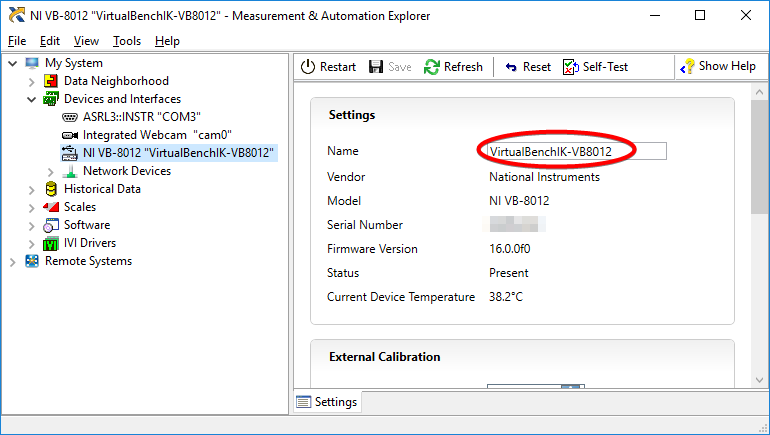
After you install NI-VISA, open NI-MAX and plug in the VB 8012.
You should see the device show up under devices along with the resource name.
I'm not sure if it will work as a stand alone signal generator with your software.
Curt