- Subscribe to RSS Feed
- Mark Topic as New
- Mark Topic as Read
- Float this Topic for Current User
- Bookmark
- Subscribe
- Mute
- Printer Friendly Page
HTTP GET returns error 363650
Solved!
 yura_beno
08-10-2022 07:55 AM
- Mark as New
- Bookmark
- Subscribe
- Mute
- Subscribe to RSS Feed
- Permalink
- Report to a Moderator
URL is working Okay in browser but returns empty 'body' and error code 363650 in G Web Development Software 2022 Q3
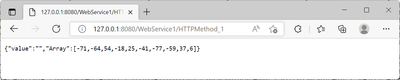
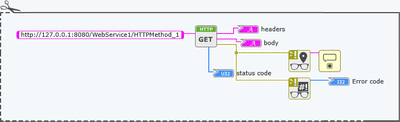
Any suggestions would be greatly appreciated
Solved! Go to Solution.

08-10-2022 11:02 AM - edited 08-10-2022 11:03 AM
- Mark as New
- Bookmark
- Subscribe
- Mute
- Subscribe to RSS Feed
- Permalink
- Report to a Moderator
Does the error status string have any helpful info? Likely causes for 363650 is CORS configuration issues. You're accessing the web service directly in the browser but accessing the G Web page from another host address which is then trying to access the web service data at 127.0.0.1 which is a different host address from the G Web access which triggers CORS security checks.
08-11-2022 03:19 AM
- Mark as New
- Bookmark
- Subscribe
- Mute
- Subscribe to RSS Feed
- Permalink
- Report to a Moderator

Adding Access-Control-Allow-Origin * header doesn't seem to help, still generic error 363650 with random error location: HttpClientGet in NI::HTTP::httpWebServerClient.sli::httpWebServer_Get->NI::HTTP::GET.gvi->WebApp::YBB_02_Aug.gviweb
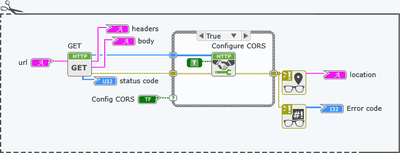
Configure CORS doesn't seem to do anything either... any ideas?
08-11-2022 06:36 AM
- Mark as New
- Bookmark
- Subscribe
- Mute
- Subscribe to RSS Feed
- Permalink
- Report to a Moderator
Adding CORS to any origin (*) still gives 363650 and a random location string: HttpClientGet in NI::HTTP::httpWebServerClient.sli::httpWebServer_Get->NI::HTTP::GET.gvi->WebApp::YBB_02_Aug.gviweb
Do I need to change any of these in http://localhost:3582/web-config
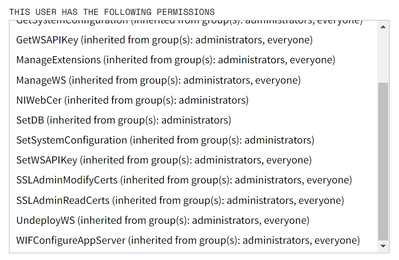
Thank you
08-11-2022 07:12 AM
- Mark as New
- Bookmark
- Subscribe
- Mute
- Subscribe to RSS Feed
- Permalink
- Report to a Moderator
Also tried adding the built GWebVI to a public folder as suggested in Configuring CORS for a LabVIEW Web Service
Note: You do not need to enable CORS if your WebVI and LabVIEW Web Service have the same origin. To achieve this, host the built WebVI in the Public Content Folder of the LabVIEW Web Service the WebVI is making HTTP requests to when running your web application.

but still the same error, I must be missing something
08-11-2022 07:17 AM
- Mark as New
- Bookmark
- Subscribe
- Mute
- Subscribe to RSS Feed
- Permalink
- Report to a Moderator
I'm hosting using IIS10 on Windows11 but that seem to work fine:
08-11-2022 10:39 AM - edited 08-11-2022 10:40 AM
- Mark as New
- Bookmark
- Subscribe
- Mute
- Subscribe to RSS Feed
- Permalink
- Report to a Moderator
So you're pulling up the page on yuribeno.com but the G Web app is still trying to access the webservice via 127.0.0.1:8080 instead of a relative URI that will map to the same domain. When I open the page, 127.0.0.1 is MY machine and of course I don't have anything running.
Try using "/WebService1/HTTPMethod_1" as the URL for http client methods. Not specifying the authority portion of a URL (the host, port, and any basic auth info) is the recommended approach when everything is running via the same host.
08-12-2022 01:35 AM - edited 08-12-2022 01:39 AM
- Mark as New
- Bookmark
- Subscribe
- Mute
- Subscribe to RSS Feed
- Permalink
- Report to a Moderator
Thank you for your help
/WebService1/HTTPMethod_1 stopped giving 363650
Now I get 404, the whole message is below and on yuribeno.com

Tried /HTTPMethod_1/ and other string combinations.
Still working okay in any browser:
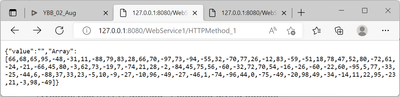
I must be missing something very basic..
08-13-2022 07:53 PM
- Mark as New
- Bookmark
- Subscribe
- Mute
- Subscribe to RSS Feed
- Permalink
- Report to a Moderator
Its working now www.yuribeno.com, had to properly forward the webservice port and use the public IP
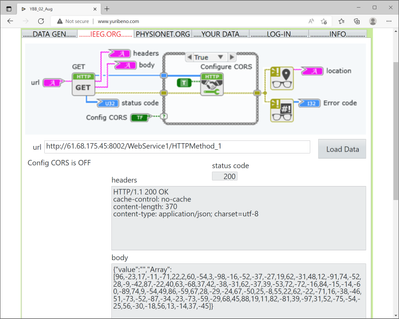
Thank you
