- Subscribe to RSS Feed
- Mark Topic as New
- Mark Topic as Read
- Float this Topic for Current User
- Bookmark
- Subscribe
- Mute
- Printer Friendly Page
Code Generation motor issue
Solved!
 Steve_Brooks
09-22-2013 02:15 PM
- Mark as New
- Bookmark
- Subscribe
- Mute
- Subscribe to RSS Feed
- Permalink
- Report to a Moderator
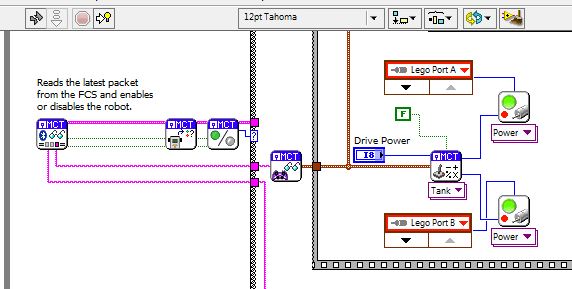
With the latest software (LVLM 2012 sp1f4 & MCT 20130909) I created a new project, selected the FTC Arm and Grabber template. Checked the schematic editor to confirm the motors were named. Went into the remote control editor and clicked generate code. After the code is generated the VI is not runnable. All the motor constants are listed as “Lego Port x” and none of the constant pull downs list the DC motors are not listed. The move DC Motor has a Lego motor control VI at its core. It looks like the HiTechnic pallets aren’t installed. Are there separate installs or should the MCT install everything? The MCT functions pallete is installed.
Thanks,
-Steve
Solved! Go to Solution.
 HunterSeeker

09-23-2013
04:33 PM
- last edited on
03-10-2026
08:40 AM
by
 Content Cleaner
- Mark as New
- Bookmark
- Subscribe
- Mute
- Subscribe to RSS Feed
- Permalink
- Report to a Moderator
We had a few issues with the MCT that was posted on FTC Kick Off.We posted a fix on 9/9. Try downloading a freash MCT and doing an install and restarting. Is the "Code Generation" button have double test printed on it? This is one symptom of the install error.
http://joule.ni.com/nidu/cds/view/p/id/4331/lang/en
09-23-2013 05:10 PM
- Mark as New
- Bookmark
- Subscribe
- Mute
- Subscribe to RSS Feed
- Permalink
- Report to a Moderator
So we did download early a few weeks ago and we did have the double image generate code button. With three new / fresh systems (no previouse LV installed) we downloaded all the latest code Thursday the 19th which has the same file as the link above and we have the issue described above. We have a clean generate code button, it generates and opens a LabVIEW VI but there are no tetrix motor constants or VIs.

 ESearl
09-24-2013 09:37 AM
- Mark as New
- Bookmark
- Subscribe
- Mute
- Subscribe to RSS Feed
- Permalink
- Report to a Moderator
Hi Steve,
It looks like you don't have any HiTechnic motors configured in the Schematic Editor. The default Schematic only includes the Lego Motors. Please try configuring the Tetrix Motors in the schematic editor and then referencing them from the Joystick application or the block diagram motor constants.
Thanks!
09-24-2013 10:08 AM
- Mark as New
- Bookmark
- Subscribe
- Mute
- Subscribe to RSS Feed
- Permalink
- Report to a Moderator
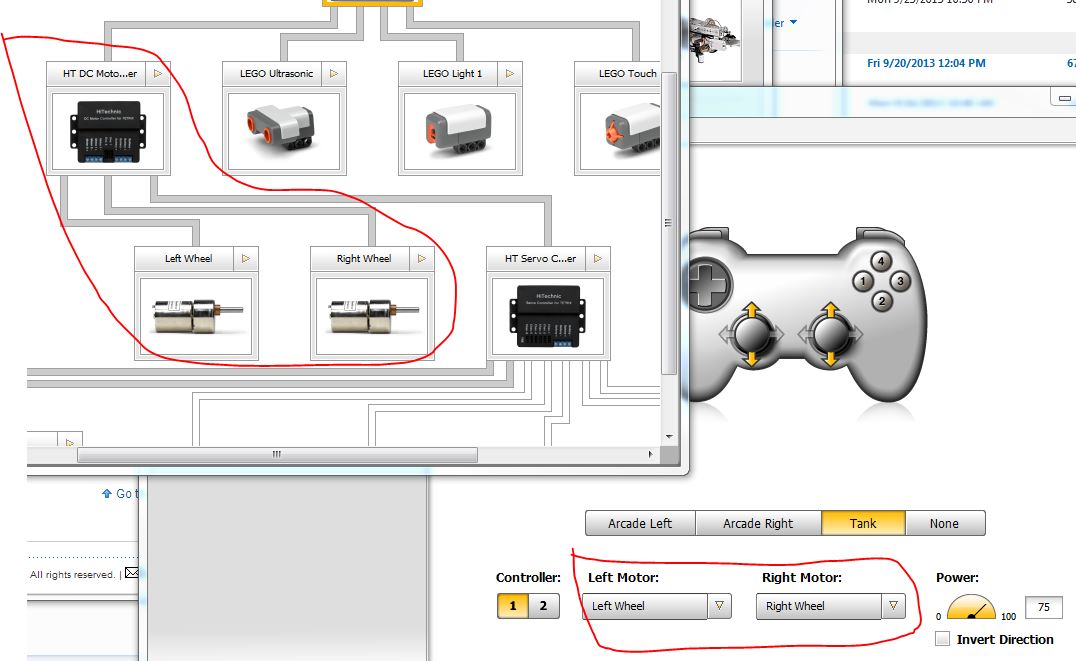
I do have HiTechnic motors on the schematic and they are referenced on the joystick application. I actually did a test starting with the FTC arm & grabber template and it does the same thing. I have put a zip file of the project on the NI/Incoming ftp site named: FTC Arm-Gripper.zip.
ESearl
09-24-2013 10:38 AM
- Mark as New
- Bookmark
- Subscribe
- Mute
- Subscribe to RSS Feed
- Permalink
- Report to a Moderator
Steve, if you pull down on one of the generated motor constants and select the "Configure..." option, does it bring up the correct schematic?
09-24-2013 11:06 AM
- Mark as New
- Bookmark
- Subscribe
- Mute
- Subscribe to RSS Feed
- Permalink
- Report to a Moderator
Yes. Oddly enough after I choose configure, look at the schematic then go back to the VI I can see the schematic motor names in the constant pulldown now. When I select the right motor the correct drive subVI is selected and it looks like things should work.
So now I would assume that somehow when the generate code button is pressed the schematic isn't getting referenced correctly? On one of my test projects I started from scratch, created the schematic with HiTechnic controller and motors then saved. Then created a remote control scheme referencing those motors and saved. Then pressed generate code and it referenced lego motors instead of the schematic motors.
Thanks,
-Steve
ESearl
09-24-2013 11:11 AM
- Mark as New
- Bookmark
- Subscribe
- Mute
- Subscribe to RSS Feed
- Permalink
- Report to a Moderator
Yes.. it sounds like there was an error reading the schematic file when you generated code and the system fell back on the default schematic. I will try and look into what might have caused this. Glad you have things working somewhat. Let me know if the issue is reproducible or not.
09-24-2013 11:30 AM
- Mark as New
- Bookmark
- Subscribe
- Mute
- Subscribe to RSS Feed
- Permalink
- Report to a Moderator
It is very repeatable, it happens every time for me. I just created a new project, selected FTC Arm & Grabber template. Open the schematic to make sure all motors are there, making no changes then close. Open the remote control window to make sure correct motors are referenced, making no changes then generating code. Every time starting with FTC arm & grabber or from scratch the generated VI references lego motors.
What I just noticed is while the VI has just been generated and has not been saved yet, I can press configure and it opens the correct schematic but I still cannot see the correct motor names in the pulldown. When I close and save the VI then re-open it I now see the correct motors in the pulldown and can change them from lego to the schematic motors.
-Steve
ESearl
09-27-2013 09:51 AM
- Mark as New
- Bookmark
- Subscribe
- Mute
- Subscribe to RSS Feed
- Permalink
- Report to a Moderator
Hey Steve,
What kind of computer and version of Windows are you using?
