Math Node - A new way to do math in LabVIEW
 Darin.K
 Darin.K
01-27-2017
03:33 AM
Darin.K
01-27-2017
03:33 AM
- Subscribe to RSS Feed
- Mark as New
- Mark as Read
- Bookmark
- Subscribe
- Printer Friendly Page
- Report to a Moderator
Code and Documents
Attachment
Math Analysis Category Winner
GRAND CHAMPION
Summary:
My primary goal of this example is to demonstrate something cool in LabVIEW. I hope to have accomplished a few things: Demonstrate cool LV capabilities such as scripting and XNodes in new and interesting ways and to share my vision for a new type of math tool in LabVIEW that is based on G, but leverages the power of other tools such as Mathematica, Math Type, LaTeX, and others. In short, I utilize the power of LaTeX and MathML to quickly and easily share equations between all of these programs (and even Wikipedia) and implement them in native G code in LabVIEW.
At the heart of the code is an expression parser which uses the Shunting Yard algorithm to convert math expressions to G code using scripting. On top of this, I have written parsers which convert both MathML and LaTeX to regular expressions which can then be converted to G. With this ability, it is very easy to transfer equations to LabVIEW. In addition, with the use of freely available software (MikTeX and Ghostscript) this tool will automatically place beautifully formatted equations as labels next to the G code. The generated code can be placed on the clipboard for pasting, put into a new VI, or saved as a Math Snippet. The Math Snippets contain the LaTeX or MathML used for the equation and label and they can be loaded and edited by the tool, a great timesaver.
As a bonus, I have taken things to the next level. While G code is beautiful for many things, complex equations can be difficult to follow and debug. Therefore, I have included an XNode which encapsulates the G code and presents only a Typeset equation and a set of terminals. Think formula node with LaTeX typesetting.
Finally, it may not be practical, but one of the flat-out coolest things I have done with LabVIEW is to use the Math Input Control of Windows 7 to write out an equation by hand (scribble really), and see that handwritten code turned automatically into G. Now you can do that too if you have Windows 7.
The code is Windows only since I do not have Mac access. Most of the Windows only functionality is in clipboard functions and system exec calls to execute the external tools, which should be fairly easy to port for those interested.
Function:
Three tools are included in this example.
Convert Math Expression to G: Takes code written in MathML, LaTeX, or normal text (y=a+b) and converts it to G with a nicely typeset label (if you install LaTeX and Ghostscript). You can also launch the Math Input Control and the result is automatically placed into the control, or go to a Wikipedia page and copy and equation and you can paste the code into the controls automatically. With Wikipedia, you can either use the web image as the label or tweak the LaTeX as you desire.
Math Node.xnode: When you drop this XNode onto a block diagram, a dialog box appears which is very similar in feel to the Convert Math Expression to G tool. You can load math snippets, or generate code in many of the same ways. When you are finished, you get a beautiful node powered by G under the hood. My knowledge of XNodes is primarily from reverse engineering the ones in vi.lib and this code should be considered a hack. It does however, demonstrate a Math Node I would like to see as a fully integrated tool in LV's arsenal. Plus, with scripting fully supported, maybe we can get some more light shed onto XNode technology, the logical next step. Note: the terminals are fully type adapting, need an array, or cluster, just wire it in. If you can wire it to the math primitives, you should be able to wire it up to the math node. Much of the underlying code is the same as the Convert Math Expression VI to G, I just keep them namespaced since having an XNode in memory reserves the SubVIs and prevents editing.
G shortcut for Quick Drop: Just a bonus tool I use to convert Greek symbols in control labels to Greek, so things like \alpha or \beta are converted to Symbol font. Some LV bugginess with copy and paste of formatting in terminal labels, but the front panel looks good. Shift-G undoes the greek-ification.
Steps to execute code:
- Download and unzip one or all of the tools.
- For LV2010, open ConvertMathExpressionToG.vi and then save after recompilation. Then open Math Node Tree.vi and do the same thing. This VI will load all subVIs into memory for recompilation.
- For full enjoyment and power, install MikTeX (http://miktex.org) and Ghostscript (http://pages.cs.wisc.edu/~ghost/). The basic MikTeX version should be fine, both programs are free (and quite useful). You can still use many features without these installed.
- I highly recommend adding Math Node.xnode to the palettes (Tools->Advanced->Edit Palette Set..) Be sure to set file type to All Files to see the xnode. LV seems to use the icon from the Initialize ability VI so I have made that one a bit snappier than the others.
- Add the code from the G shortcut to the QD shortcut folder LV20xx/resource/dialog/QuickDrop/plugins.
- Read the Formula Parsing Readme file to see what functions are supported.
- When you first run the code you will see a configuration screen asking for the paths to the directories containing the LaTeX and Ghostscript executables. On my system, MikTeX is in Program Files/MikTeX 2.7/miktex/bin and Ghostscript is in Program Files/gs/gs8.xx/bin. When both paths are checked out, you have the option to test the install.
- Try it out, if I have done my job, the UI should be fairly intuitive. When copying equations from Wikipedia, drag to select the equation and use 'Copy' as opposed to 'Copy Image'. I have tested in IE, Mozilla, Chrome and Safari. In Safari you only get the copy option when the mouse is not over the selected equation when you right-click.
Screenshots:

Here is the tool in action.

Copy from Wikipedia and create G code automatically
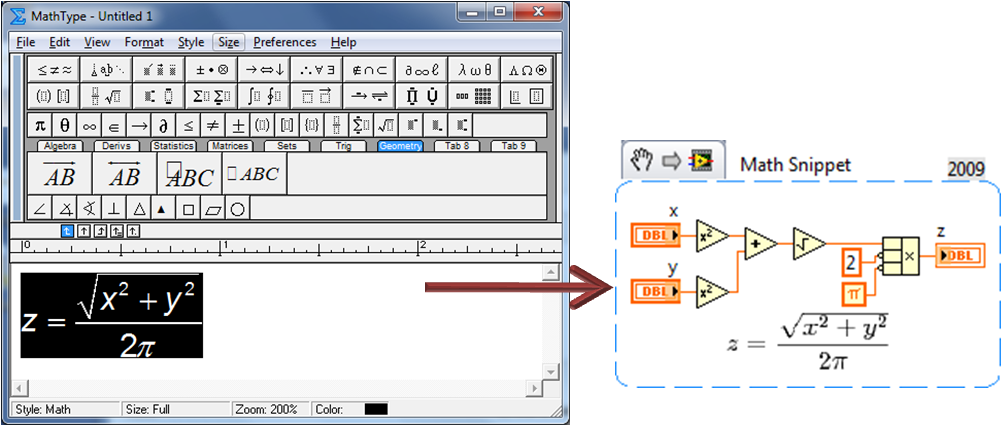
Use your favorite tool (this is MathType), and export the LaTeX or MathML to quickly create G code.
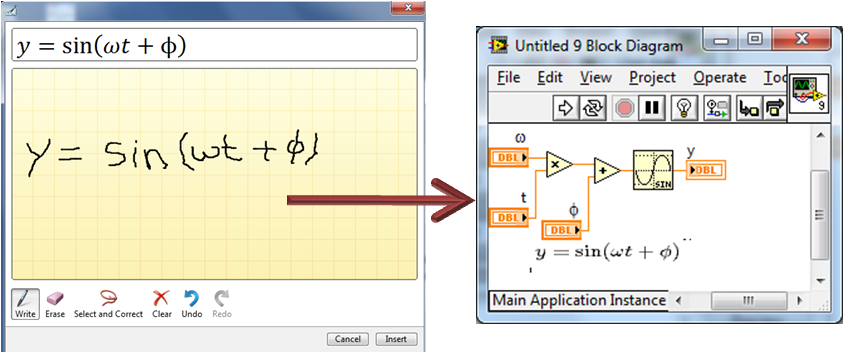
Here my chicken-scratch is turned into G with a much nicer looking label, how cool is that?
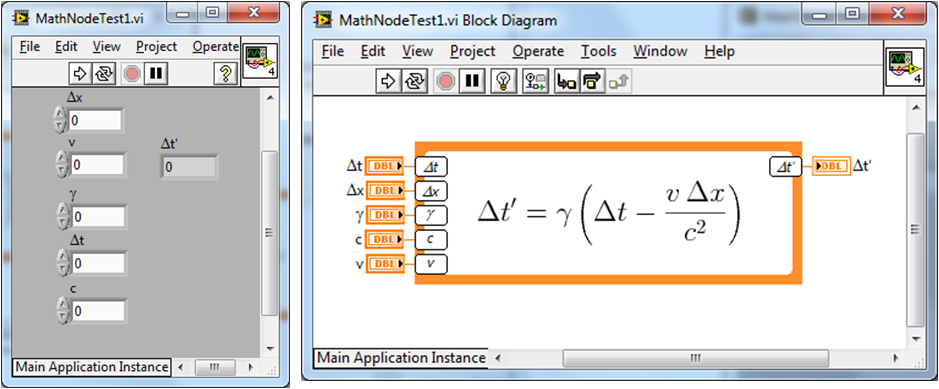
Here is the Math Node XNode in action. Need an array? All of the inputs are fully adaptable.
VI Snippet:
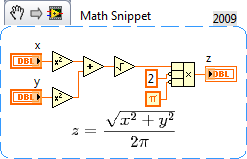
A math snippet with embedded information about the equations used for the G and the label. You can open this in either the ConvertMathExpressionToG.vi or the Math Node configuration dialog to edit the code.
Some tips for your enjoyment:
- The LaTeX you need to know is pretty basic here. Fractions are \frac{num}{den}, roots are \sqrt
{root}, where n is optional, and exponents are x^{32}, the braces are used to group the values, otherwise LaTeX would see that at x^3 followed by 2. The G parser is perfectly happy with x^32, but you may be surprised. Most functions simply have a \ character in front, so sin(x) is \sin (x), it is only there so the type face is correct. That about covers it, once you see a few examples, it is pretty easy. - LaTeX is much easier to deal with than MathML, use the conversion. Cleaning the G code string removes superfluous formatting to help you out.
- Implicit multiplication is very common in typeset equations, but very difficult for parsers so it is the most common bug you will find. For now I leave it up to you to put a * symbol between two variables. 2x is ok, but xy should be x*y unless you really want a variable named xy. The preview function is helpful here, look for misnamed variables. The 'Clean *' button for the label will remove the * character from the label since it often looks better. If you really want to show multiplication I suggest using \times, it looks better.
- If you do not want to install LaTeX and Ghostscript, Wikipedia is a great place to find equations, and the tool will use the web image. I like the special relativity page since it is full of roots and Greek characters. I try to fake LaTeX a bit by converting Greek characters to Symbol font, but it isn't quite the same.
- The Math Input Control may be finicky, it is a hidden app called from a shared library, and I don't use it often enough to fully debug the errors, just close and reopen the VIs and it should work. Usually I only have trouble when I am editing VIs, and not when I just use the tools.
- Finally, I am primarily a hobbyist in LV and this is written during late nights, early mornings, coffee breaks,etc. Bugs are certainly there, as in most code of this scale and ambition. Digging too deep into either the Shunting Yard, or scripting is not for the feint of heart, but I am happy to assist those up for the adventure.
- I could spend weeks adding cool features, and probably will anyway.
Links to videos:
Part 1 - Introduction : http://www.screencast.com/t/WgKDsNzI0
Part 2 - Math Input Control and Math Node : http://www.screencast.com/t/jnW69fj1P
Part 3 - Multiple Equations from Wikipedia and Quick Drop Action : http://www.screencast.com/t/YzG9ojDPig3
VI attached below
Removed a few vestigial passwords.
Example code from the Example Code Exchange in the NI Community is licensed with the MIT license.


- Mark as Read
- Mark as New
- Bookmark
- Permalink
- Report to a Moderator
@Darin: Very cool stuff! Thanks for sharing!
However, I have encountered some problems with the operator precedence. When I enter this example:
F = 1 - A*x + B*x^2
I get this result:
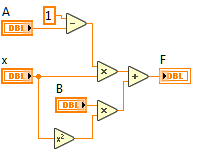
which is obviously wrong.
I traced the origin of this behavior to the ShuntingYard.vi, where I figured I had to remove the wire from "FindFunction.vi" to "IsOperator.vi" in order to let the latter use its default operator precedence. This was just some guess, which yielded the correct result on the first example, but broke this example:
F = A/B*x
which now yields:
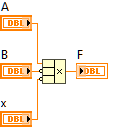
which is also not correct. However, if I leave the wire intact, the second example comes out right. So I think there is *something* wrong in the ShuntingYard.vi, but I cannot figure out the exact problem. Any idea? Any help would be greatly appreciated, because I have some monster of a formula to translate 😉
btw, I use LV2017 64bit
Edit: I could finally include some images...
- Mark as Read
- Mark as New
- Bookmark
- Permalink
- Report to a Moderator
I think I found the problem. Actually there were 2:
1) There is a second instance of "IsOperator.vi" in "ShuntingYard.vi", where the wire for the "Operators" input from the "FindFunctions.vi" is simply missing. -> attached that wire
2) The default value of the function list in "FindFunction.vi" offers the basic operators in a different order. -> made that consistent with the list in "IsOperator.vi".
These changes fixed all problems with operator precedence for me. Unfortunately I don't know how to attach the corrected VIs here, sorry...


- Mark as Read
- Mark as New
- Bookmark
- Permalink
- Report to a Moderator
This looks really cool, thanks for the post and update.
Certified LabVIEW Architect, Certified Professional Instructor
ALE Consultants
Introduction to LabVIEW FPGA for RF, Radar, and Electronic Warfare Applications

- Mark as Read
- Mark as New
- Bookmark
- Permalink
- Report to a Moderator
Reading jqu's recent posts, I revisited the problems I mentioned a couple of years ago. Implementing jqu's fixes does solve the layout issue reported in this post.
However, in this particular example, LabVIEW (2017 SP1 64 bits) still crashes.
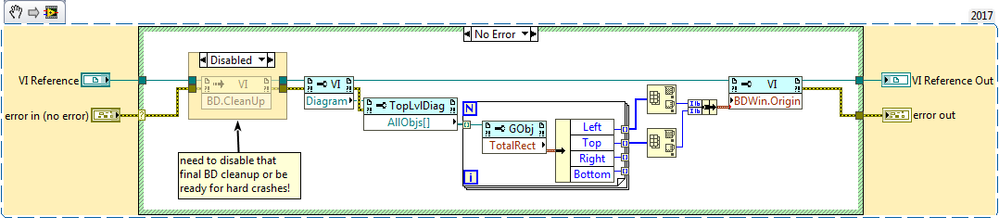
I confirmed that the crash originates from the call to BD.CleanUp in MathToG.lvlib:CleanBlockDiagram.vi.
A simple disable structure fixes the problem:
- Mark as Read
- Mark as New
- Bookmark
- Permalink
- Report to a Moderator
Oh yeah and there still are a few hardcoded paths that don't work in 64 bits and will need to be corrected for LaTeX and GhostScript to be called properly (some of the VIs are duplicated for the XNode interface, and therefore two corrections are needed each time).
Look for latex.exe, gswin32c.exe and dvips (that last one is trickier as it requires building a path with dvips.exe).
As far as the DLLs involved in the capture of the Math Input Control data, I haven't bothered to look for a replacement as I am not interested.


- Mark as Read
- Mark as New
- Bookmark
- Permalink
- Report to a Moderator
Hi Darian.x,
This is such an awesome work thank you for doing this for the community.
Is there any change to get the DLLs for 64 bit, please?
Cheers,


- Mark as Read
- Mark as New
- Bookmark
- Permalink
- Report to a Moderator
I can't believe I only just stumbled upon this now after being around LV for nearly 8 years. Any update about a 64 bit option?

