XML-RPC Client for LabVIEW
 Christian_L
 Christian_L
01-30-2017
10:12 AM
Christian_L
01-30-2017
10:12 AM
- Subscribe to RSS Feed
- Mark as New
- Mark as Read
- Bookmark
- Subscribe
- Printer Friendly Page
- Report to a Moderator
Code and Documents
Attachment
Document to share XML-RPC client VIs for LabVIEW and provide feedback, suggestions, request, etc.
The first VI is a very simple XML-RPC client that sends a method call with numeric parameters to a server and receives the response.
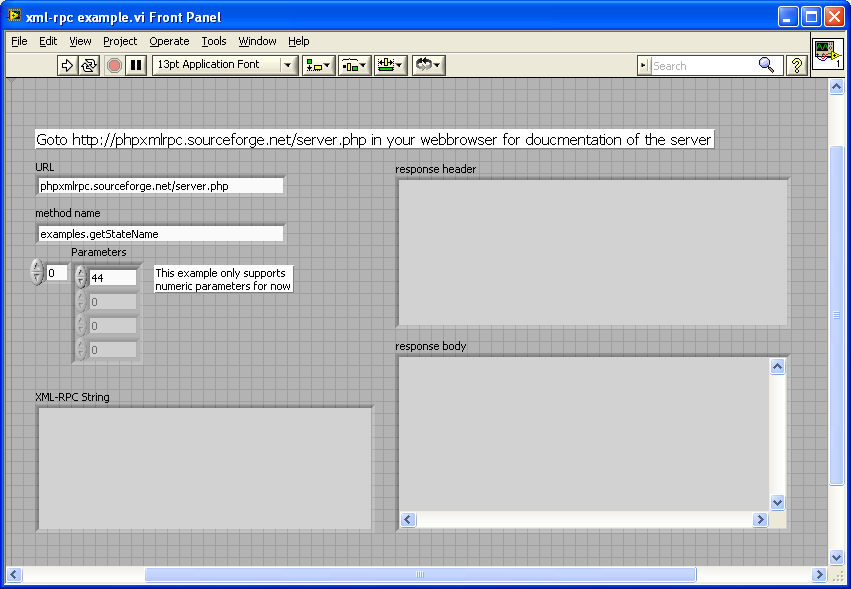
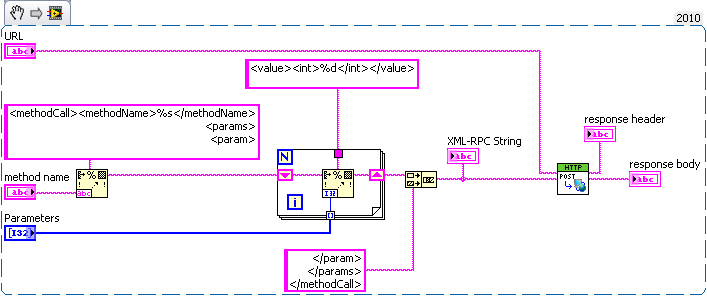
[1/17/2010] Added a LV 8.0 version of the code. This VI includes a custom version of the HTTP Post VI as HTTP Post didn't exist in LabVIEW 8.0.
Christian L, CLA
Systems Engineering Manager - Automotive and Transportation
NI - Austin, TX
Example code from the Example Code Exchange in the NI Community is licensed with the MIT license.


- Mark as Read
- Mark as New
- Bookmark
- Permalink
- Report to a Moderator
This looks really useful. My interest is that I would really like to see a Robotic Operating System (ROS) interface in LabVIEW and this is certainly the first step.
========
Ask me about Rust & NI Hardware
My writings are at https://www.wiresmithtech.com/devs/


- Mark as Read
- Mark as New
- Bookmark
- Permalink
- Report to a Moderator
Please save in LabVIEW 9.0 because it was saved in LabVIEW 10. Thanks

- Mark as Read
- Mark as New
- Bookmark
- Permalink
- Report to a Moderator
I added a version of the code saved in LV 8.0.
Christian L, CLA
Systems Engineering Manager - Automotive and Transportation
NI - Austin, TX
- Mark as Read
- Mark as New
- Bookmark
- Permalink
- Report to a Moderator
The following and other similar headers are the HTTP header, and not part of the XML. Basically they are what make the HTTP Post call to the HTTP server running on the device you are talking to.
POST /server.php HTTP/1.0
User-Agent: National Instruments LabVIEW
Host: phpxmlrpc.sourceforge.net
Content-Type: application/x-www-form-urlencoded
Content-Length: 160
HTTP is a protocol based on top of TCP, which is based on top of IP which is based on top of Ethernet. In short there are about five layers of nested protocols. For your application, assuming the HTTP Post function is written correctly, you should not need to worry about anything other than the XML to be sent to your device. In the case where the header starts with the following:
POST /RPC2 HTTP/1.0
/RPC2 represents the location on the server where the XML-RPC engine/parser/interpreter is located. In my example this was /server.php, but it may need to be /RPC2 in your case. You specify this location as part of the URL passed to the HTTP Post function and do not need to modify the HTTP Post itself. If your server is located at 'localhost' the URL would be
http://localhost/RPC2
In addition the port of the HTTP server is specified in the URL. By default it is port 80. If you need to use a different port (e.g. 8080) then it becomes part of the URL like this:
localhost:8080/RPC2
I have updated the HTTP Post function for LV 80 and will upload the new VI to this document. The previous version did not support adding a non default port to the URL.
Addition: I just found another issue that the SNAPConnect server may be sensitive to. The HTTP header contains a field called Content-Type. For XML-RPC this should be set to text/xml. My code does not do this. My test server did not care about this field, but the SNAPConnect server may. I will need to make another update to the VIs, but don't have time to do that right now. I'll get to it later tonight or tomorrow. Is there some documentation available online for the SNAPConnect XML-RPC interface?
Christian L, CLA
Systems Engineering Manager - Automotive and Transportation
NI - Austin, TX
- Mark as Read
- Mark as New
- Bookmark
- Permalink
- Report to a Moderator
Christian L, CLA
Systems Engineering Manager - Automotive and Transportation
NI - Austin, TX
- Mark as Read
- Mark as New
- Bookmark
- Permalink
- Report to a Moderator
There seem to be some serious issues in the comment editing fields of NI Community right now, which is causing the messed up formatting and error messages.
If you get the error message 'An unexpected error has occurred. Please make sure that your session did not expire while viewing this page.' ignore it and assume your message has been posted correctly. Refresh the page.
Christian L, CLA
Systems Engineering Manager - Automotive and Transportation
NI - Austin, TX

- Mark as Read
- Mark as New
- Bookmark
- Permalink
- Report to a Moderator
Hi,
I need to communicate to RPC server running on port 7700 with a username and password. How do I this in labview? Does anyone have any examples?
As the example below?

