Overview
This VI is a basic example of how to configure various types of front panel controls into a .ini file and updating them by reading from it.
Description
The configuration File VIs palette is very useful for saving or updating front panel object values. This can be especially useful when various initial settings configurations are required - simply load the front panel control values from a specified configuration (.ini) file before starting the main VI application. With the built-in LabVIEW examples on configuration files, reading from the .ini updates indicators. How can we update controls directly? This VI is a basic example of how to configure various types of front panel controls (numeric, boolean array, string, file path) into a .ini file and updating them by reading from it.
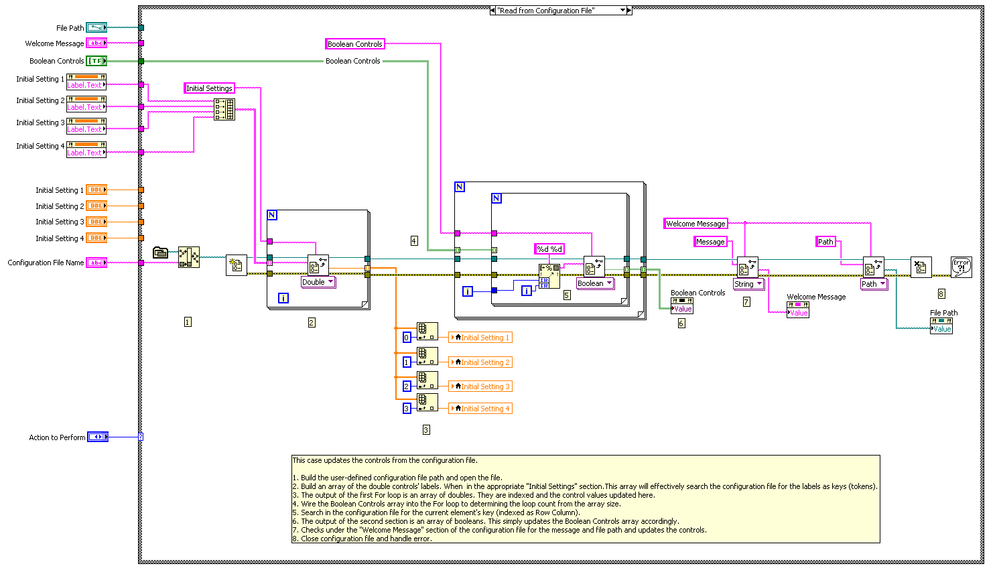
This VI has 3 states: Write to Configuration File, Reset controls to Blank Values and Read from Configuration File. This is done to simulate a real environment where a user might want to save current front panel values for future reference. In the Write to Configuration State, the Front Panel controls are organized into logical sections (Initial Settings, Boolean Controls and Message) and written to a configuration file. The resulting .ini file is very logically organized, such that a user could modify it in a text editor and create separate files for separate test environments (for example). In the Reset to Blank Controls State, the Front Panel controls are reinitialized to their default, blank values. This is simply done to simulate a reopening of the VI and to show that the next state actually updates the controls. In the Read from Configuration State, the Front Panel controls are updated from the values currently stored in the configuration file.
Requirements
- LabVIEW 2012 (or compatible)
Steps to Implement or Execute Code
- Set front panel controls to non-blank values - Initial Settings (doubles), Boolean controls (array of booleans), Welcome Message (string) and File Path.
- Set the action to "Write to Configuration File" and run the VI.
- Set the action to "Reset to Blank Controls" and run the VI. This is to simulate a reopening of the program.
- Make sure the Configuration File Name is set to an existing .ini file in the VI directory.
- Set the action to "Read from Configuration File" and run the VI. The front panel controls are updated according to their values in Step 3.
- Modifying manually the .ini file (created in step 3, in the VI directory) in a text editor and repeating step 6 will also change front panel controls accordingly.
Additional Information or References VI Block Diagram
VI Block Diagram
**This document has been updated to meet the current required format for the NI Code Exchange.**
Xavier


