Saving and Loading Control Values to and from a File in LabVIEW
 example_scrubber_andres
10-18-2017
11:57 AM
example_scrubber_andres
10-18-2017
11:57 AM
- Subscribe to RSS Feed
- Mark as New
- Mark as Read
- Bookmark
- Subscribe
- Printer Friendly Page
- Report to a Moderator
Code and Documents
Attachment
Overview:
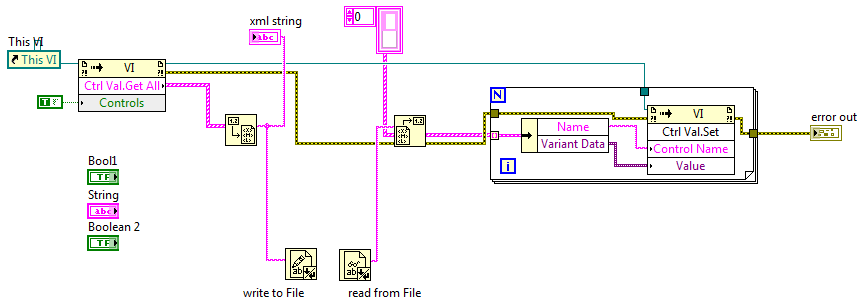
This VI will save all your VI's control values to a file by converting them to an XML string.
Description:
The VI will also load these values into the VI's controls.
Requirements:
- LabVIEW 2012 (or compatible)
Steps to Implement or Execute Code:
- Run the VI.
Additional Information or References:
"**This document has been updated to meet the current required format for the NI Code Exchange.**"
Applications Engineer
Example code from the Example Code Exchange in the NI Community is licensed with the MIT license.


- Mark as Read
- Mark as New
- Bookmark
- Permalink
- Report to a Moderator
Very nice. Didn't know this was possible, this code will surely help me with a project I have.


- Mark as Read
- Mark as New
- Bookmark
- Permalink
- Report to a Moderator
really thank you
- Mark as Read
- Mark as New
- Bookmark
- Permalink
- Report to a Moderator
I just tested the VI but I notice that it doesn't work ;( It goes bad when the loaded xml string needs to be flattend by the "xml flatten vi" it says
Error 1106 occured at Unflatten From XML in Save or Read Control Values To and From a file.vi
Possible reason(s): LabVIEW: The XML tag describing the type of data does not match the wired type.
You know a solution?

- Mark as Read
- Mark as New
- Bookmark
- Permalink
- Report to a Moderator
Looks like there is a bug in LabVIEW 2009 that does not allow Variants to faletten to XML. I modified the code to make it work. Try the new download. Not as clean, but does the trick.
Applications Engineer
- Mark as Read
- Mark as New
- Bookmark
- Permalink
- Report to a Moderator
Pity... because the xml was pretty readable now it isn't anymore because you don't know what value the data represents.

- Mark as Read
- Mark as New
- Bookmark
- Permalink
- Report to a Moderator
Good Idea but I had to change the scheme slightly to get it to work in 8.6.1.


- Mark as Read
- Mark as New
- Bookmark
- Permalink
- Report to a Moderator
Late to the party, but this helps a lot, thanks!

