ISO-8601 compliant date/time string in LabVIEW
 PhillipBrooks
 Example_Scrubber_Asser
09-02-2017
02:49 AM
Example_Scrubber_Asser
09-02-2017
02:49 AM
- Subscribe to RSS Feed
- Mark as New
- Mark as Read
- Bookmark
- Subscribe
- Printer Friendly Page
- Report to a Moderator
Products and Environment
This section reflects the products and operating system used to create the example.To download NI software, including the products shown below, visit ni.com/downloads.
- LabVIEW
Software
Code and Documents
Attachment
Overview
This example transforms the input date and time to ISO 8601 Standard
Description
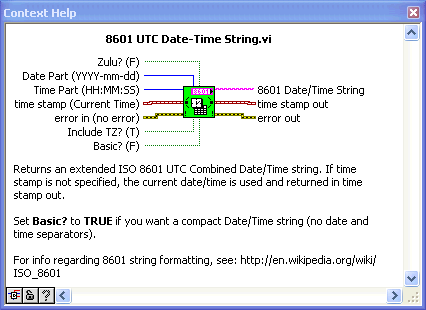
This example creates an ISO-8601 compliant date/time string using various LabVIEW format specifiers. If no timestamp is provided, the current time is used.
Requirements
LabVIEW Full Development System 2012 or compatible
Steps to Implement or Execute Code
- Enter the Date and Time Part in the same format as indicated
- If no date and time is entered the current time will be used
- Select whether to show the Time Zone, Basic or Zulu
- Run the VI
Additional Information or References
VI Block Diagram

SubVI Connector Pane
**This document has been updated to meet the current required format for the NI Code Exchange. **
Coordinated Universal Time (UTC) format string: %^<%Y-%m-%dT%H:%M:%S%3uZ>T
Example code from the Example Code Exchange in the NI Community is licensed with the MIT license.


- Mark as Read
- Mark as New
- Bookmark
- Permalink
- Report to a Moderator
Hi Phillip,
there's a bug in your VI related to how LabVIEW numbers weeks of year. The LabVIEW numbering scheme uses US-american standard which is different to ISO8601! You can test that with a date like Jan 3rd 2010 (as noted in the linked Wikipedia entry, section "Week dates")...
GerdW
using LV2016/2019/2021 on Win10/11+cRIO, TestStand2016/2019
- Mark as Read
- Mark as New
- Bookmark
- Permalink
- Report to a Moderator
Wow! Thanks for catching that. I'm gonna try to fix that up, but it seems I have to do more of the work that LV should have done for me 
Coordinated Universal Time (UTC) format string: %^<%Y-%m-%dT%H:%M:%S%3uZ>T
- Mark as Read
- Mark as New
- Bookmark
- Permalink
- Report to a Moderator
Hi Phillip,
go here: http://forums.ni.com/t5/LabVIEW/Date-time-conventions/m-p/172136#M101086 to find a correctly working ISO-Week VI!
GerdW
using LV2016/2019/2021 on Win10/11+cRIO, TestStand2016/2019
- Mark as Read
- Mark as New
- Bookmark
- Permalink
- Report to a Moderator
GerdW, I used the example you referenced. I changed the design of my VI to use a state machine, and had to add some logic to the referenced VI to update the year.
Lesson learned: LabVIEW 'to UTC' ≠ ISO-8601 compliant
Coordinated Universal Time (UTC) format string: %^<%Y-%m-%dT%H:%M:%S%3uZ>T
- Mark as Read
- Mark as New
- Bookmark
- Permalink
- Report to a Moderator
The VI I created offers many variants of an 8601 string, but you can use the following format string with "Format into String" and "Scan from String" to persist an 8601 UTC timestamp.
%^<%Y-%m-%dT%H:%M:%S%3uZ>T
Coordinated Universal Time (UTC) format string: %^<%Y-%m-%dT%H:%M:%S%3uZ>T


- Mark as Read
- Mark as New
- Bookmark
- Permalink
- Report to a Moderator
More developement work has been done here and shared as open source project. A very comprehensive set of time zone libraries. You can also find the package via JKI VI Package manager by searching for "Epoch"

