Description
Description-Separate-1
Overview
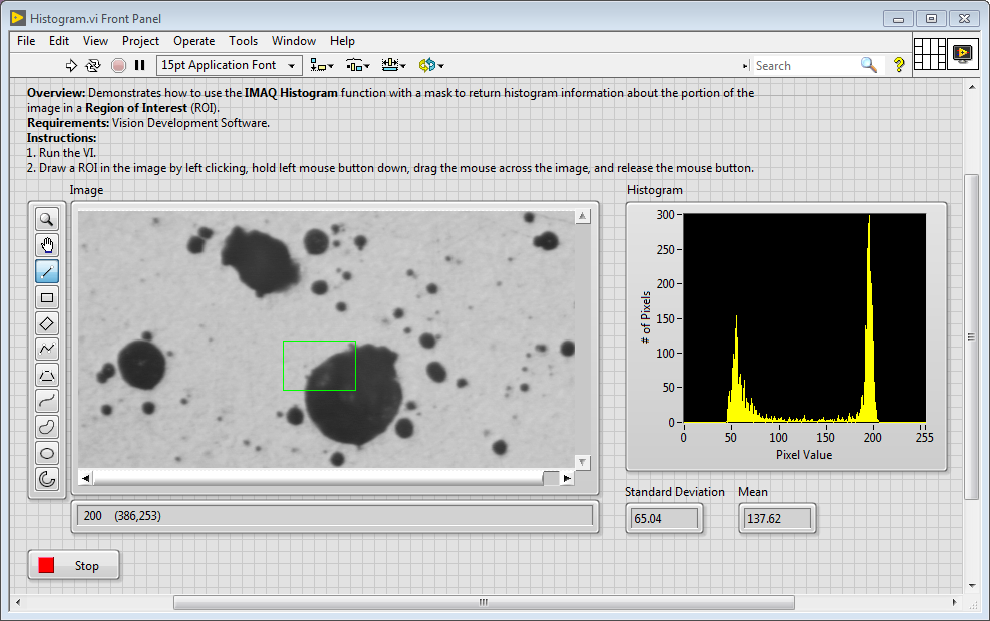
Demonstrates how to use the IMAQ Histogram function with a mask to return histogram information about the portion of the image in a Region of Interest (ROI).
Description
This example shows how to compute the histogram of an image or a region in the image. This example also shows how to set up and use the display tools to select and work on different regions in the image interactively.
Hardware and Software Requirements
LabVIEW 2014 or compatible
Vision Development Module 2014 or compatible
Steps to Implement or Execute Code
1. Download the attached VI, or in LabVIEW, go to Help >> Find Examples >> Toolkits and Modules >> Vision >> Analysis
2. Run the VI.
3. Draw a ROI in the image by left clicking, hold left mouse button down, drag the mouse across the image, and release the mouse button.
Front Panel:
Additional Information or References
Alyssa
Applications Engineering
National Instruments
Description-Separate-2


