Guitar Tuner in LabVIEW
 10Degree
 Content Cleaner
11-07-2024
04:37 PM
Content Cleaner
11-07-2024
04:37 PM
- Subscribe to RSS Feed
- Mark as New
- Mark as Read
- Bookmark
- Subscribe
- Printer Friendly Page
- Report to a Moderator
Products and Environment
This section reflects the products and operating system used to create the example.To download NI software, including the products shown below, visit ni.com/downloads.
- LabVIEW
Software
Code and Documents
Attachment
Description
Description-Separate-11. Overview
The application continuously acquires sound, extracts tones, guesses at what string is being tuned, and gives you a dial-type indicator to help zoom in on a perfect tuning. The application can also play the tone for the string you are trying to tune, and will play custom frequencies too (such as a 440 A).
2. Description
I have done a few wingnut things with LabVIEW every now and then. A few years ago I used LabVIEW, an old monitor, some cardboard boxes 2x4’s and drainage pipe to make a robot for our church’s vacation bible school. The robot recorded kid’s voices talking and played them back with echo / robot effects and then periodically stopped and spoke the bible verses of the day. It was a big hit!
I keep a bunch of guitars in my office at home that I grab and play when I need a break or when I am seeking inspiration. One night, I was playing with a rather out-of-tune instrument (when I should have been working) and I thought to myself that LabVIEW is pretty good at data acquisition and analysis (an understatement). Making a guitar tuner in LabVIEW should be a piece of cake! After a little screwing around to figure out how to analyze acquired guitar sounds from my computer’s built-in mic I built Guitar Zapper – a LabVIEW powered guitar tuner application.
3. Requirements
- NI LabVIEW Professional Development System 2012 or above.
4. Steps to Implement or Execute Code
- Load the “Guitar Zapper” project
- Load and run the “Guitar Zapper Main.vi”
- When you pluck a string, the VI will guess what string you are tuning and display the current frequency in the gauge.
- When you tune up or down, you will see the frequency gauge move.
- When it hits top-dead-center, it will become green and you are dead-on.
- You can also pick a string on the right-hand side of the application and click “Play String” to hear the tone you are trying to tune to.
- You can also type in a custom frequency and play that tone as well.
- Once you are done, click the stop button or close the panel.
5. Additional Information or References
- Acquire Sound Express VI: https://www.ni.com/docs/en-US/bundle/labview-api-ref/page/vi-lib/sound2/soundacquiresource-llb/sound...
- Extract Multiple Tone Information VI: https://www.ni.com/docs/en-US/bundle/labview-api-ref/page/vi-lib/measure/matone-llb/extract-multiple...
- Play Waveform Express VI: https://www.ni.com/docs/en-US/bundle/labview-api-ref/page/vi-lib/sound2/playwaveformsource-llb/playw...
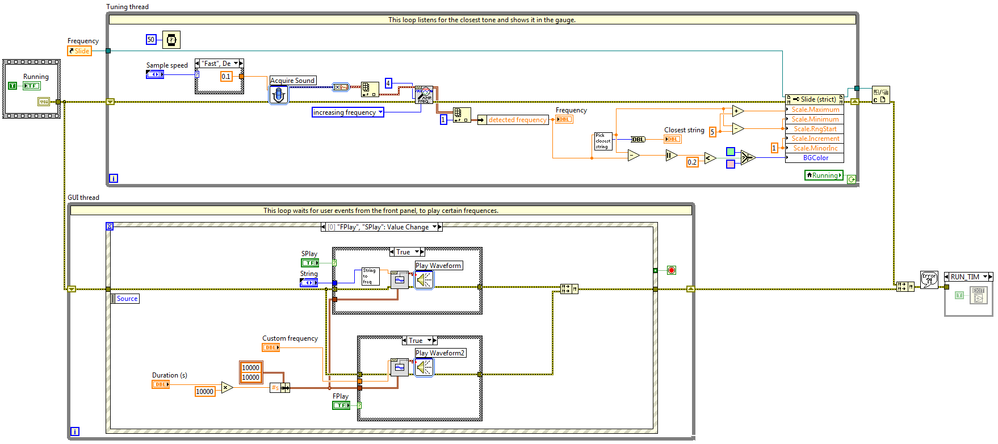
**The code for this example has been edited to meet the new Community Example Style Guidelines.**
Description-Separate-2Example code from the Example Code Exchange in the NI Community is licensed with the MIT license.

- Mark as Read
- Mark as New
- Bookmark
- Permalink
- Report to a Moderator
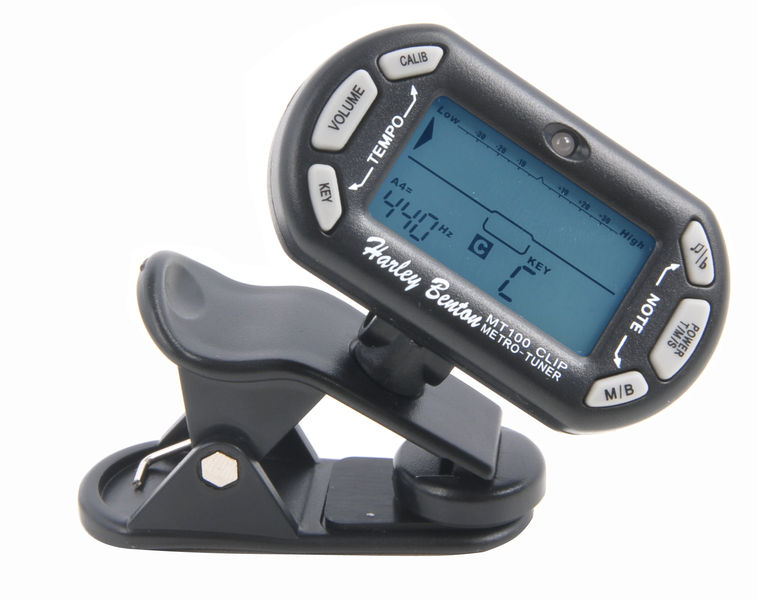
Great job! I'm not a guitar tuner expert but if I may suggest you something, you could get some inspiration from a simple common guitar tuner interface like the one in the picture.



- Mark as Read
- Mark as New
- Bookmark
- Permalink
- Report to a Moderator
so, has anyone ever successfully tuned a guitar with this? is there information lacking?
## recording the signals, which are measnt to be analysed

- recording the sound signal still works in windows 11, labview 64 bit, tested with a plugin Logitech Headset G332
- when trying to use the built-in microphone of a Microsoft Surface 8 running Windows 11, this results in error 4800, device 0 can't be found
## analyzing the recorded mono-audio-signal
- I converted the express.vi in an usual sub.vi
- in the original .vi the stereo signal is converted to a mono signal, by simple ignoring the other channel
- the signal is then fed into "extract multiple tone information.vi"

the detected frequencies are meant to be proessed further, but there is no need for as there is no frequnecy to be processed further
## problem
- when I record the sound of a guitar string via microphone, it is easy to visualize the recorded data frame, but no frequency is detected
- even when I create a sinus signal with an app eg. phybox, record it via microphone, no frequency is detected

yes, I know about "C:\Program Files\National Instruments\LabVIEW 2026\examples\Signal Processing\Waveform Measurements\Multitone with Amplitudes.vi" - but I don't want to simulate a multitone signal, I want to record one.
I suppose there is information missing e.g. what is 'treshhold = 1M' meant to be? counts? how to define a valid measurement range?
attached as labvie 2020
looks like I can't attach anything
- Mark as Read
- Mark as New
- Bookmark
- Permalink
- Report to a Moderator
- via smartphone app, I generate a single-tone at 440 hz for many seconds, at a 'low volume', while press the microphone at the smartphones speaker
- I set the threshold to 1E-5, and -alas - I now see there is a detected frequnecy around 440 hz


