CAN Frame Signal Conversion
 Hooovahh

 migration-bot
12-29-2023
01:11 PM
migration-bot
12-29-2023
01:11 PM
- Subscribe to RSS Feed
- Mark as New
- Mark as Read
- Bookmark
- Subscribe
- Printer Friendly Page
- Report to a Moderator
Products and Environment
This section reflects the products and operating system used to create the example.To download NI software, including the products shown below, visit ni.com/downloads.
- NI-XNET
Driver
Code and Documents
Attachment
Description
Description-Separate-1Overview
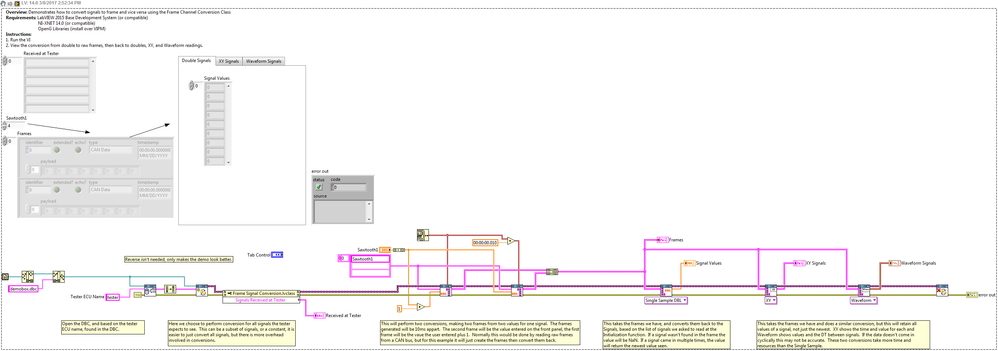
The example demonstrates how to perform CAN Bus Frame and Signal conversion, leveraging the NI-XNET API for parsing the database.
Description
The attached zip contains an example VI demonstrating the signal to frame, and frame to signal conversion, using a class. This code uses the XNet API for database parsing but the conversion itself is done with pure G. The Frames to Signal conversion function is a polymorphic VI and supports 4 different modes: Single Sample Double, which reads the latest value for the signal, XY which reads every value along with a timestamp for each value, Waveform, which reads every value into a waveform, and Single Sample String, which reads signals and displays them by converting doubles to strings, and displaying enumerated signals as their string representations. Going in the reverse direction is also supported with the String to Frames supporting an array of doubles, or an array of strings.
Requirements
Software
- LabVIEW 2015 Base Development System (or compatible)
- NI-XNET 14.0 (or compatible)
- OpenG Libraries (install over VIPM)
Hardware
- No hardware is necessary to use this example VI
(Although the NI-XNET software is used, there is no need for NI-XNET hardware)
Steps to Implement or Execute Code
There are three examples on the root with instructions in each. For the Basic and Mux example just run the VI and look at the output. For the Conversion Speed Test, select the conversion test to perform by changing the tab value, then run the VI.
Additional Information or References
Changelog
- Version 8. All conversion is now done with raw G code. The XNet API is only used for reading signal information like scaling and string enumeration. Converting to and from strings, using the signal enumeration is added as polymorphics. The Init now supports a DBC or a database name. New properties for reading and writing data added. Speed of conversion greatly improved with Conversion Speed Test added to demonstrate the differences between Version 7 and 8, and the NI method.
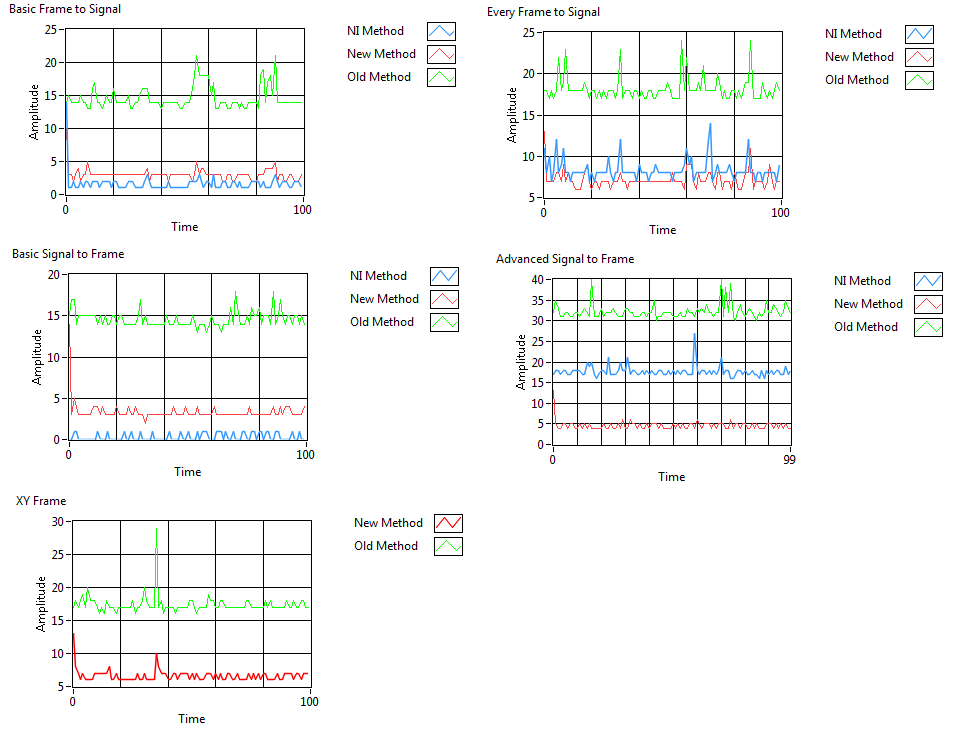
- Version 7 removes the NI-XNET conversion API for frames to signals, and implements the conversion with G. This makes the conversion process about 10 times faster. Signal to frame still uses NI-XNET conversion. NI-XNET 16.0 added new restrictions to the characters allowed in an alias, and so Get Alias from DBC was updated to replace invalid characters with underscores.
- Version 6 added CAN and LIN Frames to Table VIs and added them to the demos. Also added NI-XNET Frame Conversion which is a polymorphic VI that converts from NI-CAN frames, neoVI CAN frames, and NI-XNET LIN frames to NI-XNET CAN frames. Other polymorphic types can be added.
- Version 5 handles muxed signals slightly differently. If a signal was requested to be converted which is a muxed signal, but the multiplexer wasn't specified, then when the conversion takes place the multiplexer values will not be returned from any of the Frames to Signals conversions.
- Version 4 added better support for multiple conversion sessions at once. It does this by generating unique names in the Get Alias from DBC instead of using the same temp name. The Close was also modified to help cleanup these temp names, which correspond to files that don't exist anymore.
- Version 3 added multiplexed signal support. Frames can be made from muxed signals, and converting frames back to signals will return nothing if the multiplexer value is not correct. If no signals a multiplexed the conversion works as it always has.
- Version 2 added which sets the payload size of all frames to 8 bytes on start. This avoids a bug in the XNet conversion library.
**The code for this example has been edited to meet the new Community Example Style Guidelines. The edited copy is marked with the text 'NIVerified'. Read here for more information about the new Example Guidelines and Community Platform.**
Description-Separate-2
Unofficial Forum Rules and Guidelines
Get going with G! - LabVIEW Wiki.
17 Part Blog on Automotive CAN bus. - Hooovahh - LabVIEW Overlord
Example code from the Example Code Exchange in the NI Community is licensed with the MIT license.


- Mark as Read
- Mark as New
- Bookmark
- Permalink
- Report to a Moderator
Dear Hoovahh,
Recently I found one issue about “NaN”.
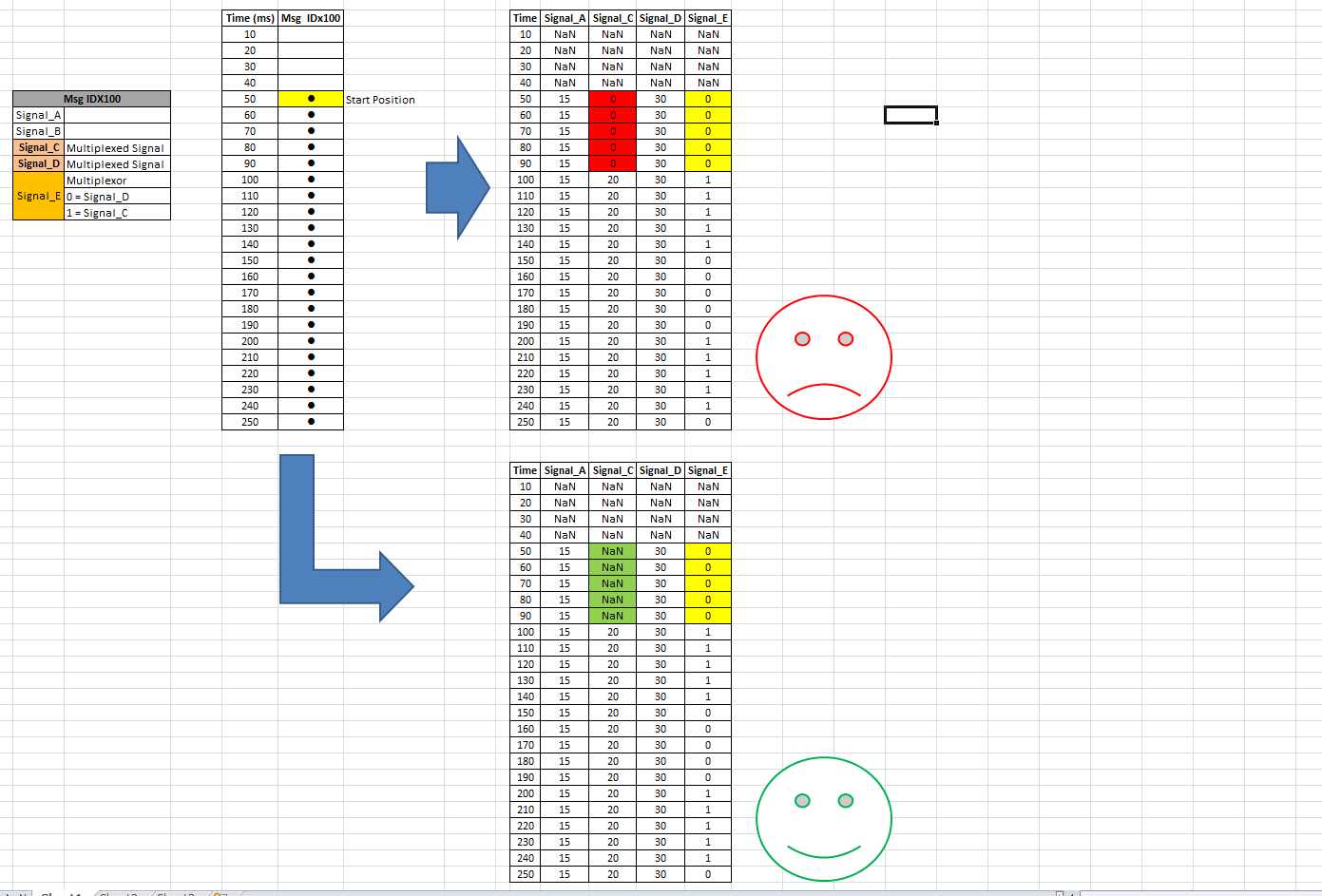
Usually displaying “NaN” as output before Signal start. But as per attached image,
Let’s take Signal_C & Signal_D are multiplexed type (CAN IDx100) & Signal_E is Multiplexor.
ID: 0x100 is started at 50ms but Signal_C started at 100ms. So, from 50ms-90ms there is no value for “Signal_C” but NI-XNET convert.vi is giving default value (i.e. Zero (0)).
when I’m displaying in CANalyzer, it’s showing “Blank” (up to 90ms for Signal_C).
I think we need to consider about this also. Not only starting point of ID & also Multiplexor value.
Once data came then no need to check . because NI-XNET APIs will take previous value (if session is live).
I hope you understood this issue.

- Mark as Read
- Mark as New
- Bookmark
- Permalink
- Report to a Moderator
I just uploaded Version 3 which should support multiplexed signals. There are a few edge cases that aren't implemented in the signal to frame conversion, but from to signal should always work.
Unofficial Forum Rules and Guidelines
Get going with G! - LabVIEW Wiki.
17 Part Blog on Automotive CAN bus. - Hooovahh - LabVIEW Overlord


- Mark as Read
- Mark as New
- Bookmark
- Permalink
- Report to a Moderator
Guys. i need your help on how to convert the raw data of CAN bus in LabVIEW to proper engineering unit. would be best if you guys got example or brief tutorial on how to do that..
Thanks in advance
- Mark as Read
- Mark as New
- Bookmark
- Permalink
- Report to a Moderator
This download literally has two examples of what you are asking for. What have you tried? What didn't work?
Unofficial Forum Rules and Guidelines
Get going with G! - LabVIEW Wiki.
17 Part Blog on Automotive CAN bus. - Hooovahh - LabVIEW Overlord

- Mark as Read
- Mark as New
- Bookmark
- Permalink
- Report to a Moderator
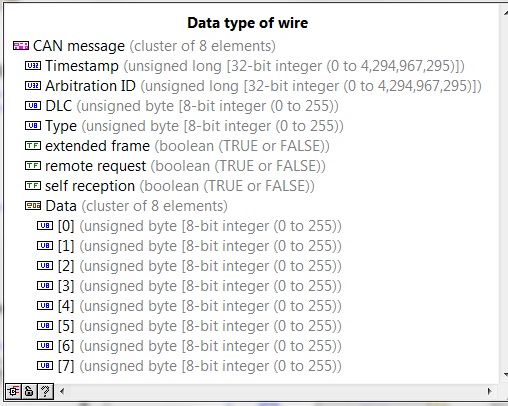
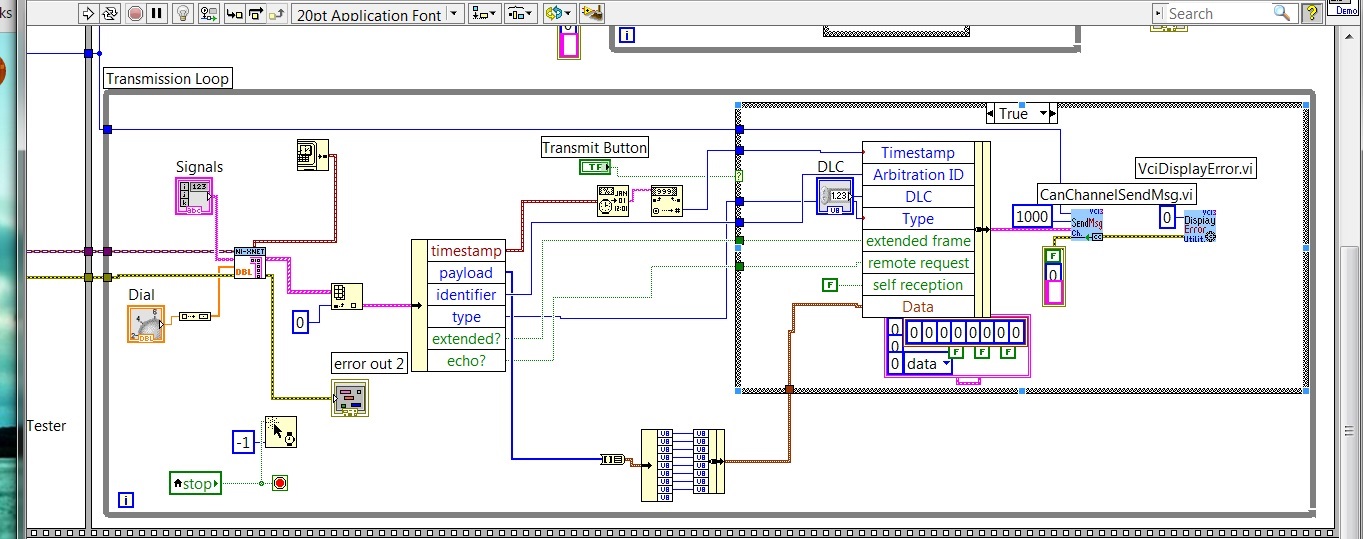
Hello Hoovah, big thanks for your library, works perfectly with my dbc file! But I have a question, because I am using some different usb to can device - german brand IXXAT with library for Labview. Please if you could how to get a frame from the Convert to signals.vi to my send block for my device: I have uploaded to photos of data types. Thanks in advance!
- Mark as Read
- Mark as New
- Bookmark
- Permalink
- Report to a Moderator
This should be no problem at all. You'll just need to convert from the one cluster type, to the other. So if you have one frame use the unbundle by name to get the data you want, then use a bundle by name, with the new cluster type.
You'll need to share the Arbiration ID (or ID), if it is extended or not, the 8 bytes of pay load (the array of Data), and the DLC is the number of bytes in the pay load. If you have multiple frames you'll want to wrap this unbundle and bundle in a for loop. If you still have questions I suggest making a thread on the forums. We can't attach code here so it is harder to help with specific questions like this.
Unofficial Forum Rules and Guidelines
Get going with G! - LabVIEW Wiki.
17 Part Blog on Automotive CAN bus. - Hooovahh - LabVIEW Overlord
- Mark as Read
- Mark as New
- Bookmark
- Permalink
- Report to a Moderator
Yes I have extended ID, and I did everything as you said, works very fine  But the question is how to now automatically decide how many bytes are in the payload? Because I don't want to send all the 00 bytes all the time Best regards from Norway
- Mark as Read
- Mark as New
- Bookmark
- Permalink
- Report to a Moderator
Array size is DLC.
Unofficial Forum Rules and Guidelines
Get going with G! - LabVIEW Wiki.
17 Part Blog on Automotive CAN bus. - Hooovahh - LabVIEW Overlord
- Mark as Read
- Mark as New
- Bookmark
- Permalink
- Report to a Moderator
Hello Hoover,
Thanks for latest version.
I think you have not yet fixed “Multiplexed issue” in your latest version.
Please let me know once your fixing that issue.
Reference:
- Mark as Read
- Mark as New
- Bookmark
- Permalink
- Report to a Moderator
I want to make sure I understand your request, for some reason I thought you were having a different issue.
So you are requesting that only the signals you ask be converted, and not show the multiplexer if one was not requested to be converted to signals?
For the conversion to work properly the multiplexer has to be specified, otherwise XNet craps out with an error. That's why in Get Mux Information the muxed signals are added to the list to be converted if they don't exist already. So in the sent example Sawtooth1 would not be shown in any results.
Edit: Version 5 posted which I think does this properly. The example now includes that multiplexer signals so the data is returned.
Unofficial Forum Rules and Guidelines
Get going with G! - LabVIEW Wiki.
17 Part Blog on Automotive CAN bus. - Hooovahh - LabVIEW Overlord
- Mark as Read
- Mark as New
- Bookmark
- Permalink
- Report to a Moderator
Hello Hoover,
Thanks for your reply.
Your understanding is correct.
To convert “Multiplexed signals”, we need to add corresponding multiplexer. It is just workaround. But end user don’t want to see multiplexer value(until and unless he is not specifying in signal list).
I think, for data conversion we need to add multiplexer. Once conversion is done, we need to remove that values from output index.
If user is specifying Multiplexed signal + multiplexer, then no need to do anything.
Edit: Now it is working correctly. Thanks for update.
- Mark as Read
- Mark as New
- Bookmark
- Permalink
- Report to a Moderator
Dear Hoover,
I found small bug.
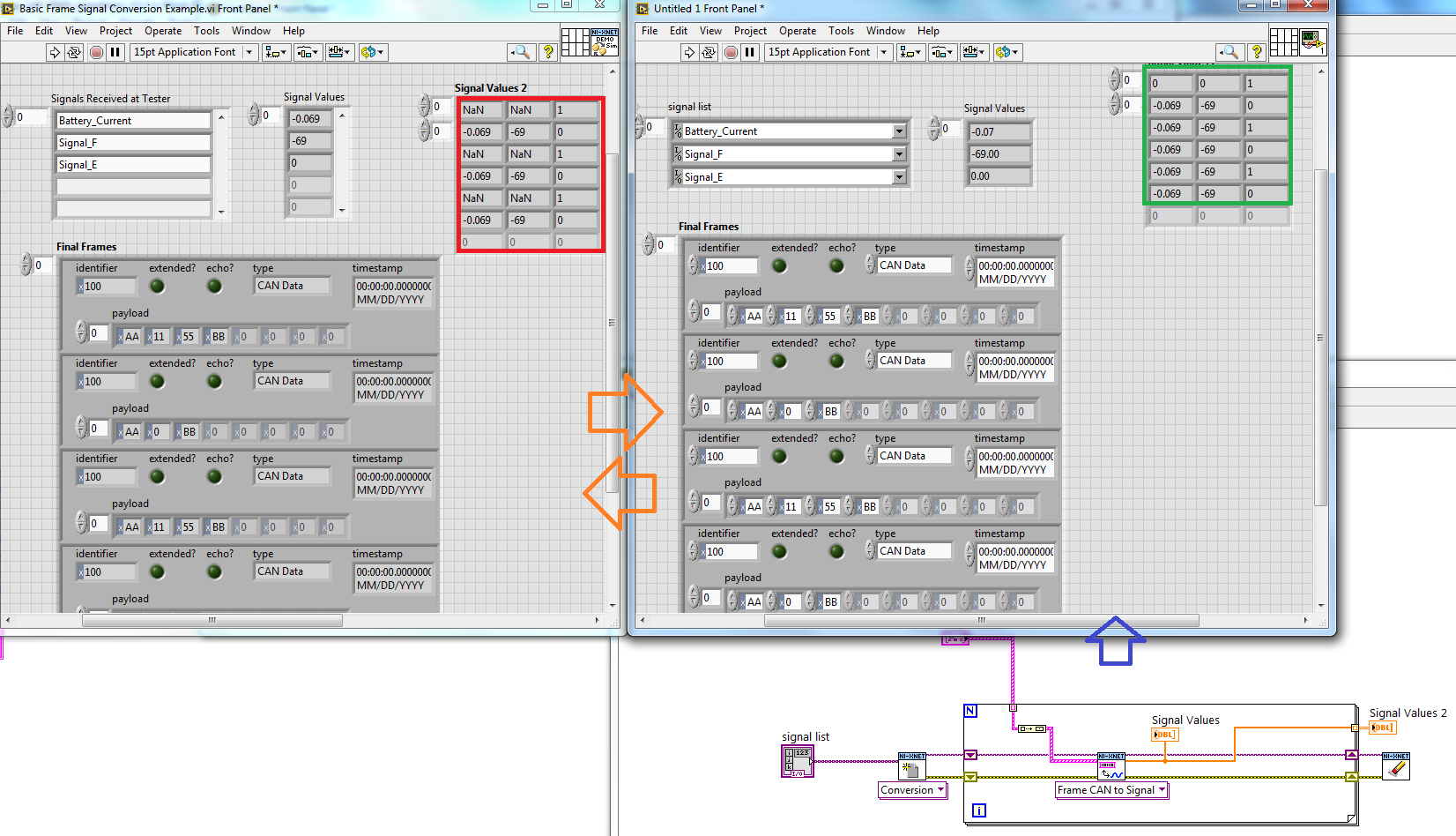
As per attached image, left side is your code & Right side is NI XNET conversion.
I sent same frames in both the ways (in For Loop) but results are different.
Usually when data conversion is happening continuously and frames are not found (in between) for same ID, XNET will takes previous value for that signal.
But in you logic it is not happening. Because you’re not taking session out reference from “XNET Convert (Frame CAN to Signal).vi”.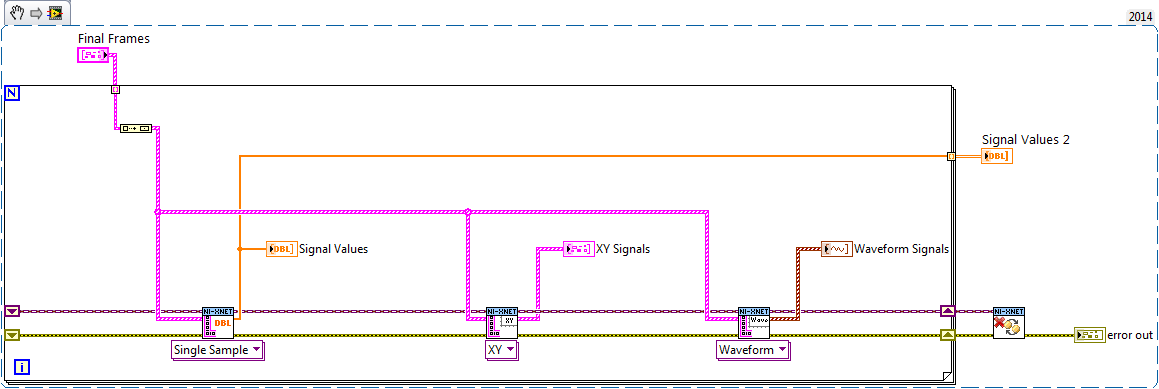
- Mark as Read
- Mark as New
- Bookmark
- Permalink
- Report to a Moderator
I don't believe this is a bug with the conversion library but is a way you are using it. Converting one frame at a time is not the intended way of using this library and instead you should provide all frames and do the conversion at once. All unique values can be see in the XY or Waveform read type.
The reason the data has different output from this library, to the XNet is because of how default values are handled. In your images you are asking the library to read those three signals. But when the last signal has a value of 1 the other signals are not valid. My library correctly returns NaN, the XNet library reads the default or last valid reading which is why it shows 0 the first time, but this is deceiving because the value read was never 0.
If you want to read all unique valid values on the signals to convert, use the read XY type, or Waveform type.
Unofficial Forum Rules and Guidelines
Get going with G! - LabVIEW Wiki.
17 Part Blog on Automotive CAN bus. - Hooovahh - LabVIEW Overlord
- Mark as Read
- Mark as New
- Bookmark
- Permalink
- Report to a Moderator
Hello Hoover,
Thanks for your reply.
If we are converting all frames at once by CAN frame to Signal.vi, we will get only latest updated value.
But if we are converting Frame by Frame, NIXNET will give every value. If signal data is not found, it gives default value ( max 0).
Once signal data is found, it gives that value & after that if data is not found, NI XNET VI will takes previous value.
Suppose, I have 100 frames & my signal data is coming at every 10th line. Signal started at 5th line.
Output:
1st line-4th line: default value
5th : Value-1
6th – 9th : previous value (i.e. 5th value-1)
10th – Value-2
11th-19th : Value-2
...
..
As you said, we can get the output data by XY or Waveform read type. But I think frame by frame is more faster than sending all frames at once.
Suppose I have 1000000 frames. How it will handle?
I tested your VI with 100000 frame with Frame by Frame & all at once.
Frame by frame is more faster.
- Mark as Read
- Mark as New
- Bookmark
- Permalink
- Report to a Moderator
Okay lots to take in, at some point we should probably have a discussion back on the forums, where you can post things like code, and example frame data.
The purpose of this API is to fix the issues with the XNet frame conversion. One of those issues is with the appearance that there is data when there isn't data. What you described as a feature I describe as a bug in XNet, where when reading a signal, default data is shown when the signal has not been seen, and then it holds that value, when the signal comes and then goes away. When I do a read, on voltage I want to know what the value of voltage is. I don't want to know what the value of voltage was last time I saw it, because that could have been minutes or hours ago. I don't know when the last time my signal came in I only know what it's last value was. I also don't want my reading of voltage to be 0 if it has never been seen before.
My API will fix these issues by returning NaN if the signal is not valid for the set of frames it was told to convert. My API will also return all values of a signal in the form of XY or Waveform. This conversion only needs to happen once.
As for performance I have never done a test as you describe because it goes against the purpose of the API. I never did a test of converting one frame at a time because it was not designed for that, it was designed to convert all frames in one shot. I would be very surprised if the conversion took longer to handle all frames at once, rather than one by one. If I get some time I'll run a test and post my results in the forums.
EDIT: Okay I can see that if your frames are mostly frames that are not to be converted, converting them all at once is faster, but if your frames are mostly frames that need to be converted, then frame by frame is faster. I'll look into this and see if I can make some improvements.
Unofficial Forum Rules and Guidelines
Get going with G! - LabVIEW Wiki.
17 Part Blog on Automotive CAN bus. - Hooovahh - LabVIEW Overlord

- Mark as Read
- Mark as New
- Bookmark
- Permalink
- Report to a Moderator
- Mark as Read
- Mark as New
- Bookmark
- Permalink
- Report to a Moderator
The database parsing at the moment leverages the XNet database tools, and just performs an import based on the file path which imports the DBC and handles it. But included is also a VI that just handles this by using the XNet Database name if one is already imported. The Init Conversion is a polymorphic VI and you can select Database and provide the database to be used. If you want to use an XML I'd suggest importing it with the XNet Database tools, then specify the database to use in the Init function which match the just imported XML. Is this what you are talking about?
Unofficial Forum Rules and Guidelines
Get going with G! - LabVIEW Wiki.
17 Part Blog on Automotive CAN bus. - Hooovahh - LabVIEW Overlord
- Mark as Read
- Mark as New
- Bookmark
- Permalink
- Report to a Moderator
Hi Hoover,
Thank you very much for your library. There is a question that i want to ask is how to use your library to convert a frame which payload was customized by myself. for example there is a frame that payload was 12 and i set signal in 7,8 bytes. but when i use your library to convert this frame to signal . only previous 8 signal can be converted and the rest will lost. So i hope to ask is there any set that required to be set for this kind of application. the following is the database setup and i use your library example.(Basic Frame Signal Conversion.vi). for this example and only number 8 can be displayed and the number 9 can not be displayed.
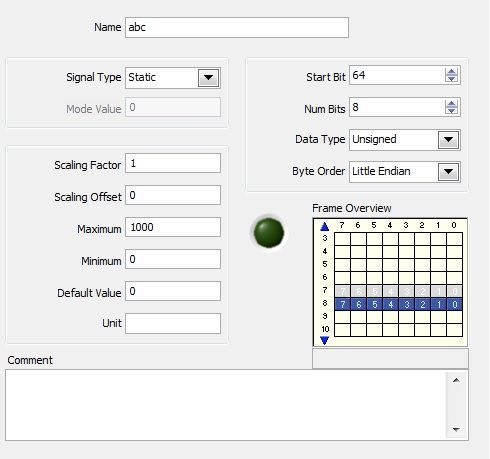
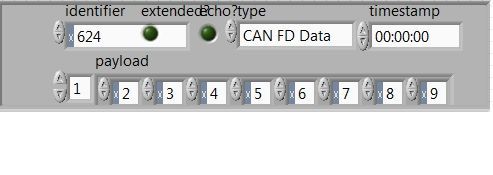
Thanks
Daniel


- Mark as Read
- Mark as New
- Bookmark
- Permalink
- Report to a Moderator
The Frame to Signal conversion does not seem to take into account the Data Type from the database. So does it handle both signed and unsigned integers properly or does it only work with unsigned int?
- Mark as Read
- Mark as New
- Bookmark
- Permalink
- Report to a Moderator
I'm not sure I understand what you are saying. Could you post an example frame with what you expect the conversion to be and see how it differs from the library?
And sorry Danielweng for not seeing your message I never got a notification. The API currently does not handle CAN-FD that release is planned.
Unofficial Forum Rules and Guidelines
Get going with G! - LabVIEW Wiki.
17 Part Blog on Automotive CAN bus. - Hooovahh - LabVIEW Overlord

- Mark as Read
- Mark as New
- Bookmark
- Permalink
- Report to a Moderator
Hooovahh, I think what mattyG is saying is that the library treats all values as unsigned, and ignores the Data Type from the DBC:
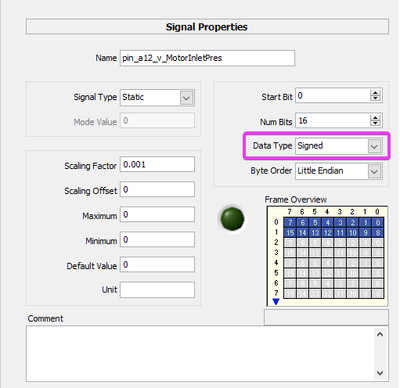
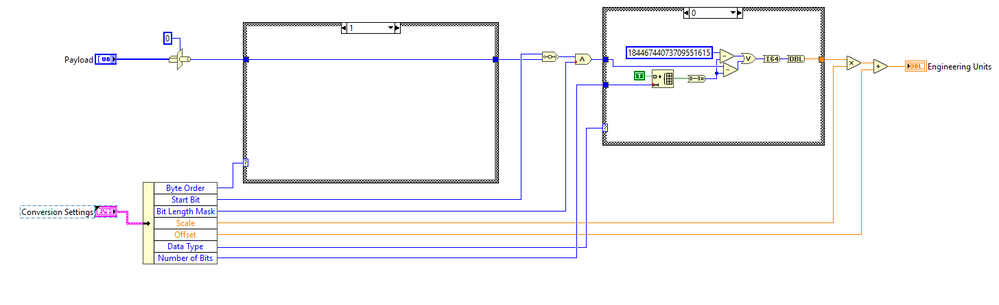
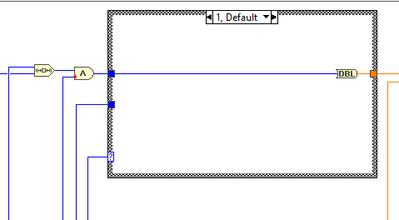
I added this functionality to your library for my use by modifying "Convert Payload to EU" and adding "Data Type" and "Number of Bits" to "Cluster - Read Conversion Settings.ctl", perhaps this saves you some effort if you choose to implement it yourself:
- Mark as Read
- Mark as New
- Bookmark
- Permalink
- Report to a Moderator
I mean I get that my code didn't read the Data Type and use it, but I'm trying to figure out when that would matter. At the moment my code looks at the Scaling Offset and Scaling Factor. So if your signal is Signed, and your offset is negative, then your resulting output can be negative depending on the payload. It will always be a double obviously but it will result in what I believe is the correct value.
Now if you have an inconsistent database, where the offset is negative, but the data type is unsigned, then the result will be a negative value which one could argue is incorrect. But in this case I'd suggest the database is wrong for allowing two things that appear to contradict each other. That's why I was asking for an example of a conversion that results in the wrong value.
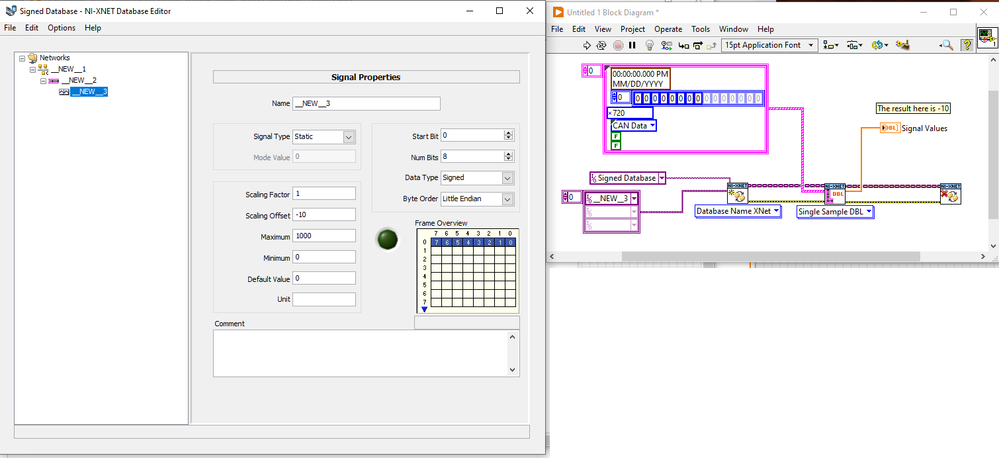
Here is an example where the conversion results in the correct negative number, for the signed data type. If there is more to this issue and I'm doing a conversion incorrectly for some cases I can update the code. For performance reasons I try to keep that conversion part as minimal as possible. And in fact I don't like that type cast and may try to code improvements.
Unofficial Forum Rules and Guidelines
Get going with G! - LabVIEW Wiki.
17 Part Blog on Automotive CAN bus. - Hooovahh - LabVIEW Overlord
- Mark as Read
- Mark as New
- Bookmark
- Permalink
- Report to a Moderator
You are correct that with an appropriate value for offset, that you can obtain negative values from unsigned datatypes. However, this ignores the Vector DBC file format, and FIBEX format used by XNET, which allow for setting a signedness for signals.
Practically speaking, it means that my existing DBC/FIBEX with 1000's of signals is not interpreted correctly, as it was written with the expectation that signedness would be followed.
In regards to your example, the value of the signal is the same for a payload of 00 for both signed or unsigned. However, for a payload of F0, your code would return a signal of 240-10=230. Whereas if the signedness was respected, you would get a signal of -16-10=-26
- Mark as Read
- Mark as New
- Bookmark
- Permalink
- Report to a Moderator
OMG I can't believe it took me almost a year to look at this again and realize you are right. In all cases that I've seen Signed signals, they always just had a huge negative offset, so the value from the payload would always be positive making it less negative, then eventually positive as it grew. So if it was a 4 bit signal, you might have an offset of -4. Then if you had 0b0111 (0d7) you'd get a positive 0d3. But if it was 0b1111 what should the value be? Well it is obvious to me now that you have the -4 offset, then apply the 0b1111 which is now -1 in decimal. Applying the offset means the value should now be -5.
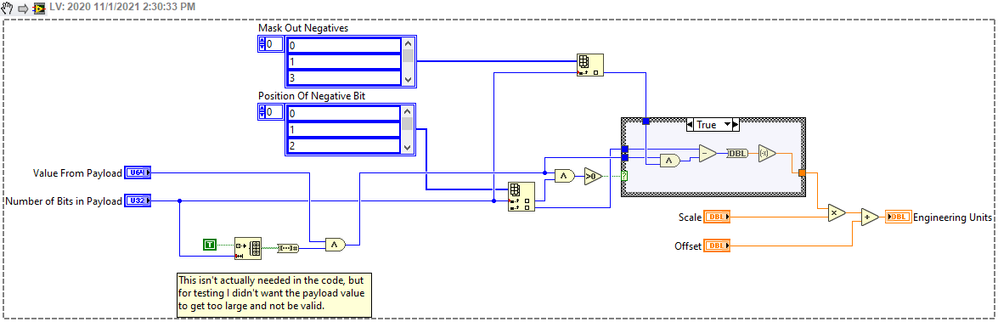
Okay with that out of the way I see the need to read the data type. But I don't fully understand the logic to handle the signed payload. It might be right but I don't understand it. The logic that I think of is see if the highest bit is set, and if so get the most negative number (based on the number of bits) then add to that, the positive portion of the value (so taking away the signed bit). I actually subtracted the positive portion, then negated it just so I could stay in U64 up until the end. I don't do much bit manipulation like this so I don't know the most efficient method, but I think I can cut some corners with some precompiled array of values of things that get indexed, since the number of bits will be 64 or less, and in practice it will be 52 or less. Here is what I came up with. Am I on the right track?
Also sorry there still is no CAN-FD. I have it, it works, I've been using it, but it uses some internal libraries that I need to spend some time working on.
Unofficial Forum Rules and Guidelines
Get going with G! - LabVIEW Wiki.
17 Part Blog on Automotive CAN bus. - Hooovahh - LabVIEW Overlord

- Mark as Read
- Mark as New
- Bookmark
- Permalink
- Report to a Moderator
Hi Hoover,
I follow your ideas to create our own "Conversion" classes. And there are three points to discuss with you:
1. In you code, the type of "Bit Length Mask" is U32. The type of it should be set to U64.
2. The way we adopted to handle the "Signed" signal (in 2's complement representation) is as the following picture for your reference:
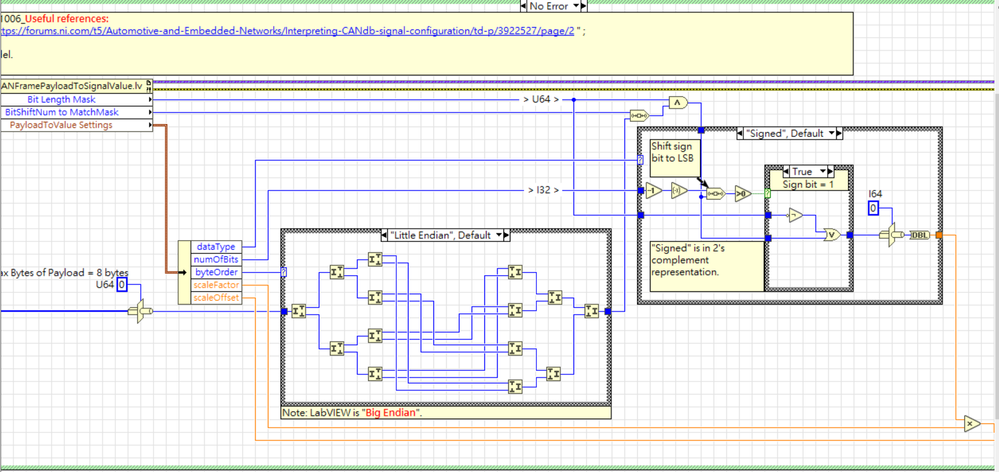
3. In CAN-FD, the length of payload is not constant and can be greater than 8 bytes. So we cannot use the way of bit operations with 64bit mask to get the signal value and vice versa. What is your way to get the signal value of a CAN-FD frame and vice versa?
Thanks
Godel
- Mark as Read
- Mark as New
- Bookmark
- Permalink
- Report to a Moderator
Hi Godel. I have a preliminary release of an update which handles CAN-FD, and the negative signed values in a way that I think is correct. I've put them on my Google Drive just because I'm unsure if these will be published in this state, or if there are more changes to make. First install the XNet Tools package, and its dependencies which it should find on the internet. Then install the CAN Frame Signal Conversion package. After installing it you should have the Hooovahh palette, and then CAN, then the Frame Signal Conversion library which is an updated version of what is posted here, but uses LabVIEW 2020 or newer.
I handled the Signed conversion differently than you and I believe we should get the same result. I used some precompiled arrays in the hopes it would make it more efficient. I also handle the CAN-FD conversion in this release. I did this by looking at single Quads of the payload, or 64 bit chunks. If a signal fits within a single Quad the conversion is pretty straight forward. If it straddles two quads then it is more complicated. I'm fairly sure it works but there are corner cases that might need more attention, like signed values that span quads, can have issues. After some more testing and updating I plan on posting these packages to VIPM.IO.
Unofficial Forum Rules and Guidelines
Get going with G! - LabVIEW Wiki.
17 Part Blog on Automotive CAN bus. - Hooovahh - LabVIEW Overlord
- Mark as Read
- Mark as New
- Bookmark
- Permalink
- Report to a Moderator
Would it be possible to get the CAN Frame Signal Conversion package compatible with LabVIEW 2019? Stuck with using an older version for the time being.
- Mark as Read
- Mark as New
- Bookmark
- Permalink
- Report to a Moderator
Version 8 should work in LabVIEW 2015 and newer. I don't have 2015 (or 2019) to test with at the moment. If you are referring to the beta packages I posted in October then you might be out of luck. The oldest version I intend on supporting is 2020 because it uses array VIMs, which would also need to be reverted.
Unofficial Forum Rules and Guidelines
Get going with G! - LabVIEW Wiki.
17 Part Blog on Automotive CAN bus. - Hooovahh - LabVIEW Overlord


- Mark as Read
- Mark as New
- Bookmark
- Permalink
- Report to a Moderator
Hi! I am using these great libraries, thank you! Today i found i needed a signed value in a DBC and quickly found my way to this page 🙂 However, when i install the packages posted on 10-06-2023 there is a problem opening my project. VIPM has been adding sufixes to the packages. For example LabVIEW cannot find the file Frame Signal Conversion_Conversion.lvclass or CAN Frame XNET Model_XNet.ctl. The underscore extension was present in earlier versions of the packages but not in these. Is this an issue with the packages or my VIMP? Please could you look and see? Thanks!
- Mark as Read
- Mark as New
- Bookmark
- Permalink
- Report to a Moderator
@Michael_78. Earlier versions of the code did have an underscore with some identifier. Really early versions of VIPM needed to have unique name space and so I got used to adding that. In the later years VIPM has improved to where you don't need to rename files to make a package. This makes development easier since if you want to use the source, or the installed package files, you just need to load them into memory first then it will relink to it since it is the same name.
What this means for you is that if you used the older stuff, using the older name, you'll need to replace those VIs and type def controls with the new package ones. Sorry. Also the shorter name helps with making builds since building on a temp location may create a file path that is too long on Windows and cause problems.
Unofficial Forum Rules and Guidelines
Get going with G! - LabVIEW Wiki.
17 Part Blog on Automotive CAN bus. - Hooovahh - LabVIEW Overlord
- Mark as Read
- Mark as New
- Bookmark
- Permalink
- Report to a Moderator
@ Brian Thank you! Im a bit stuck now because i have had to do some fixes on early versions and i wanted packages, so i re-packaged everything! I was not aware these VI's were being actively developed, my bad! Now I could go back to using the latest packages but if then there is the issue of fixes. I would be happy to share the details and see if you would integrate the changes. Is the package source available anywhere or do you maintain it yourself?
One fix example is DTC reading where a defined message may already be in the CAN buffer from a failed previous read, so I fluch the RX buffer just before doing a diagnostic request.
Another issue is with Kvasser I changed the init so that you can set silent mode before going on bus, this stops the kvaser generating error frames if the baud rate is wrong for example.
The next thing i was going to do was make all drivers plug-in classes. This is so we dont have to include all dll's to make the software work but also to make it so we can add other hardware: maybe sbRIO CAN, FPGA CAN, arduino CAN etc..
The libraries are amazing thank you!!! I would be keen to discuss further. I am keen to colaberate!
thank you,
Michael.
- Mark as Read
- Mark as New
- Bookmark
- Permalink
- Report to a Moderator
Any suggestions or bug fixes are appreciated. There's been several issues found here that have helped me, and others so whatever you can share would be nice.
As for driver specific versions. Internally the CAN code I have is quite a bit better than what I've posted online. Yes I've developed them to be a hardware abstraction layer with a class for each hardware type. Vector, Kvaser, NI-CAN, NI-XNet, and Intrepid. I did start down a path of Arduino CAN but couldn't get the performance I wanted. A Teensy seems way more capable but I never finished it. Then a separate classes for UDS, XCP, A2L parsing, CDD parsing, BLF and TDMS logging. Then I made some helper sessions that handle asynchronous reading and writing. This is updated for CAN-FD, and 64 or 32 bit platforms when possible. I'm quite proud of it but it does use some code that I would probably not be able to license out to be shared. So whatever you can share I'll try to update the publicly available packages.
Ideally one day I would post these things over on VIPM.IO so that VIPM finds them and there is a good place to publish. As for source I'm the only owner of it and it isn't online. It is just a collection of VIs, and anyone can make changes but there isn't a repo anywhere.
Unofficial Forum Rules and Guidelines
Get going with G! - LabVIEW Wiki.
17 Part Blog on Automotive CAN bus. - Hooovahh - LabVIEW Overlord


- Mark as Read
- Mark as New
- Bookmark
- Permalink
- Report to a Moderator
Hi Hooovahh,
I think I found an issue and fixed it in my side, You can check also one more time youself.
Source: Convert Payload to EU.vi
in thsi VI the case for "Data Type" had a default value "1". when the data type is IEEE Float, Data Type value is 2, and the code entering to the default case and trying to do data convertion as Unsigned data, instead of doing conertion as Signed data type. Simpley I changed the default case to "0", and the code is working right.
You can easley check the issue creating 1 signal for example with data length 3 bytes and data type signed with the payload of for example FF FE 53. and by the same logic other signal with the Data type Float (data lenght automaticly becomes 4 bytes) with the payload FF FF FE 53. in both cases You should have the same dbl value at the out. but current code working wrong, by changeing the Default case to the "0", at out You will have the same number for both examples.
Hope I explained it right. open for any discussion. thanks
- Mark as Read
- Mark as New
- Bookmark
- Permalink
- Report to a Moderator
I am unsure, but I think I have that fixed in a planned future release. I have a case 2 where it converts it to a U32, then a Single data type. This should support the IEEE Float type.

Notice that the block diagram constant is a Single, not Double data type. This is done by changing the representation by right clicking on a Double constant.
At the moment I don't handle this properly if the signal spans Quads. I feel like that is a pretty rare case, but to be fair I should be able to handle it with some extra math, I just haven't yet.
Unofficial Forum Rules and Guidelines
Get going with G! - LabVIEW Wiki.
17 Part Blog on Automotive CAN bus. - Hooovahh - LabVIEW Overlord


