Basic Frame-Based Animation in LabVIEW
 Alex.T
 Example_Scrubber_Suryo
11-02-2017
08:31 PM
Example_Scrubber_Suryo
11-02-2017
08:31 PM
- Subscribe to RSS Feed
- Mark as New
- Mark as Read
- Bookmark
- Subscribe
- Printer Friendly Page
- Report to a Moderator
Products and Environment
This section reflects the products and operating system used to create the example.To download NI software, including the products shown below, visit ni.com/downloads.
- LabVIEW
Software
Code and Documents
Attachment
Overview
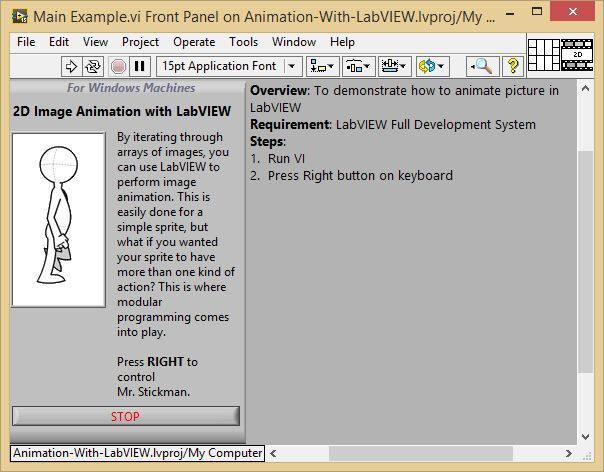
To demonstrate how to animate picture in LabVIEW
Description:
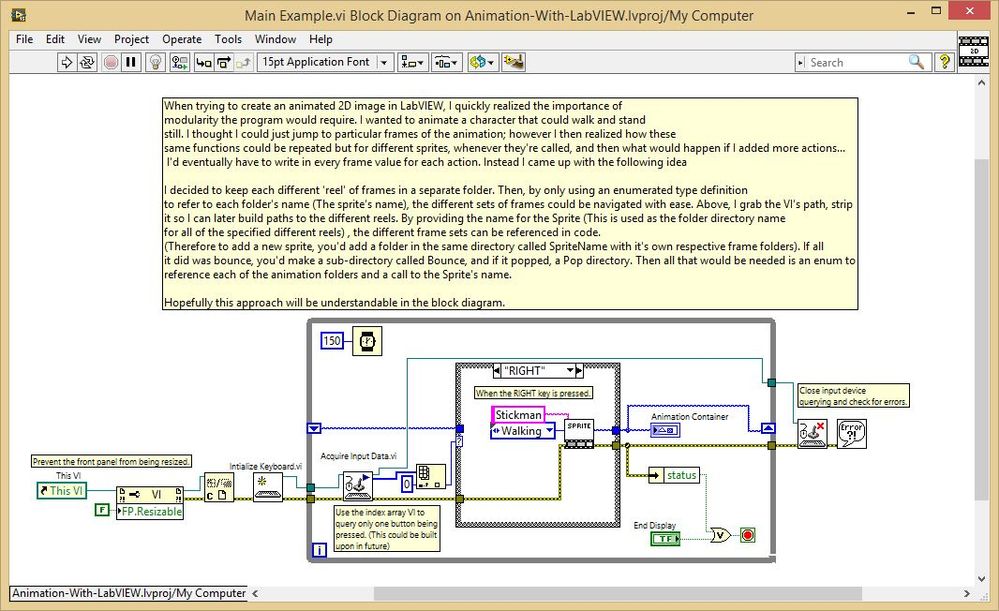
hen trying to create an animated 2D image in LabVIEW, I quickly realized the importance of modularity the program would require. I wanted to animate a character that could walk and stand still. I thought I could just jump to particular frames of the animation; however I then realized how these same functions could be repeated but for different sprites, whenever they're called, and then what would happen if I added more actions...
I'd eventually have to write in every frame value for each action. Instead I came up with the following idea I decided to keep each different 'reel' of frames in a separate folder. Then, by only using an enumerated type definition to refer to each folder's name (The sprite's name), the different sets of frames could be navigated with ease. Above, I grab the VI's path, strip it so I can later build paths to the different reels. By providing the name for the Sprite (This is used as the folder directory name for all of the specified different reels) , the different frame sets can be referenced in code. (Therefore to add a new sprite, you'd add a folder in the same directory called SpriteName with it's own respective frame folders). If all it did was bounce, you'd make a sub-directory called Bounce, and if it popped, a Pop directory. Then all that would be needed is an enum to
reference each of the animation folders and a call to the Sprite's name.
Hopefully this approach will be understandable in the block diagram.
Instructions:
To implement this example:
- Run VI
- Press right button on the keyboard to animate picture.
To execute this example:
- Install the required software.
- Open the VI and refer the Implement Steps
Requirements
Software
LabVIEW 2012 or compatible
Hardware
-
**This document has been updated to meet the current required format for the NI Code Exchange.**
Example code from the Example Code Exchange in the NI Community is licensed with the MIT license.


- Mark as Read
- Mark as New
- Bookmark
- Permalink
- Report to a Moderator
Good

- Mark as Read
- Mark as New
- Bookmark
- Permalink
- Report to a Moderator
that's great~~~

- Mark as Read
- Mark as New
- Bookmark
- Permalink
- Report to a Moderator
Hello,
I really like this - more than I should...(laughing)
I have slightly modified it to meet the needs of my project.
It works very well in the development environment.
I can't seem to make it work after a create an EXE.
it feels like a silly thing that I am missing.
can you give ma any suggestions?
thanks

