ni.com is currently undergoing scheduled maintenance.
Some services may be unavailable at this time. Please contact us for help or try again later.
- Subscribe to RSS Feed
- Mark Topic as New
- Mark Topic as Read
- Float this Topic for Current User
- Bookmark
- Subscribe
- Mute
- Printer Friendly Page
Report.ExportToImage() triggers error

 Lukas_Doubek
03-27-2018 05:27 AM
- Mark as New
- Bookmark
- Subscribe
- Mute
- Subscribe to RSS Feed
- Permalink
- Report to a Moderator
Hi, im trying to export 2DAxis to a png file, but i error, the code is simple like this and the report object exists and has one curve
Report.Settings.ImageExport.PNG.BitsPerPixel = ePNGBitsPerPixelRGB24
Report.Settings.ImageExport.PNG.Width = 300
Report.Settings.ImageExport.PNG.UseRatio = True
Call report.ActiveSheet.Objects("2DAxis1").ExportToImage("C:\DEV\axis", eImageExportTypePNG)
I tried it like this without file extension specified like is written in help, and as well with extension. still the same error:
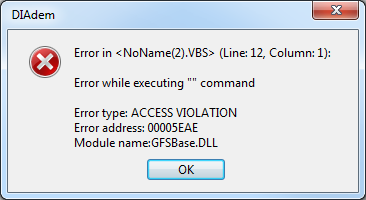
Diadem 2017 64bit, windows 7
03-27-2018 06:28 AM - edited 03-27-2018 06:32 AM
- Mark as New
- Bookmark
- Subscribe
- Mute
- Subscribe to RSS Feed
- Permalink
- Report to a Moderator
i wrote something but i wanted to delete it after, but i didnt find button to delete post or whole thread...
03-27-2018 06:35 AM
- Mark as New
- Bookmark
- Subscribe
- Mute
- Subscribe to RSS Feed
- Permalink
- Report to a Moderator
I found out how to walk around the problem, before exporting the axis, i apply this code to move it to front and then it exports without error
Report.ActiveSheet.Objects("2DAxis1").Position.ZOrder.MoveToForeground

 AndreasK
03-28-2018 12:13 AM
- Mark as New
- Bookmark
- Subscribe
- Mute
- Subscribe to RSS Feed
- Permalink
- Report to a Moderator
Would it be possible to share the report causing the issue?
03-28-2018 01:51 AM
- Mark as New
- Bookmark
- Subscribe
- Mute
- Subscribe to RSS Feed
- Permalink
- Report to a Moderator
attached, i just delete curve inside, so add some curve
AndreasK
03-28-2018 02:21 AM
- Mark as New
- Bookmark
- Subscribe
- Mute
- Subscribe to RSS Feed
- Permalink
- Report to a Moderator
I tried to reproduce the error with the following script
Option Explicit

data.Root.clear
DataFileLoad ProgramDrv & "\Libr\Data\Example.tdm"

report.LoadLayout currentScriptPath & "report.tdr"
dim curve : set curve = Report.Sheets("15-11KNSLRI00H3DSXC").Objects("2DAxis1").Curves2D.Add(e2DShapeLine,"My2DCurve")
curve.Shape.XChannel.Reference = "[1]/[1]"
curve.Shape.YChannel.Reference = "[1]/[2]"
Call Report.Refresh()

Report.Settings.ImageExport.PNG.BitsPerPixel = ePNGBitsPerPixelRGB24
Report.Settings.ImageExport.PNG.Width = 300
Report.Settings.ImageExport.PNG.UseRatio = True
Call report.ActiveSheet.Objects("2DAxis1").ExportToImage(currentScriptPath & "axis", eImageExportTypePNG)
but it does not show the behavior on my machine. Would it reproduce it on your machine?
