- Subscribe to RSS Feed
- Mark Topic as New
- Mark Topic as Read
- Float this Topic for Current User
- Bookmark
- Subscribe
- Mute
- Printer Friendly Page
Create URI plugin
Solved!
 Cisco
Cisco
01-13-2017 04:00 AM - edited 01-13-2017 04:03 AM
- Mark as New
- Bookmark
- Subscribe
- Mute
- Subscribe to RSS Feed
- Permalink
- Report to a Moderator
Hello,
I've understand it's possible to create a ".uri" Diadem plugin from a LabVIEW project (we've a vi to convert a specific formed txt file to a tdms file with channels and properties). I've find some exemple on internet, but the output file is a dll and not an uri file. What is the procedure to generate this uri file from my LV project? I've LabVIEW 2015SP1 with DataPlugin SDK and Diadem 2015.
Thank you per advance.
Solved! Go to Solution.

01-14-2017 03:31 PM
- Mark as New
- Bookmark
- Subscribe
- Mute
- Subscribe to RSS Feed
- Permalink
- Report to a Moderator
Hi Francis,
if you create a DataPlugin with the LabVIEW DataPlugin SDK and you create the installer, the installer will install the following files. So there is a URI file, but it will not do you any good without the DLL file.
So I recommend using the installer or if you use the URI file you have to manually copy the DLL file in the same directory as the URI file will be copied to ('C:\ProgramData\National Instruments\Shared\USI\Plugins\DataPlugins\DATAPLUGINFOLDERNAME').

So the steps to create the dataplugin is:
- Open a LabVIEW DataPlugin SDK example project
- Build the DLL
- Build the installer
- Run the installer on the target system
Best Regards,
Christoph
National Instruments
Certified LabVIEW Developer (CLD), Certified LabVIEW Embedded Systems Developer (CLED)
Don't forget Kudos for Good Answers, and Mark a solution if your problem is solved
01-16-2017 12:59 AM
- Mark as New
- Bookmark
- Subscribe
- Mute
- Subscribe to RSS Feed
- Permalink
- Report to a Moderator
Hi Christoph,
Thanks for the answer. I've tried with the "Speadsheet DataPlugin one shot" example, but no uri file was created...
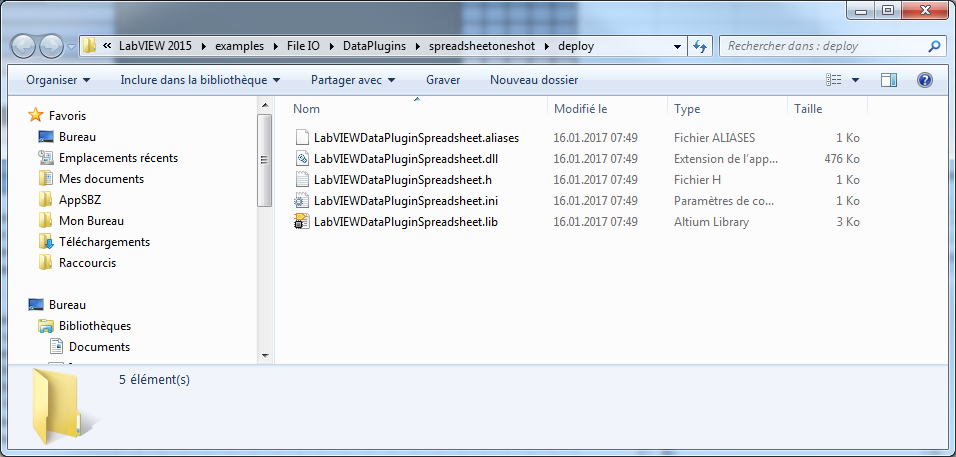
Thank you
01-16-2017 02:03 AM
- Mark as New
- Bookmark
- Subscribe
- Mute
- Subscribe to RSS Feed
- Permalink
- Report to a Moderator
Hi Francis,
you made it to step 2. Please create an installer (step 3) and run the installer (step 4). Only after that I saw the URI file in the folder (C:\ProgramData\National Instruments\Shared\USI\Plugins\DataPlugins\YOURDATAPLUGINFOLDER)
Best regards,
Christoph
National Instruments
Certified LabVIEW Developer (CLD), Certified LabVIEW Embedded Systems Developer (CLED)
Don't forget Kudos for Good Answers, and Mark a solution if your problem is solved

01-16-2017 02:14 AM
- Mark as New
- Bookmark
- Subscribe
- Mute
- Subscribe to RSS Feed
- Permalink
- Report to a Moderator
Hi Francis,
Christoph showed the files being installed on a system, while you are looking at the files for the installer.
The URI file is created during installation process, so you will find it at the location mentioned by Christoph after you have installed your DataPlugin.
Please note that it is not sufficient to distribute a DataPlugin created by the LabVIEW DataPlugin SDK, so called G-Code DataPlugins, using only the URI. Only VBS DataPlugins can be distributed using a single URI file.
01-16-2017 02:48 AM - edited 01-16-2017 03:04 AM
- Mark as New
- Bookmark
- Subscribe
- Mute
- Subscribe to RSS Feed
- Permalink
- Report to a Moderator
OK thank you! I haven't see that the installer moves dll and creates uri file...
Now we've the uri, but we can't choose it in Diadem to add our file type and index them...
In the general option, we can import the created uri file, we've a confirmation windows, all seem to be OK but the new file type never appears on the file types list of Diadem.
01-16-2017 04:11 AM
- Mark as New
- Bookmark
- Subscribe
- Mute
- Subscribe to RSS Feed
- Permalink
- Report to a Moderator
After remake the procedure, it runs...
Thank you for your help!
01-16-2017 05:07 AM
- Mark as New
- Bookmark
- Subscribe
- Mute
- Subscribe to RSS Feed
- Permalink
- Report to a Moderator
Please note that LabVIEW DataPlugins are platform specific. If you install a LabVIEW DataPlugin created with LabVIEW 32bit, you will not see it in DIAdem 64bit, and vice versa.
