ni.com is currently undergoing scheduled maintenance.
Some services may be unavailable at this time. Please contact us for help or try again later.
- Subscribe to RSS Feed
- Mark Topic as New
- Mark Topic as Read
- Float this Topic for Current User
- Bookmark
- Subscribe
- Mute
- Printer Friendly Page
2D Plot Channel Names
Solved!
 BrianCT
05-09-2018 12:24 PM
- Mark as New
- Bookmark
- Subscribe
- Mute
- Subscribe to RSS Feed
- Permalink
- Report to a Moderator
I'm having trouble finding a method to extract the name of the channel being used within a plot as the y-axis (ex: [#]/Speed, [#]/Torque). What I'm attempting to do is:
Look if a specific channel exisits
If it does exist add the corresponding mean value channel
If it does not exist move on to the next curve/plot/tab
Solved! Go to Solution.

 gsklyr
05-10-2018 09:00 AM - edited 05-10-2018 09:21 AM
- Mark as New
- Bookmark
- Subscribe
- Mute
- Subscribe to RSS Feed
- Permalink
- Report to a Moderator
Are you talking about curves in the VIEW tab?
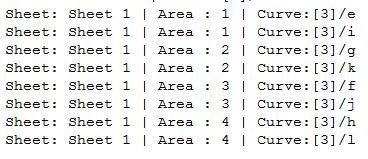
If so, this code can get you started on accessing different elements in sheets/areas/curves in the VIEW tab. Just type a period after each element to view a variety of methods/properties.
Option Explicit 'Forces the explicit declaration of all the variables in a script.

Dim Sheet, Area, Curve

For Each Sheet In VIEW.Sheets
 For Each Area In Sheet.Areas
 For Each Curve In Area.DisplayObj.Curves2D
 Call LogfileWrite("Sheet: " & Sheet.Name & " | " & Area.Name & " | Curve:" & Curve.YChannelName)
 Next
 Next
Next
05-10-2018 11:37 AM
- Mark as New
- Bookmark
- Subscribe
- Mute
- Subscribe to RSS Feed
- Permalink
- Report to a Moderator
I will be looking at curves in Report.
gsklyr
05-10-2018 01:22 PM
- Mark as New
- Bookmark
- Subscribe
- Mute
- Subscribe to RSS Feed
- Permalink
- Report to a Moderator
You can right click on an element such as a 2D curve plot and select "Copy as Script" and then paste it in the SCRIPT tab it will list out all the elements for you with comments!
05-10-2018 01:35 PM
- Mark as New
- Bookmark
- Subscribe
- Mute
- Subscribe to RSS Feed
- Permalink
- Report to a Moderator
From what I can tell this only provides the code to create that element. What I'm trying to do is get the channel name of an element that is already plotted.
gsklyr
05-10-2018 02:26 PM
- Mark as New
- Bookmark
- Subscribe
- Mute
- Subscribe to RSS Feed
- Permalink
- Report to a Moderator
That does seem to be oddly complicated to extract... was not able to find a workaround
 ML927
ML927
05-12-2018 10:08 AM
- Mark as New
- Bookmark
- Subscribe
- Mute
- Subscribe to RSS Feed
- Permalink
- Report to a Moderator
Hi Brian,
Find attached a test I did. That may not be the best way to do it and you may need some editing but that should work fine.
Feel free to ask if needed 🙂
05-14-2018 08:31 AM
- Mark as New
- Bookmark
- Subscribe
- Mute
- Subscribe to RSS Feed
- Permalink
- Report to a Moderator
Is there anyway that you can put the scrip in the body of a reply? I cannot download internet files.
ML927
05-14-2018 09:30 AM
- Mark as New
- Bookmark
- Subscribe
- Mute
- Subscribe to RSS Feed
- Permalink
- Report to a Moderator
Sure !
'-------------------------------------------------------------------------------
'-- VBS script file
'-- Created on 05/09/2018 13:37:04
'-- Author:
'-- Comment:
'-------------------------------------------------------------------------------
Option Explicit  'Forces the explicit declaration of all the variables in a script.

Data.Root.Clear
Call DataFileLoad(CurrentScriptPath & "EXAMPLE.TDM")

Call VIEW.LoadLayout(CurrentScriptPath & "EXAMPLE.TDV")

Dim oSheet : Set oSheet = VIEW.Sheets("Test")
Dim oChart : Set oChart = oSheet.Areas("Chart")
Dim oCurves : Set oCurves = oChart.DisplayObj.Curves2D
Dim oChannels : Set oChannels = Data.Root.ActiveChannelGroup.Channels

Dim channel, oMyCurve, count, name

On Error Resume Next
For Each channel in oChannels
  count = 1
  oCurves.SetLeadingCurve(count)
  While(Err.number = 0)
    name = Split(oCurves.LeadingCurve.YChannelName, "/")
    If(channel.Name = name(1)) Then
      Set oMyCurve = oCurves.Add("[1]/Time", oCurves.LeadingCurve.YChannelName & "_Mean")
      Err.number = 1
    End If
    count = count + 1
    oCurves.SetLeadingCurve(count)
  Wend
  Err.Clear
Next

Call VIEW.Refresh
The ZIP also contained a TDM and a TDV but I am sure you can adapt this code to your application 🙂
Note : the code is given as is and that may not be the best way to do it.
05-14-2018 11:22 AM
- Mark as New
- Bookmark
- Subscribe
- Mute
- Subscribe to RSS Feed
- Permalink
- Report to a Moderator
I think this scrip will only work in View, I'm working in report.
